
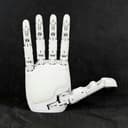
Aero Hand Open
Chestnut Robotics (formerly Tetheria) · Image
Aero Hand Open is an open-source, tendon-driven robotic hand from Tetheria (now Chestnut Robotics) that packs 7 active degrees of freedom into a lightweight, 3D-printed frame. It's a robot hand for research labs, universities, and hobbyists who want a capable dexterous manipulation platform without the five-figure price tag of proprietary options. The hand ships with the Aero Hand Open SDK, a Python control GUI, and a simulation-ready model you can train policies on. And the robotic hand price sits under $314.
About Aero Hand Open
What Is Aero Hand Open
Aero Hand Open is a five-fingered robotic hand built around a tendon-driven design. Instead of cramming a motor into every joint, it routes force through cables, which keeps the hand small, light, and cheap to make. That's the whole point: a dexterous manipulation platform you can actually afford and repair.
The hand is designed by Tetheria, a Silicon Valley robotics startup founded in early 2025 by veterans from Tesla, Waymo, and Apple. The company has since rebranded to Chestnut Robotics, but the Aero Hand Open name and docs still live on. The team's pitch is simple. Bring the entry cost of dexterous hands down by an order of magnitude and let researchers stop rationing hardware. It lands.
The biggest limitation is the flip side of that design. Tendon-driven hands are underactuated, meaning one motor drives several joints through a single cable. So those joints aren't independently commandable, and the hand is trickier to learn on than a direct-drive unit. If your work needs per-joint independence with tight force control, this probably isn't the hand for you.
Getting Started
- Install the SDK with
pip install aero-open-sdkon Python 3.10 or newer, or clone the GitHub repo and install it in editable mode for the latest updates. - Connect the hand to your PC over USB-C, then launch the control app (
aero-open-guion Mac and Linux,python -m aero_open_sdkon Windows). - Refresh the port list and select the right serial device, then press Homing so every finger resets to a known position.
- Drag the slider bars to move each finger or thumb joint, or run the Python examples to test preset grasp sequences.
- Train or deploy a policy in simulation, then run it on the physical hand without fine-tuning or extra state estimation.
Product Information
A quick look at Aero Hand Open's pricing, supported platforms, and performance.
Best for
The users, tasks, and scenarios where this tool fits best.
Users
- Research labs
- Universities and educators
- Robotics hobbyists and makers
Tasks
- Training manipulation policies
- Grasping and in-hand manipulation research
- Teleoperation and data collection
Scenarios
- Setting up a lab bench without blowing the budget
- Prototyping a new control algorithm
- Classroom demos of embodied AI
Key features
7 Active Degrees of Freedom with a 3-DOF Thumb
The hand runs 7 active degrees of freedom across 16 total, and the thumb alone gets three of the active ones. That's what separates it from simpler grippers: a three-DOF thumb can oppose and reposition in ways a single-axis one can't, which is the difference between a pincer grasp and something closer to a real pinch. For manipulation work, the thumb configuration matters more than raw finger count.
Tendon-Driven, Underactuated Transmission
Each finger's tendon is driven by a single motor, with the DIP and PIP joints passively coupled at a 1:1 ratio and adaptive coupling at the MCP joint for softer contact. Routing force through cables instead of placing motors in the joints is what keeps the hand light and the cost down. So what's the catch? The trade-off is real. Plan around it: coupled joints can't be commanded independently.
Open SDK and Python Control
The Aero Hand Open SDK installs with a single pip command and runs on Python 3.10 and up. A graphical control app lets you set each finger's position from fully open to full grasp by dragging a slider, and the same library backs the Python examples. If you've built with other robot SDKs, this one will feel familiar fast.
Simulation-Ready Model with RL Training
The hand ships with a simulation model that reproduces the cable transmission, plus an identified actuation map that connects that model to motor commands in both directions. A reinforcement learning package trains policies for the hand. The payoff: you can train entirely in simulation and run the result on hardware with no fine-tuning and no state estimation. That's rare for a tendon-driven hand, where the underactuated transmission is usually hard to represent in a sim.
3D-Printed and Modular Hardware
The mechanical parts are 3D-printed and modular, so this is a 3D printed robot hand you can rebuild yourself from the released design files. Compact servo actuator modules with built-in encoders handle the drive side, and the whole thing runs on a 6V DC power input over USB-C. Break a finger and you print another one. No shipping a hand back for repair.
Open Licensing for Mixed Use
The licensing splits cleanly by what you're using. Software, meaning firmware and the SDK, is Apache-2.0 and fine for commercial use with notices. The design files, which cover CAD, STEP, STL, drawings, BOM, and docs, are CC BY-NC-SA 4.0 and non-commercial only, with derivatives under the same license. If you want to manufacture parts or sell kits built from those files, you'll need a commercial license.
Pros and cons
Pros
- Costs under $314, which is a fraction of what proprietary dexterous hands run and makes multi-unit labs practical.
- Ships simulation-ready with an RL training package, so you can develop policies in sim and deploy without fine-tuning.
- Open SDK installs in one pip command and runs on standard Python, lowering the setup barrier.
- 3D-printed modular parts mean cheap, fast repairs and the option to build your own unit.
- A 3-DOF thumb supports genuine dexterous grasps, not just simple open-and-close.
Cons
- Underactuated, coupled joints can't be commanded independently, which limits per-joint force control.
- Harder to learn on than a direct-drive hand, so expect a steeper curve for policy training.
- Design files are non-commercial only, so you need a separate license to sell kits or parts built from them.
- The product page now redirects to Chestnut Robotics after a rebrand, so documentation and support links can be confusing.
Frequently asked questions
It's a research platform for dexterous manipulation. Labs use it for grasping, in-hand manipulation, teleoperation, and reinforcement learning experiments where you need a real hand without a real hand's price tag.
Related content
Explore related tools, skills, and articles for Aero Hand Open.
Aero Hand Open Alternatives

X Ray Interpreter
X-ray Interpreter · ImageX Ray Interpreter is a web-based AI radiology tool that turns X-rays, CT scans, MRI, ultrasound, and PET images into plain-language reports. You upload a scan, get a preliminary X-ray interpretation in moments, then ask follow-up questions if something needs explaining. It works as a second opinion and a learning aid, not as a medical diagnosis.

Aieasypic
AIEasyPic · ImageAIEasyPic is an AI image generator that turns plain text prompts into finished artwork in seconds. You can also train custom models on your own photos, swap faces in existing images, and create short video clips from text, all from a browser. It suits casual creators who want quick visuals and hobbyists who want to build a personal model without touching any code.

Chargen
Chargen · ImageChargen is an AI character generator and worldbuilding toolkit built for Dungeons & Dragons and other tabletop RPGs. It turns a one-line idea into a painted character portrait, spins up NPCs, monsters, maps and encounters from the same session, and keeps every creature's details close at hand. The tabletop RPG art side runs on a credit system called Gold, while the text generators stay free for everyone.