

Agent Browser
agent-browser-io · Coding
Agent Browser is a browser automation tool that lets an AI agent drive a real web browser the same way a person would. It turns pages into compact ASCII wireframes, so the model reads links and buttons as indexed text instead of parsing pages of raw HTML. You can use it inside an MCP client like Cursor or Claude Desktop, wire it into a Node app with the Vercel AI SDK, or test it from a command line.
About Agent Browser
What Is Agent Browser
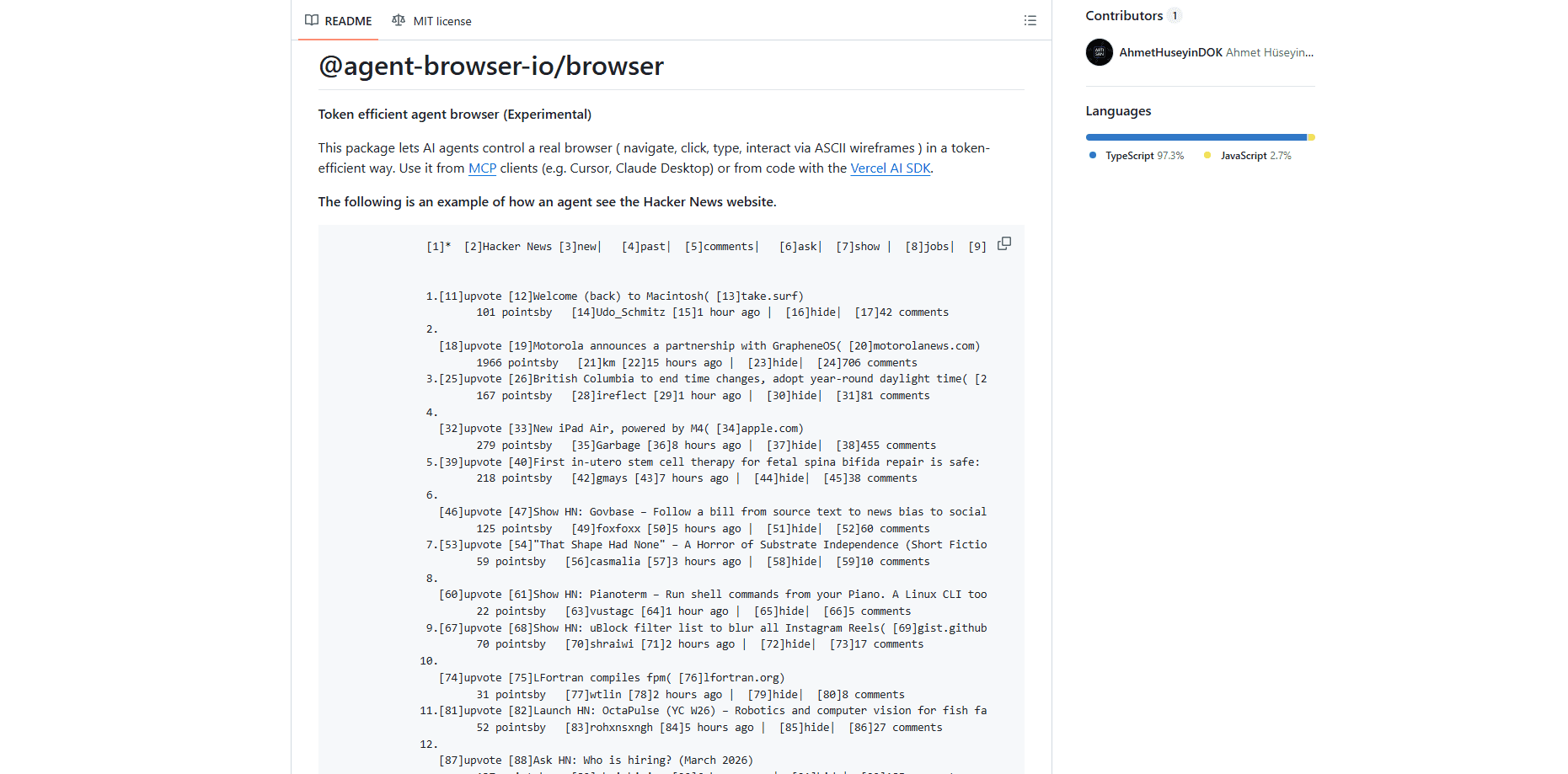
Agent Browser is an experimental package from agent-browser-io that gives AI agents hands and eyes on the web. Instead of scraping static HTML, the agent opens a live browser through Playwright, then asks for a wireframe: a stripped-down text map where every clickable element gets a number. The agent picks a number, and the tool clicks, types, or scrolls for it.
The point is token cost. A full web page can burn thousands of tokens in markup the model doesn't need. That's the problem. So what does the agent actually see? A short text map, not the whole page. The wireframe cuts that down to the parts that matter, which keeps the agent inside its context window on longer tasks. It's early software. The project labels itself experimental, and its last publish was version 0.3.0. Expect rough edges.
The main limit is maintenance and polish. The repo is public and small, so there's no support desk if a target site changes its layout and breaks your flow. You also need Node 18 or newer to run it. For hobby projects and tool building, that's fine. For production, think twice.
Getting Started
- Install the package with
npm install @agent-browser-io/browserin a Node 18+ project. - To use it from an AI assistant, add the MCP server to your client config with the command
npxand args["-y", "@agent-browser-io/browser", "mcp"], then restart the client. - Have the agent call the
launchtool first, since navigate, click, and the rest depend on a running browser. - Ask for a wireframe to see the page as numbered elements, then tell the agent which number to click or what to type.
- For code use, create the browser with
new AgentBrowser(new PlaywrightBrowserBackend())and passcreateBrowserTools(browser)into agenerateTextcall.
Product Information
A quick look at Agent Browser's pricing, supported platforms, and performance.
Best for
The users, tasks, and scenarios where this tool fits best.
Users
- Developers building AI agents
- Cursor and Claude Desktop users
- QA and automation tinkerers
Tasks
- Reading and summarizing pages
- Filling forms and clicking through flows
- Multi-step research runs
Scenarios
- Building an internal research bot that scans a handful of sites and reports back.
- Testing a web flow from a script instead of clicking through it by hand.
- Prototyping an agent feature where you need real browser control, not a headless fetch.
Key features
Token-Efficient Wireframes
Agent Browser renders a page as an ASCII map with numbered elements, which is the core of how it saves tokens. The agent reads labels like [11]upvote and picks the number rather than loading the whole DOM. On a busy page this is the difference between a few hundred tokens and several thousand, and that headroom lets longer tasks finish instead of losing the thread.
Real Browser Control via Playwright
The tool drives an actual browser through Playwright. That's classic Playwright browser automation, pointed at an agent instead of a test script. It works on pages that need JavaScript, cookies, or a live session. Anything a person can click, the agent can click. It's not a headless scraper pretending to be a browser, which matters when a site blocks plain requests.
MCP Integration
The package ships an MCP server you can drop into Cursor, Claude Desktop, or any stdio-based MCP client. One config entry exposes the full set of MCP browser tools, and the server speaks JSON-RPC over stdin and stdout with no extra environment variables. If your assistant already uses MCP, this is the shortest path to giving it a browser.
Vercel AI SDK Tools
For code, createBrowserTools(browser) returns a set of tools you pass straight into generateText. The toolset covers launch, navigate, getWireframe, click, type, fill, dblclick, hover, press, select, check, uncheck, scroll, screenshot, and close. It matches the MCP server, so behavior stays the same whichever way you call it.
Interactive CLI
You can run the CLI for manual testing with npx @agent-browser-io/browser or the agent-browser-cli binary after install. Why bother? It's the fastest way to check that a wireframe looks right. Confirm the selectors land where you expect before you commit to a script.
Screenshots Alongside Wireframes
When you need to see the actual pixels, the screenshot tool captures the page as an image. Simple as that. The wireframe handles structure and the screenshot handles visual detail, so you can switch depending on whether the agent needs to read or to look.
Pros and cons
Pros
- Wireframes cut token use on page-heavy tasks, which keeps agents inside their context window.
- Works with MCP clients like Cursor and Claude Desktop through a single config block.
- Open source and free, with the full code on GitHub for anyone to inspect or fork.
- Drives a real Playwright browser, so JavaScript-heavy sites behave like they do for a person.
- The same toolset powers the MCP server and the code path, so results stay consistent.
Cons
- Marked experimental, and the last release was 0.3.0, so APIs can still shift under you.
- No hosted service or support, which means you debug issues yourself.
- Requires Node 18+ and some setup, so it isn't a click-and-go tool for non-developers.
- Pages that change their layout can break a saved flow, and you'll need to rebuild the steps.
Frequently asked questions
It lets an AI agent control a real browser to navigate, click, type, and read pages. People use it to build research bots, automate web flows, and give MCP assistants the ability to browse.
Related content
Explore related tools, skills, and articles for Agent Browser.
Agent Browser Alternatives
Forefront
Forefront · CodingForefront is a web platform for building with open-source AI. It lets you fine-tune leading open-source language models on your own data, evaluate how they perform, and run them through an API or export them to host yourself. Developers who want the convenience of a closed-source platform but insist on owning their models and data are the target audience here.

Startkit
StartKit.AI · CodingStartkit is a boilerplate for building AI SaaS and AI wrapper products. Think of it as an AI startup boilerplate with the boring parts already wired up: authentication, Stripe and Lemon Squeezy payments, usage limits, transactional email, and an AI API starter that talks to OpenAI, Anthropic, Groq, or Llama. You clone the repo, set your price, and start on the part of your product that people actually pay for. It's Next.js under React and Tailwind, so most of the boilerplate code already feels familiar.
Testim
Tricentis · CodingTestim is an AI-powered test automation platform for building and running end-to-end tests across web, mobile, and Salesforce applications. It leans on machine learning to keep tests stable when an interface changes, so teams spend less time fixing broken selectors. Not bad for an automated testing tool you can start using today. You create tests by recording actions in a browser, then optionally add JavaScript when you need more control. It's a solid pick for busy QA teams.