

Agent Skills
Yuki Capital · Coding · Leaning
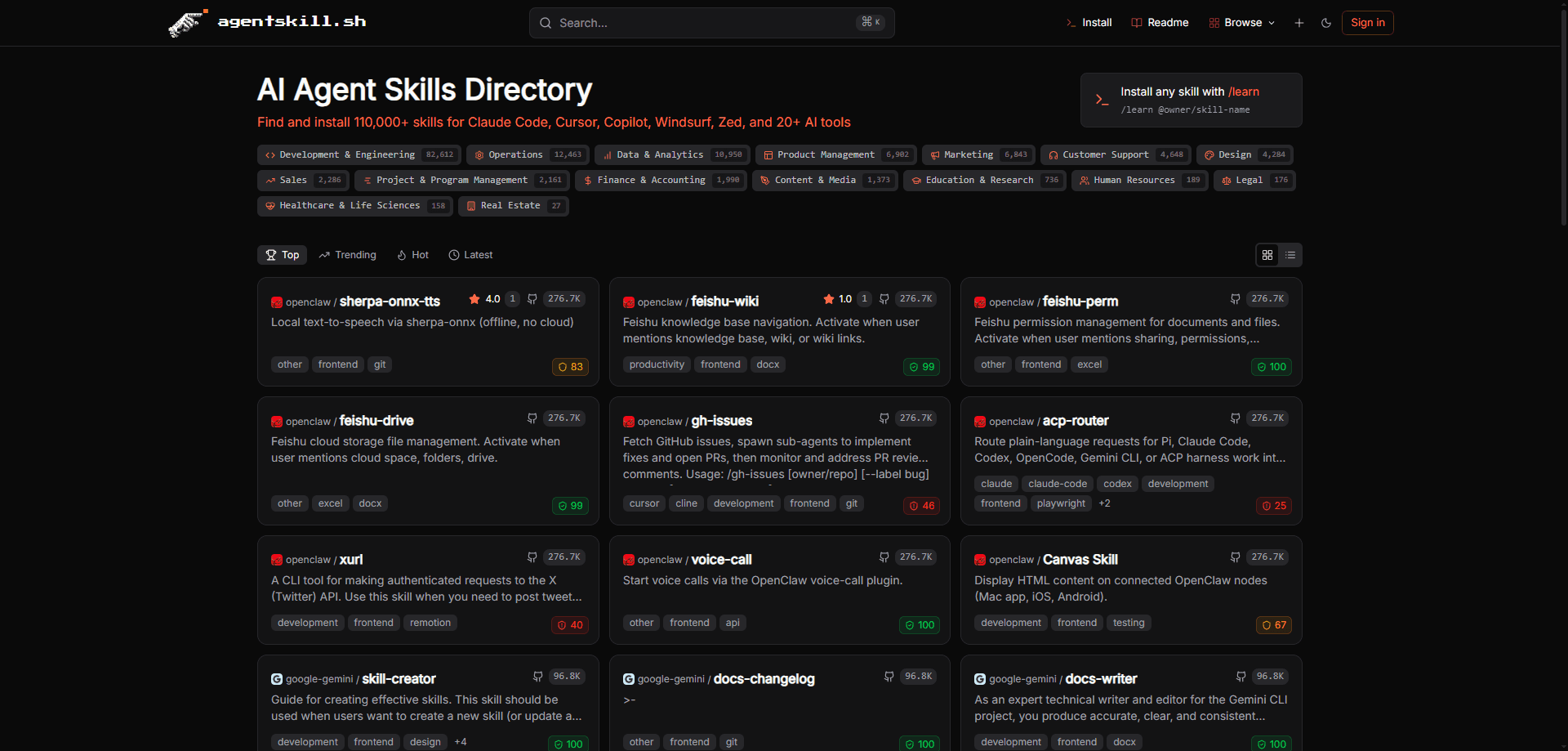
Agent Skills is an open directory and AI agent skill marketplace that hosts more than 275,000 installable skills for AI coding and chat agents such as Claude Code, Cursor, Copilot, Windsurf, and Zed. Instead of writing your own instructions from scratch, you point an agent at the catalog, and it pulls in packaged skills that teach it a new task. The platform focuses on discovery, security scanning, and version tracking, so you can add capabilities mid-conversation without digging through random repositories.
About Agent Skills
What Is Agent Skills
Agent Skills is a web-based directory and marketplace for reusable capabilities that AI agents can load on demand. Each entry bundles instructions, scripts, or resources into a small package, and the agent installs it when you ask for a task it doesn't already handle. The catalog covers things like SEO writing, code review, media generation, and financial analysis.
The problem it solves is trust. Installing skill files from unknown GitHub repos means you're the only line of defense against a malicious SKILL.md, and most people don't have time to audit every file. Agent Skills runs server-side static analysis across 12 threat categories, assigns a 0-100 security score, and then performs a second client-side check at install time. Two layers, not one.
The platform is free to browse and use, but it isn't a plug-and-play app. It leans on a CLI and a /learn slash command, so there's a small setup step before anything works. That's the catch. If your tooling doesn't support plugins or Node.js, the install path gets bumpier.
Getting Started
- Run the setup command in your terminal:
npx @agentskill.sh/cli@latest setup. It detects the AI agents on your machine and asks which ones you want to target. - Restart your agent or open a fresh session so the new
/learncommand loads. Claude Code users can instead add the marketplace plugin directly. - Type a request such as
/learn seo, or name a specific skill like/learn @anthropic/seo-content-optimizer. - Review the skill's security score and metadata when prompted, then confirm the install.
- Keep working. The agent tracks the installed skill by content SHA and tells you when an update is available.
Product Information
A quick look at Agent Skills's pricing, supported platforms, and performance.
Best for
The users, tasks, and scenarios where this tool fits best.
Users
- Developers who use Claude Code, Cursor, or Copilot and want to extend them without writing prompts from scratch
- Technical teams that need a vetted source of agent skills instead of cloning unknown repos
- Analysts and marketers who use an AI agent daily and want task-specific skills like SEO or code review, as long as they're comfortable with a CLI step
Tasks
- Searching a large skill catalog mid-conversation
- Auditing skill security
- Keeping installed skills up to date
- Contributing to collective quality
Scenarios
- Adding a niche capability on a deadline
- Reviewing a teammate's PR
- Researching a market or stock
Key features
Massive Skill Catalog
The directory lists more than 275,000 skills spanning writing, coding, research, design, and finance. You search by topic or by exact skill name, so you can go broad when exploring or jump straight to a known package. The breadth is the point. For most common agent tasks, someone has already packaged a skill.
Two-Layer Security Scanning
Every skill gets server-side static analysis across 12 threat categories, including command injection, data exfiltration, and credential harvesting. The platform assigns a normalized 0-100 score and shows it before installation begins, then /learn runs a second verification on your machine. This mattered enough to build a public dashboard: the current distribution shows over 109,000 skills rated Excellent and about 3,000 in the Critical band.
The /learn Command
/learn is the everyday entry point. It works inside your editor or chat, searches the catalog, suggests matches, and installs the one you pick, all without restarting your agent. You can also pass a skill name to skip the search entirely. Want SEO help? Type the topic and go.
Version Tracking by Content SHA
Each installed skill is recorded with its content SHA, so you always know the exact version running on your machine. When a newer version exists, the agent prompts you before updating rather than overwriting files silently. Nothing breaks without warning.
Community Feedback Loop
Agents rate skills after they're used, so popular and reliable skills rise while broken ones get flagged by the community. Your agent both contributes to and benefits from that signal. It's a decent way to filter a catalog this large.
Multi-Platform Support
The setup command detects installed agents and installs to the ones you choose, covering Claude Code, Cursor, Copilot, Windsurf, Zed, and 20+ other tools. Claude Code users get a plugin marketplace path. Copilot CLI users install a plugin from GitHub.
Pros and cons
Pros
- Catalog size is hard to beat, with 275,000+ skills and search that works mid-conversation
- Two-layer security model with published scores beats installing blind from GitHub
- `/learn` removes the friction of manually hunting repos and copying files
- Content-SHA version tracking keeps you aware of exactly what's installed
- Free to use across 20+ supported AI tools
Cons
- Requires a Node.js CLI setup and a session restart before `/learn` works, which is more friction than a browser-only tool
- Quality varies widely across a catalog this big, and a shared 0-100 score can't capture whether a skill fits your specific stack
- No public pricing page means anything beyond the free tier is unclear from the site itself
- Most skills are community-built, so you still read the description and score before trusting one with sensitive files
Frequently asked questions
It's a directory and installer for AI agent skills, the packaged capabilities that teach agents like Claude Code or Cursor to perform specific tasks. You use it to find a skill by topic and install it into your agent without leaving your editor.
Related content
Explore related tools, skills, and articles for Agent Skills.
Agent Skills Alternatives
Forefront
Forefront · CodingForefront is a web platform for building with open-source AI. It lets you fine-tune leading open-source language models on your own data, evaluate how they perform, and run them through an API or export them to host yourself. Developers who want the convenience of a closed-source platform but insist on owning their models and data are the target audience here.

Startkit
StartKit.AI · CodingStartkit is a boilerplate for building AI SaaS and AI wrapper products. Think of it as an AI startup boilerplate with the boring parts already wired up: authentication, Stripe and Lemon Squeezy payments, usage limits, transactional email, and an AI API starter that talks to OpenAI, Anthropic, Groq, or Llama. You clone the repo, set your price, and start on the part of your product that people actually pay for. It's Next.js under React and Tailwind, so most of the boilerplate code already feels familiar.
Testim
Tricentis · CodingTestim is an AI-powered test automation platform for building and running end-to-end tests across web, mobile, and Salesforce applications. It leans on machine learning to keep tests stable when an interface changes, so teams spend less time fixing broken selectors. Not bad for an automated testing tool you can start using today. You create tests by recording actions in a browser, then optionally add JavaScript when you need more control. It's a solid pick for busy QA teams.