

Agentation
Benji Taylor · Coding
Agentation is a desktop visual feedback tool that turns UI annotations into structured context for AI coding agents. Instead of describing a broken button in words, you click it, type a note, and copy a markdown block that carries CSS selectors, source file paths, and your intent alongside the actual React component tree for that element. You can hand that block to Claude, Codex, Gemini, or any coding agent that can read your codebase, and it knows exactly which element you mean.
About Agentation
What Is Agentation
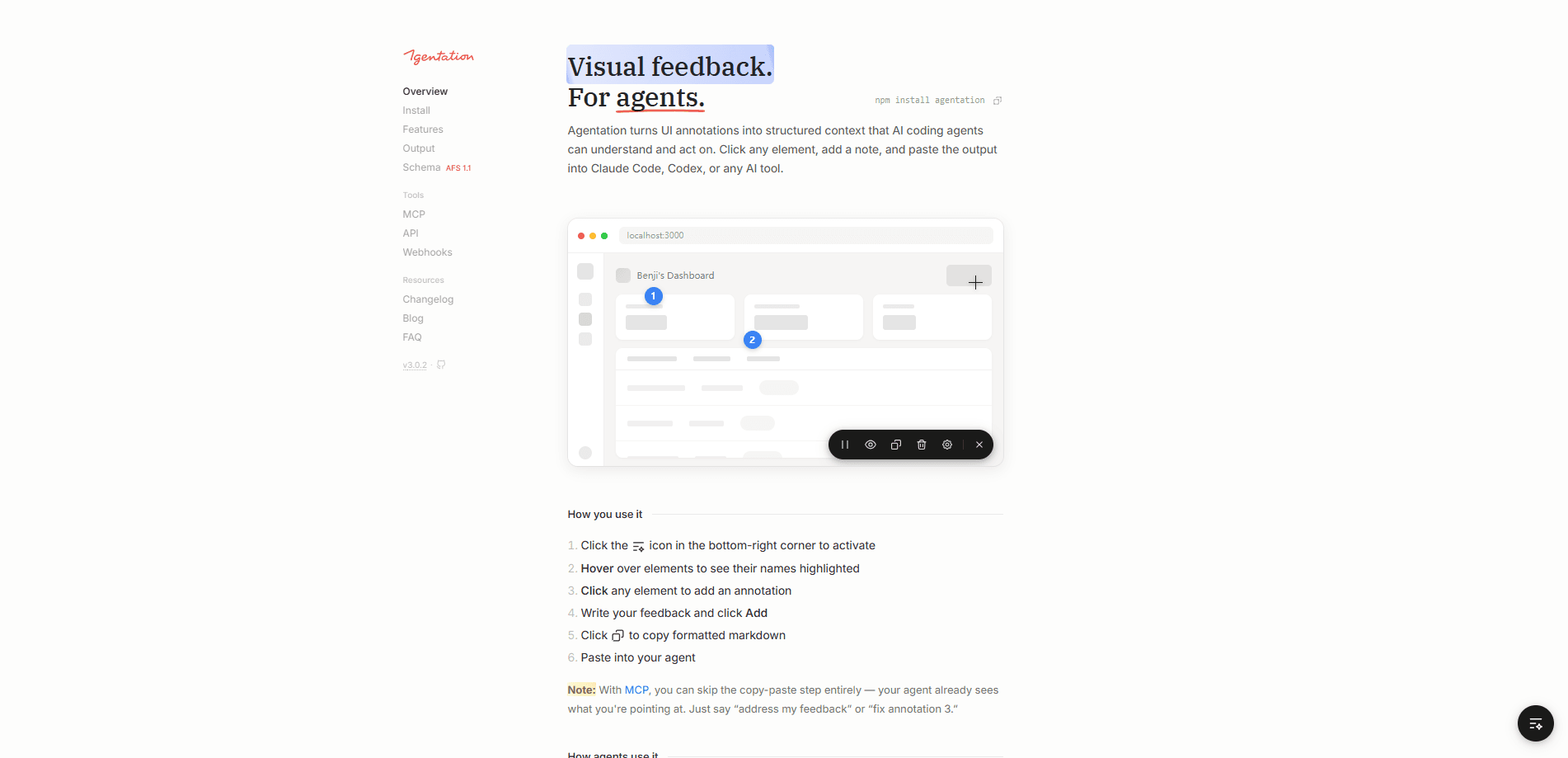
Agentation is an agent-agnostic feedback layer that sits between your running app and your AI coding assistant. You mount a small toolbar in your React app, hover over elements to see their names, and click any element to attach a comment. The tool then formats everything into markdown you can paste into a chat with your coding agent.
The problem it solves is specific. When you tell an agent "the blue button in the sidebar looks wrong," it has to guess which element you mean, and a wrong guess costs you a round trip every single time. Agentation replaces that guesswork with hard identifiers: .sidebar > button.primary, the source file, and the React component tree. The agent greps your codebase instead of searching for a color. No guessing.
The biggest catch is that Agentation is desktop only right now, which means there's no mobile app, no phone-based workflow, and no way to annotate from a tablet if that's where you do your work. It also targets React projects first, since the component tree and selector output assume that setup.
Getting Started
- Install the package with
npm install agentation(or your package manager of choice) and add the Agentation component to your app. - Open the toolbar from the icon in the bottom-right corner of the page.
- Hover elements to confirm their names, then click an element to open the annotation popup.
- Write your feedback, pick an intent and priority, and click Add.
- Copy the formatted markdown and paste it into your AI coding agent.
Product Information
A quick look at Agentation's pricing, supported platforms, and performance.
Best for
The users, tasks, and scenarios where this tool fits best.
Users
- Frontend developers using AI coding agents
- Product designers giving feedback on live builds
- Small engineering teams doing internal QA
Tasks
- Reporting a styling bug in your UI annotation tool workflow
- Flagging a typo
- Reviewing an animation
- Asking an agent to clarify a design decision
Scenarios
- Iterating on a React app with Claude Code or Codex open in a second window.
- Debugging your own project where you know the file but not the line.
- Testing a new feature branch as a developer feedback tool before it reaches QA, so design and engineering notes land in the same structured format your agent already understands.
- Running a design review where feedback needs to reach an agent, not a human ticket.
Key features
Element-Aware Annotations
You click an element and Agentation captures what it actually is: its CSS selector, source file path, React component hierarchy, and computed styles. Your written note rides along with that technical context. The result is feedback an agent can act on directly instead of interpreting a description. One click does a lot.
Markdown Output for Any Agent
The tool copies a formatted markdown block that works with Claude, Codex, Gemini, Grok, or any agent with codebase access. It's agent-agnostic by design, so you're not locked into one assistant. Paste it into a chat. The agent can grep for the selector or jump straight to the source line.
MCP Integration With Two-Way Feedback
With the agentation-mcp server installed, agents don't just read annotations. They can list pending feedback, ask clarifying questions, and mark issues resolved. Follow-up messages and resolutions stay attached to the original annotation, which keeps a long back-and-forth readable instead of scattering it across a chat history. That matters once a review runs past a dozen items.
Annotation Intent and Priority
Each note carries an intent and priority field, so an agent can tell a blocker from a nice-to-have without you spelling it out. You write one issue per annotation, which makes it easier for the agent to address items individually rather than untangling a dense paragraph of mixed complaints.
Animation Pause
You can freeze an animation from the toolbar and annotate a specific frame. It's a small feature, but nobody wants to explain "the bit where it slides but not quite the start" in text. Big time saver.
Webhooks and External Delivery
Server webhooks push annotations to external services and retry on network failures, timeouts, and HTTP 429 or 5xx responses. Each retry keeps the same delivery ID, so a receiver can deduplicate. Delivery is best effort and won't survive a server restart. Worth knowing before you rely on it.
Pros and cons
Pros
- Replaces vague descriptions with concrete selectors and file paths, which cuts down the back-and-forth you'd otherwise spend telling an agent which element you meant.
- Works across Claude, Codex, Gemini, and Grok instead of tying you to one assistant.
- Free for individuals and internal company use, so there's no paywall to test it.
- MCP support lets agents ask questions and close issues, not just receive notes.
Cons
- Desktop only, so you can't annotate from a phone or tablet.
- The React-first component tree output assumes a React codebase, which limits it on other frontend stacks.
- The MCP workflow needs Node.js running locally, which adds setup for teams that just want the toolbar.
- Commercial use outside internal projects requires a paid license, so you'll need to check that before shipping it inside a product you sell.
Frequently asked questions
It lets you annotate UI elements in a running web app and turns those notes into structured markdown for AI coding agents. The output includes the element's selector, source file path, and your feedback, so an agent can find the exact spot in your code.
Related content
Explore related tools, skills, and articles for Agentation.
Agentation Alternatives
Forefront
Forefront · CodingForefront is a web platform for building with open-source AI. It lets you fine-tune leading open-source language models on your own data, evaluate how they perform, and run them through an API or export them to host yourself. Developers who want the convenience of a closed-source platform but insist on owning their models and data are the target audience here.

Startkit
StartKit.AI · CodingStartkit is a boilerplate for building AI SaaS and AI wrapper products. Think of it as an AI startup boilerplate with the boring parts already wired up: authentication, Stripe and Lemon Squeezy payments, usage limits, transactional email, and an AI API starter that talks to OpenAI, Anthropic, Groq, or Llama. You clone the repo, set your price, and start on the part of your product that people actually pay for. It's Next.js under React and Tailwind, so most of the boilerplate code already feels familiar.
Testim
Tricentis · CodingTestim is an AI-powered test automation platform for building and running end-to-end tests across web, mobile, and Salesforce applications. It leans on machine learning to keep tests stable when an interface changes, so teams spend less time fixing broken selectors. Not bad for an automated testing tool you can start using today. You create tests by recording actions in a browser, then optionally add JavaScript when you need more control. It's a solid pick for busy QA teams.