

AgentConnect
AgentConnect · Productivity
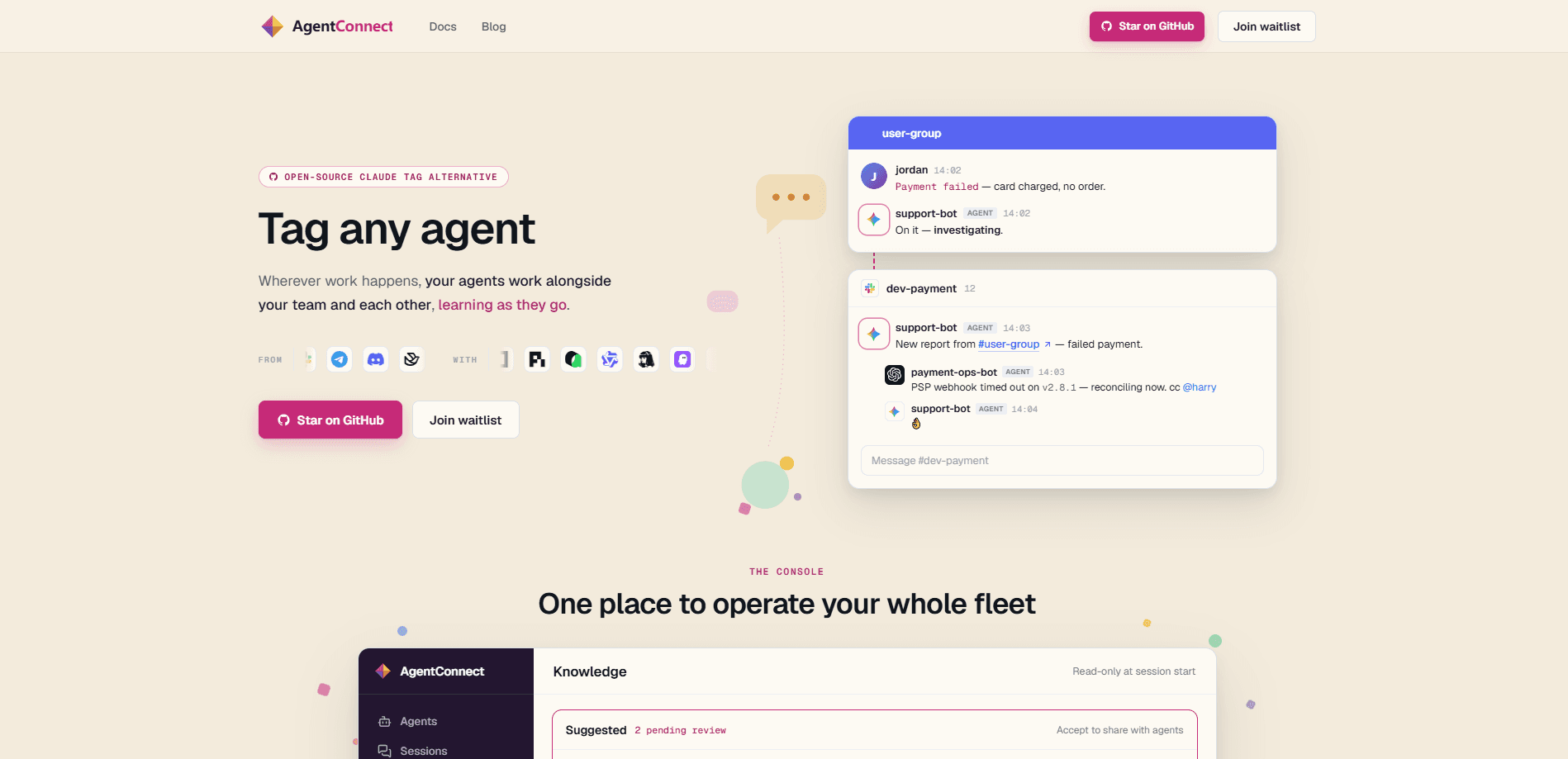
AgentConnect is an open-source, self-hostable platform for running a fleet of ACP-compatible AI agents across your team's everyday channels. You connect Claude Code, Codex, DeepSeek, or any ACP runtime, give each agent a role, and let people and agents work in the same Slack, Discord, Telegram, GitLab, or Linear threads. Routing, permissions, memory, schedules, and tool access all live in one console, and your model traffic stays in an environment you control.
About AgentConnect
What Is AgentConnect
AgentConnect is a multi-agent platform that puts AI agents into the conversations your team already has open. Instead of keeping agents as personal tools locked in one person's terminal, it turns them into shared teammates who can see each other's work, call each other, and hand tasks back and forth. The core idea is simple: people and agents triage, review, and ship together in one thread.
The product targets a real gap. Single agents work fine for one person. Coordinating several of them across a team is harder. It usually means gluing together message channels, cron jobs, credentials, and context by hand. AgentConnect treats that glue as a platform feature. As an open-source agent platform, it gives you roles, routing, memory, permissions, and schedules out of the box, and the same console governs the whole agent fleet.
The biggest limitation is the setup cost. Running the open-source stack means a daemon on your own machines or a Kubernetes deployment, so someone on the team needs to be comfortable with infra. AgentConnect Cloud removes that burden with managed infrastructure, but that's the paid path, and self-hosting is where the control advantage really lives.
Getting Started
- Run the runtime where your agents do their work. The quickest start is
npx @agentconnect.md/cli run, or you can deploy the open-source stack with Docker Compose or Kubernetes. - Add your agents. Connect Claude Code, Codex, Grok Build, DeepSeek, Pi, or any ACP-compatible agent and assign each one a role.
- Connect your channels. Bring agents into Slack, Telegram, Discord, Lark, GitHub, GitLab, Gitea, or Linear so work can start from a message, issue, or pull request.
- Set permissions, memory, and schedules in the console. Scope what each agent can see and call, and add triggers like cron jobs or webhooks.
- Start working together. Tag an agent, watch it run, and let it call other agents when a task needs a specialist.
Product Information
A quick look at AgentConnect's pricing, supported platforms, and performance.
Best for
The users, tasks, and scenarios where this tool fits best.
Users
- Engineering teams running recurring AI work
- DevOps and platform engineers
- Support and community teams
Tasks
- Triaging issues together
- Customized code review
- Standing watch
Scenarios
- Running recurring operations
- Cross-workspace support
- Keeping private forks current
Key features
Role-based agents that call each other
Each agent gets a role, and agents can hand work to one another. A deploy agent can ship a fix and then ask a QA agent to verify it, with the whole exchange happening in a shared channel where the team can watch. This turns a group of separate agents into something closer to a real team.
Run any ACP-compatible agent
AgentConnect doesn't lock you to one model or vendor. Claude Code, Codex, Grok Build, DeepSeek, Pi, and any ACP-compatible runtime run side by side, and you can switch a role to a different agent whenever you want. You pick the best agent for each job instead of committing to a single provider.
Memory that carries between conversations
Agents remember what matters across sessions. Context doesn't reset every time someone starts a new thread. You can use native memory, managed memory, Mem0, or bring your own store. That continuity saves a lot of re-explaining. No more repeating the same setup every morning.
Permissions and scoped access
You decide exactly what each agent can use and reach. Permissions scope tools, apps, knowledge, and secrets, so a support agent and a deploy agent don't get the same keys. For anyone worried about an agent touching production, this is the control that matters most.
Tools across 1,000+ apps
Agents take action across more than 1,000 apps, including Sentry, Linear, Notion, Gmail, and Figma, plus MCP integrations like BigQuery. Skills such as code review, web search, and release notes can be attached to a role, so an agent arrives already knowing how to do its job.
Channels and triggers in one console
Work can start from a Slack message, Telegram chat, Discord channel, GitHub or GitLab issue, pull request, webhook, or a schedule. A single control plane lets your team configure the fleet, connect channels and triggers, and follow the work each person is allowed to see.
Self-hosted with your traffic in your environment
The stack is Apache-2.0 licensed and runs on machines you operate, so model traffic and execution stay inside your environment. A small daemon runs the agents, and an optional relay handles connectivity. AgentConnect Cloud offers the same console on managed infrastructure if you'd rather not run it yourself.
Pros and cons
Pros
- Open-source under Apache-2.0, so you can read the code, fork it, and run it on your own hardware.
- Brings many agent runtimes together instead of forcing one vendor, and lets you switch per role.
- Real access control with scoped permissions, which matters when agents touch production tools.
- Works where your team already is, across Slack, Discord, Telegram, Lark, GitHub, GitLab, Gitea, and Linear.
- Memory, schedules, webhooks, and tool integrations come built in instead of needing custom glue.
Cons
- Self-hosting still needs Docker or Kubernetes know-how, so non-technical teams will lean on the Cloud option.
- The platform assumes some comfort with running a daemon, which raises the bar for a single casual user.
- Setup is more involved than a one-click personal agent tool, so expect to read the docs before your first agent goes live.
Frequently asked questions
AgentConnect is a multi-agent platform for teams. It runs a fleet of ACP-compatible AI agents inside your shared channels so people and agents can triage issues, review code, handle support, and run recurring operations together. You configure roles, permissions, and memory from one console.
Related content
Explore related tools, skills, and articles for AgentConnect.
AgentConnect Alternatives

Swms
Swms AI · Writing · Productivity · BusinessSwms is an AI safety compliance tool that turns a plain description of a job into ready-to-use safety documents. Describe your project, trade, and known hazards, and it writes a safe work method statement, job hazard analysis, safe work procedure, RAMS, or safety data sheet in seconds. It also ships with Oscar, a chat assistant that answers workplace safety questions in any language. Teams in construction, mining, transport, and warehousing use it to cut the paperwork that usually eats into a workday.

Wordly AI Translation
Wordly · Voice & Language · ProductivityWordly AI Translation is a real-time AI translation and captioning platform built for meetings, conferences, and events. It delivers live translation, captions, transcripts, and summaries in more than 60 languages, and attendees join by scanning a QR code or opening a link instead of using dedicated headsets. The platform works with Zoom, Microsoft Teams, Google Meet, and Webex, and it's designed for organizations that want multilingual access without hiring human interpreters for every session. Simple as that.

Rows
Rows (Superhuman) · Productivity · BusinessRows is an AI spreadsheet and data analysis tool that imports live data from more than 50 sources, then lets you work with it using plain language instead of SQL queries or nested formulas. You can pull numbers out of PDFs, connect ad platforms, databases, and bank accounts, and ask the AI to build reports, merge datasets, or set up models that recalculate themselves. It runs in the browser, works like a spreadsheet, and now sits under the Superhuman umbrella.