

AI Application Assistant
Weslen T. Lakins · Marketing · AI Assistant
AI Application Assistant is a web app for job seekers. It writes cover letters for a specific job post, rebuilds resumes, finds recruiter emails, and makes professional headshots.
About AI Application Assistant
What Is AI Application Assistant
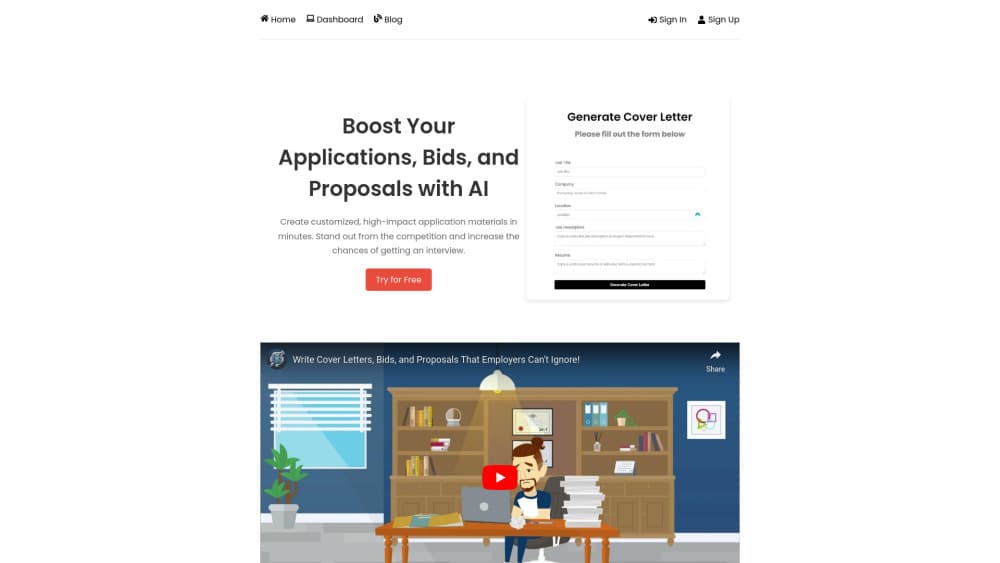
The pitch is narrow. Get an application out the door faster without it reading like a photocopy of the last one. You paste a job description, add your resume, and the app returns a letter shaped around that posting. Resumes follow the same pattern.
Two extras sit beside the writing tools. Networking Pro takes a company domain and returns names, departments, and email addresses for people who work there. The headshot generator turns a few selfies into a photo clean enough for a LinkedIn profile.
Most applicants already own a decent general resume. The real cost is the fifteen minutes per posting spent rewriting the same three paragraphs and hunting for someone to send it to. AI Application Assistant compresses both jobs into a short session, which matters when you're applying to ten roles in a week.
The limits are worth knowing before you pay. Output is a draft, not a finished letter. Nothing on the site claims to check how an applicant tracking system parses your file or to score keyword match, and no developer API is documented. It runs in a browser only, with no mobile app. The free entry point is a trial, so long-term use means a subscription.
Getting Started
- Register at aiapplicationassistant.com and land on the dashboard.
- For a cover letter, enter the job title, company, and location, paste the job description, then paste your resume. Hit generate.
- For a resume, either upload the file you already have and let the app rebuild it, or start from scratch and fill in the fields yourself.
- For contacts, type the target company's domain into Networking Pro, narrow by department, and run the search.
- For a headshot, upload at least three photos, pick a style, and generate.
Product Information
A quick look at AI Application Assistant's pricing, supported platforms, and performance.
Best for
The users, tasks, and scenarios where this tool fits best.
Users
- First-time job seekers
- Career switchers
- Freelancers bidding on Upwork or Freelancer.com
- Recruiters sourcing candidates
Tasks
- Writing a cover letter for one specific posting
- Rebuilding a resume from an old file
- Finding a hiring manager's email
- Cleaning up a profile photo
- Following up after applying
Scenarios
- Applying to five roles in one evening
- Returning to work after a long gap
- Cold outreach to a company with no posted role
Key features
Cover Letters Built Around the Job Description
You feed the app three things: the posting, the company details, and your resume. The letter it returns references the requirements you pasted rather than recycling generic praise. That's the difference between a usable draft and one you have to rewrite from the opening line. Expect to adjust the tone, since the default runs formal.
Resume Rebuilding Two Ways
There's a path for people with an existing file and a path for people starting empty. Upload the old resume and the app restructures the content into a cleaner document. Choose the from-scratch route and it walks you through the fields, which suits anyone whose current resume is a decade old or missing entirely. Both routes make it a usable AI resume builder for anyone who's been sending the same two-page file out for years, but the text still needs a fact-check.
Networking Pro Contact Search
Type a company domain and the tool returns employees with their departments and email addresses. Filters narrow the list when a company has hundreds of staff and you only want the marketing or engineering side. This is the feature that separates the product from a plain AI cover letter generator, because most applicants never get past the application portal.
Outreach Emails Without Leaving the Dashboard
Once you have a contact, you can write and send a personalized email from inside the app. The message is yours to edit. Sending from the platform also keeps the thread with the rest of the application, so you're not digging through a personal inbox three weeks later.
Headshot Generator From Three Photos
Upload at least three photos of yourself, choose a style, and the app produces a professional-looking portrait. It's aimed at people who don't want to book a studio session for a LinkedIn photo. Results track the quality of what you upload, so flat lighting and odd angles carry through.
Unlimited Generations on Paid Plans
The individual subscription removes the cap on cover letters and resumes. That changes how you use it: you can generate two versions for the same role, one formal and one warmer, and keep the better one. On a trial you'll want to be pickier about which applications get a custom letter.
One Dashboard for the Whole Search
Jobs, letters, resumes, contacts, and headshots live in the same place. The practical benefit is memory. When a recruiter calls two weeks after you applied, you can pull up the exact letter you sent instead of reconstructing it from scratch.
Pros and cons
Pros
- The letter is built from the actual posting, so the first draft already mentions the right responsibilities instead of generic skills.
- Networking Pro solves the step most people skip, which is finding a human email address at the company.
- At $6.99 a month for unlimited letters and resumes, the cost is low against the hours it saves across a search.
- Everything sits in one dashboard, including the emails you sent, which helps when you follow up weeks later.
Cons
- Drafts lean formal and generic in places. If you send one untouched, a recruiter will spot the boilerplate, so budget editing time per letter.
- No public API and no integrations with job boards are documented, which means copying and pasting for every application.
- Browser only. There's no mobile app, so applying from a phone means using the mobile web version.
- The headshot generator needs at least three decent photos, and weak source images produce soft or odd results you can't easily fix in the app.
Frequently asked questions
It writes job application material. You give it a job description and your resume, and it returns a tailored cover letter or a rebuilt resume. It also finds company contacts with email addresses and generates professional headshots from your photos.
Related content
Explore related tools, skills, and articles for AI Application Assistant.
AI Application Assistant Alternatives

Tractionwave
TractionWave · Image · MarketingTractionWave is an AI attention heatmap tool for static ads. Upload a PNG or JPG and it returns predicted attention, ranked hotspots, and fixes before you spend budget.

OpenSEO - AI Visibility
EveryApp · Coding · Marketing · BusinessOpenSEO is an open source SEO platform for keyword research, backlinks, rank tracking, site audits, and AI visibility, with usage-based pricing and MCP access for AI agents.

Plugins Radar
Plugins Radar · Marketing · BusinessPlugins Radar tracks where your ChatGPT plugin ranks in directory and in-chat search, which competitors outrank it and what changed, with hourly checks on 9,885 listings.