

AI Art Generator And AI Art Search Engine
eBank · Image
AI Art Generator is a browser studio that turns text into AI art, restyles photos, upscales images to 2K and searches millions of AI artworks in one place.
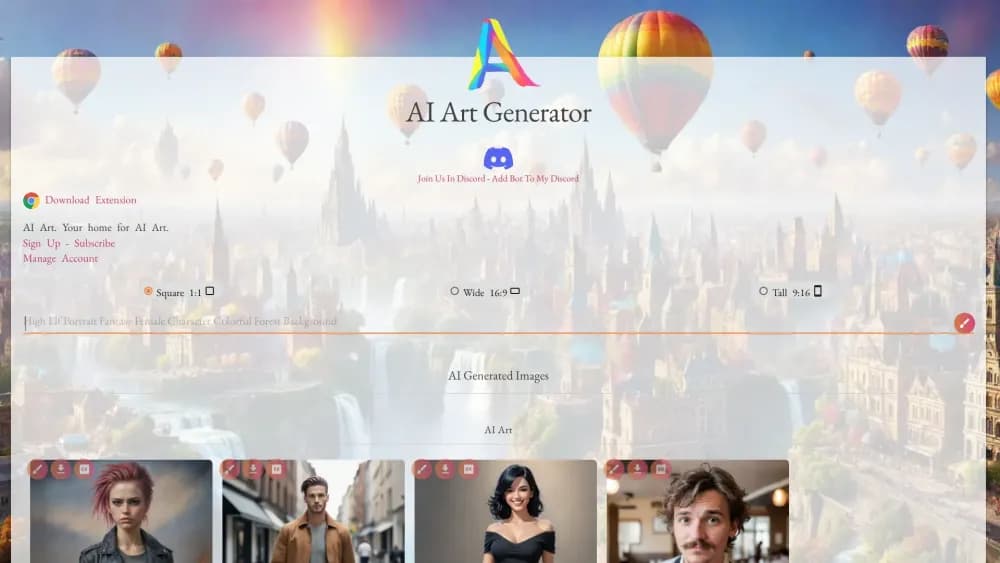
About AI Art Generator And AI Art Search Engine
What Is AI Art Generator
AI Art Generator is a web app from eBank that handles two jobs under one login. The first is a text to image generator: you type a description, pick an aspect ratio and a style, and the site renders artwork in seconds. The second is an AI art search engine, a public gallery you can browse by category and tag when you need a reference or a fresh prompt idea.
The appeal is that you don't need a design app or a drawing tablet. Six aspect ratios cover square posts, portrait covers and widescreen banners, and the style list runs from anime and comic book to oil painting and low poly. A style transfer panel repaints a photo you already own, and the editor handles background removal and 2K upscaling, so a rough draft can turn into something worth posting.
Two limits shape daily use. The free lane gives you five images a day on the site's own GPU, queued behind paying work, so a busy afternoon can mean waiting. Premium models, video and upscaling draw on image credits at one cent each, which is cheap per run but adds up across a long batch. Everything runs in the browser, with no desktop or mobile app.
Getting Started
- Open aiart-generator.art and create an account with an email address. The free lane asks for a sign in so the queue stays open to real users.
- Write a prompt in the box. Name the subject, the light and the style you want rather than dropping in one word.
- Choose an aspect ratio: 1:1 for social posts, 16:9 for banners, 2:3 or 3:2 for photo shaped frames. Keep the fast default model or switch to GPT Image 2 at 26 credits a render.
- Run the prompt and look at what comes back. The 2K button upscales a keeper with eye fix, and the style transfer panel repaints any image you drag into it.
- Save the result to your creations library, or push a finished frame into the image to video tool for a short clip with audio.
Product Information
A quick look at AI Art Generator And AI Art Search Engine's pricing, supported platforms, and performance.
Best for
The users, tasks, and scenarios where this tool fits best.
Users
- Hobbyists testing ideas
- Indie authors and small studios
- Social media managers
Tasks
- Turning a written brief into artwork
- Repainting an existing photo
- Upscaling and cleaning a final image
- Finding reference art
- Animating a still
Scenarios
- A post due in an hour
- Choosing a premium model before paying
- Building a batch of variations
Key features
Prompt to Image with Style Presets
The core tool is a plain prompt box backed by a long list of style presets. You describe the subject and mood, then pick from anime, photographic, digital art, comic book, fantasy, neon punk, steampunk, watercolor or oil painting, among others. Each render lands in your creations library, and six aspect ratios keep the output sized for the place it will be used.
AI Art Search Engine
The search side of the site is a gallery of AI generated images sorted by category and tag. Anime, cyberpunk, portrait, fantasy, pixel art and concept art each have their own shelf, and a search field narrows the grid further. Browsing costs nothing and needs no credits, which makes it a practical place to study composition or borrow a prompt structure.
Style Transfer from a Reference Image
Drag a photo into the style transfer panel and the site repaints it in the style you choose while holding on to the original layout. It suits people who already have a usable photo, a product shot or a sketch and want a different finish without rebuilding the scene from a prompt.
Editor, Background Remover and 2K Upscaling
The built in editor covers the cleanup work that usually needs a second app. Background removal runs at 2 credits an image, cutout studio isolates a subject, and the 2K upscale with eye fix sharpens a chosen frame for print or a large screen. Edits apply to the image you picked, so you aren't rerolling the whole prompt to fix one flaw.
Image to Video with LTX 2.3
Any generated image can become a clip through the LTX 2.3 image to video tool. You set a length from 6 to 20 seconds, pick 1080p, 1440p or 2160p, choose 24 to 50 frames per second, and decide whether the render includes audio. A 6 second clip costs 58 credits, so the feature is priced for occasional use rather than constant output.
Credits, API Access and Batch Tools
One credit equals one cent, and the same balance pays for website tools and API calls, with no separate developer plan. Credit packs start at $75 and unused credits don't expire while the account stays open. Batch tools sit on top: the Bulk Prompt Generator writes 2 to 20 prompt variations, and the 100 idea wall renders a full set of previews in one run.
Pros and cons
Pros
- The free plan is usable rather than a demo, with five images a day and no card required.
- Pricing is easy to reason about, since one credit is one cent and every tool lists its cost per run.
- The search engine doubles as a prompt library, giving you real examples before you write anything.
- Style presets and six aspect ratios remove most of the setup work for social and print formats.
- API calls draw on the same balance as the website, so a small team can automate without a second contract.
Cons
- Free renders sit in a low priority queue on the site's own GPU, so a busy day can mean retrying later. Paid plans move you to a priority lane.
- Everything runs in a browser. There's no desktop app and no offline mode, which hurts when the connection drops.
- Video and premium image models burn credits fast, with a 6 second clip at 58 credits and GPT Image 2 at 26 credits a render. Heavy video work needs a real budget.
- The search covers the site's own AI art gallery, so it won't surface images hosted on other platforms.
Frequently asked questions
AI Art Generator creates images from text prompts and lets you search a large gallery of AI generated art. It also restyles photos, removes backgrounds, upscales results to 2K and turns a still image into a short video with sound.
Related content
Explore related tools, skills, and articles for AI Art Generator And AI Art Search Engine.
AI Art Generator And AI Art Search Engine Alternatives

Tractionwave
TractionWave · Image · MarketingTractionWave is an AI attention heatmap tool for static ads. Upload a PNG or JPG and it returns predicted attention, ranked hotspots, and fixes before you spend budget.

Imejis.io
Imejis.io · Image · MarketingImejis.io is an AI design studio for agents and marketing teams. Describe an image in plain words, and it writes the copy, builds the layout, reflows it to every size, then exports a finished file.

Layoutr
Van Dijk Ontwikkeling · Image · China AILayoutr is a browser floor plan tool that scales your own plan, places furniture at true size, shows the room in 3D and renders it with AI.