

AI Group Call
Neu Software LLC · Productivity
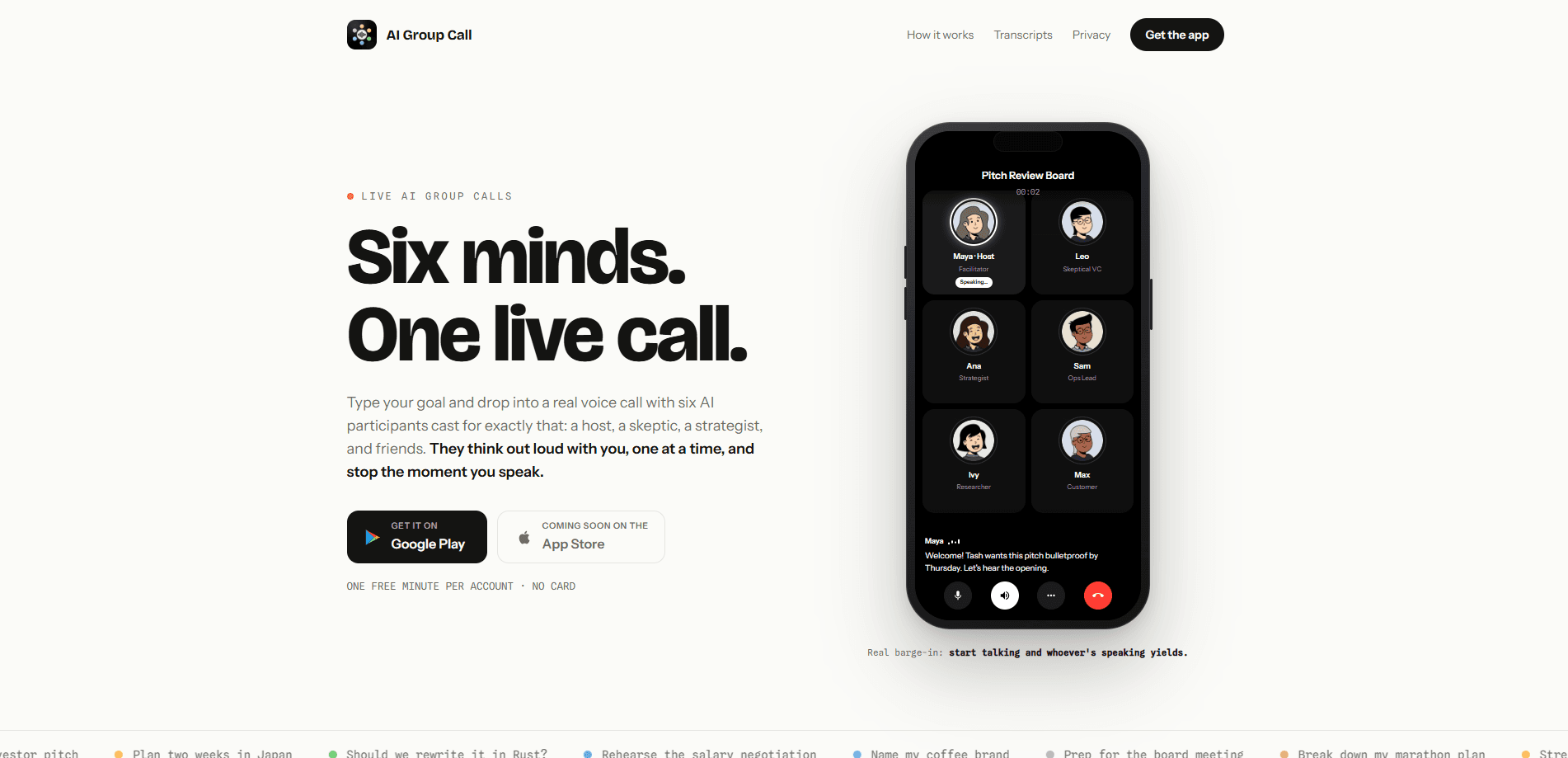
AI Group Call is an AI voice chat app that turns a single question into a live conversation with two to eight AI participants. Each voice takes a role, from host and skeptic to specialist, and they speak one at a time while you steer the group by talking, typing in Chat, or sharing an image. When the call ends, it saves the transcript, a summary with action items, and a room you can rejoin with the same cast.
About AI Group Call
What Is AI Group Call
AI Group Call is a mobile app built by Neu Software LLC for people who want more than one opinion on a decision. Instead of a single chatbot answering in isolation, the app pulls two to eight AI voices into one live call, and six is the default. You bring the goal ("help me price my app," "practice my interview") and the group works it through out loud while you listen, interrupt, or jump in.
If you want a way to talk to multiple AIs at once, this is the shape it takes. The whole point is range, not volume. A host keeps things moving, a skeptic pushes back, and a specialist adds detail, so you hear the objections a single assistant tends to skip. You can edit a participant's name, role, or personality mid-call if the room feels off.
The biggest limit is time. New accounts get three minutes total, shared across every call, and there's no daily reset, so the free tier is really a test drive. That's tight. Image sharing sits behind a paid plan too, and the app is invite-only to your own cast rather than a public room. If you want to bother a group of friends, this isn't that.
Getting Started
- Install the app on iPhone or Android and sign in with Apple or email.
- Type the goal you want the group to work through, like a pricing question or an interview to rehearse.
- Choose a cast size from two to eight AI participants and review the roles before you join.
- Join the live call, then speak naturally, type in Chat, or share an image on a paid plan.
- End the call and pull up the saved conversation, summary, and action items from History.
Product Information
A quick look at AI Group Call's pricing, supported platforms, and performance.
Best for
The users, tasks, and scenarios where this tool fits best.
Users
- Founders and solo builders
- Job seekers
- Students and researchers
- Anyone stuck on a decision
Tasks
- Pricing a product
- Practicing an interview
- Brainstorming names or angles
- Reviewing a screen or document
Scenarios
- Working through a decision on a walk
- Late-night second opinions
- Picking up a stalled thread
- Turning a messy talk into a plan
Key features
Live group calls with two to eight AI voices
The core of the app is a shared call where multiple AI participants take turns speaking instead of answering as one. Six voices join by default, and you pick the room size before you start. That structure is what makes it an AI group conversation rather than a solo chat, since the participants respond to each other and build on what's been said. A single chatbot can't do that. It only has one voice and one angle.
Natural interruption and cheap pauses
Start talking and the AI participants stop to listen, which the app calls true barge-in. You don't have to wait for a sentence to finish or tap a button to take the floor. When you need a breath, pausing the call also pauses the clock, so thinking time doesn't eat your minutes. It sounds like a small thing. It isn't. A minute is a minute.
Voice, text, and images in one thread
A call runs on more than audio. You can drop a message into Chat without leaving the conversation, and everyone in the room reads the same thread. On any paid plan, image sharing lets you send up to three screenshots or photos per message so the group can see what you mean and discuss the details with you. This is image sharing, not live screen broadcasting. Don't expect them to watch you scroll.
Editable cast and roles
Every participant carries a role chosen around your goal, and you can change a voice's name, role, or personality during the call. That flexibility is how you keep an AI brainstorming app on topic: if the specialist drifts, you retune the role instead of restarting the room. You can also give one participant the floor or ask it to stop. Handy.
Transcripts, summaries, and action items
After you hang up, the app keeps the full conversation, the shared images, and a one-tap summary with key points and action items. Instead of transcribing a call by hand, you get the useful parts pulled out. No note-taking. For anyone who talks through problems out loud, this is what turns a rambling call into something you can act on.
Rejoinable rooms in History
History doesn't just archive old calls. It lets you open the same cast again when you have more to work through. That's handy for a decision that unfolds over days, since you keep the same personalities and context instead of rebuilding the room from scratch each time. Why start over if you don't have to?
Pros and cons
Pros
- Multiple AI perspectives in one live call, so you hear objections a single chatbot skips.
- Interrupting feels natural and pausing stops the minute clock, which respects how people actually think.
- Voice, Chat, and image sharing live in one conversation, so you're not juggling three apps.
- Summaries with action items come out of the call, saving the step of writing your own notes.
- You can retune participant roles mid-call instead of restarting the room.
Cons
- Free tier is only three minutes total per account with no daily reset, so it's a demo, not a working plan.
- Image sharing requires a paid plan, so free users can't review a screenshot with the group.
- No public rooms or group invites with real people, so it's a private sounding board, not a way to loop in friends.
- Monthly minutes are shared and unused ones expire at the end of the billing period, which can catch light users off guard.
Frequently asked questions
AI Group Call is a AI conversation app for working through a question with several AI voices at once. You bring a goal, like pricing a product or rehearsing an interview, and two to eight AI participants discuss it live while you steer. It's built for second opinions and thinking out loud, not for chatting with other people.
Related content
Explore related tools, skills, and articles for AI Group Call.
AI Group Call Alternatives

Swms
Swms AI · Writing · Productivity · BusinessSwms is an AI safety compliance tool that turns a plain description of a job into ready-to-use safety documents. Describe your project, trade, and known hazards, and it writes a safe work method statement, job hazard analysis, safe work procedure, RAMS, or safety data sheet in seconds. It also ships with Oscar, a chat assistant that answers workplace safety questions in any language. Teams in construction, mining, transport, and warehousing use it to cut the paperwork that usually eats into a workday.

Wordly AI Translation
Wordly · Voice & Language · ProductivityWordly AI Translation is a real-time AI translation and captioning platform built for meetings, conferences, and events. It delivers live translation, captions, transcripts, and summaries in more than 60 languages, and attendees join by scanning a QR code or opening a link instead of using dedicated headsets. The platform works with Zoom, Microsoft Teams, Google Meet, and Webex, and it's designed for organizations that want multilingual access without hiring human interpreters for every session. Simple as that.

Rows
Rows (Superhuman) · Productivity · BusinessRows is an AI spreadsheet and data analysis tool that imports live data from more than 50 sources, then lets you work with it using plain language instead of SQL queries or nested formulas. You can pull numbers out of PDFs, connect ad platforms, databases, and bank accounts, and ask the AI to build reports, merge datasets, or set up models that recalculate themselves. It runs in the browser, works like a spreadsheet, and now sits under the Superhuman umbrella.