
AI LinkedIn Banners
AI LinkedIn Banners (ailinkedinbanners.com) · Image
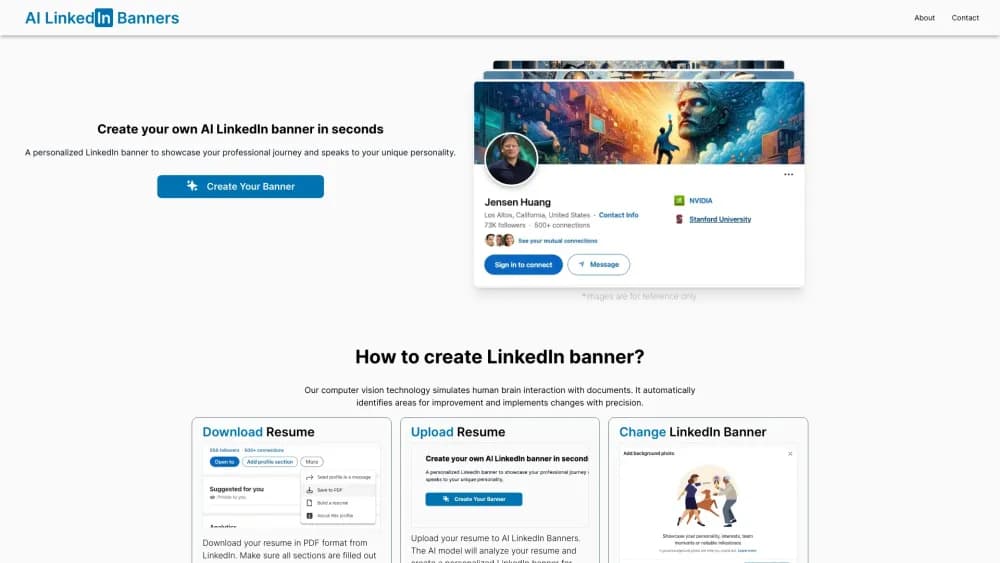
AI LinkedIn Banners turns a resume PDF into a personalized LinkedIn profile banner. Upload the file, review the generated design, then pay to download it and set it on your profile.
About AI LinkedIn Banners
What Is AI LinkedIn Banners
AI LinkedIn Banners is a browser based AI LinkedIn banner generator with a single job: read your resume and turn it into a wide header image for your LinkedIn profile. There's no editor, no template library, and no layer panel. You hand over a PDF and the service returns a banner built around your job history, skills, and the field you work in.
The pitch is aimed at people who know their profile header looks empty but don't want to open a design app. A recruiter spending seven seconds on your page sees that banner before any text, so a generic stock photo wastes the first impression. This tool tries to replace that stock photo with something that matches your actual career story.
The trade-off is control. You get what the model produces, and the site offers no documented way to nudge the layout, swap colors, or lock a brand font. Payment happens before download, so the preview is your only checkpoint. Anyone with a strict visual identity should treat this as a quick fix rather than a design system.
Getting Started
- Open your LinkedIn profile, go to Resources, and download your profile as a PDF resume. Check that the roles and dates are current before you export.
- Go to ailinkedinbanners.com and open the create page.
- Drop the PDF into the upload field and wait while the model reads the document.
- Review the banner it generates. If you want a different result, upload again with an updated resume.
- Pay at checkout, download the image, then upload it as your LinkedIn background photo.
Product Information
A quick look at AI LinkedIn Banners's pricing, supported platforms, and performance.
Best for
The users, tasks, and scenarios where this tool fits best.
Users
- Job seekers refreshing a stale profile
- Career changers
- Freelancers and consultants
- New graduates with a thin profile
Tasks
- Turning a resume into a header image
- Replacing a default LinkedIn background
- Testing a new professional positioning
- Preparing a profile before outreach
Scenarios
- Applying to a role with a deadline
- After a promotion or title change
- Profiles in fields where visuals are thin
Key features
Resume to Banner Generation
As an AI banner generator, the product takes one input, a resume PDF, and produces one output, a banner image. The model reads the document to find your roles, employers, skills, and seniority, then builds a design around that reading. It's a narrow feature set by design, and it means there's nothing to configure before you see a result.
Personalization From Work History
Because the source is your own resume, the banner tends to reflect your actual field instead of a generic tech aesthetic. A nurse, a data analyst, and a brand strategist get different visual directions from the same tool. The site doesn't spell out how much of the document influences the image, so treat the connection as thematic rather than literal.
Instant Preview Before Payment
You see the banner before you pay. That ordering matters, since it lets you reject a result and try another resume version without spending anything. The flip side is that the preview is the only editing step you get, so save the image after checkout. The site's own FAQ addresses the case where a buyer pays and then loses the file.
LinkedIn Sized Output
The download is meant to drop straight into LinkedIn's background photo slot, which uses a wide format of 1584 by 396 pixels. The site doesn't publish a full spec sheet, so check the exported file's dimensions before you upload, especially if you plan to reuse the image on a personal site or a slide deck.
No Design Skills Required
This LinkedIn banner maker has no templates to browse, no fonts to pick, and no canvas to drag. For someone who has never opened Figma, that's the main draw: the work is a file upload and a payment. For someone who has, the same absence is the limitation.
Browser Only Workflow
Everything runs on the website, with no desktop app and no mobile app. You can finish the job on a laptop in one sitting, and you can start it on a phone, even if handling a PDF and judging a wide image is easier on a larger screen.
Pros and cons
Pros
- The input is a document you already have, so there's no form to fill in or brief to write.
- Output is tied to your real work history instead of a stock template, which shows in the visual direction.
- Preview comes before payment, so a weak result costs you time rather than money.
- The whole flow runs in a browser in minutes, which suits a quick profile cleanup.
Cons
- No documented editing controls: you can't move elements, change colors, or match a company palette.
- Payment gates the download, and the site warns that an unsaved banner after purchase needs a support request.
- One output per upload with no variant picker, so comparing directions means uploading a different resume.
- No API and no company page support, which rules out agencies managing many profiles at once.
Frequently asked questions
It's a web service that reads a resume PDF and generates a wide banner image for a LinkedIn profile. You upload the file, preview the result, and pay to download the image.
Related content
Explore related tools, skills, and articles for AI LinkedIn Banners.
AI LinkedIn Banners Alternatives

Tractionwave
TractionWave · Image · MarketingTractionWave is an AI attention heatmap tool for static ads. Upload a PNG or JPG and it returns predicted attention, ranked hotspots, and fixes before you spend budget.

Imejis.io
Imejis.io · Image · MarketingImejis.io is an AI design studio for agents and marketing teams. Describe an image in plain words, and it writes the copy, builds the layout, reflows it to every size, then exports a finished file.

Layoutr
Van Dijk Ontwikkeling · Image · China AILayoutr is a browser floor plan tool that scales your own plan, places furniture at true size, shows the room in 3D and renders it with AI.