

AI Music Video Generator So
AI Music Video Generator So · Video
AI Music Video Generator So is an online AI music video maker that turns a song and a single reference photo into a beat-synced, lip-synced music video in minutes. You upload an MP3, M4A, or WAV file, or paste a Suno or FlowMusic link, then let the AI plan the storyboard, generate each shot, and cut the final edit. There's no timeline to learn. No camera, either. It works as an AI lyric video tool too, when the vocals drive the shots. New accounts start with 600 free credits, so you can test a short clip before paying.
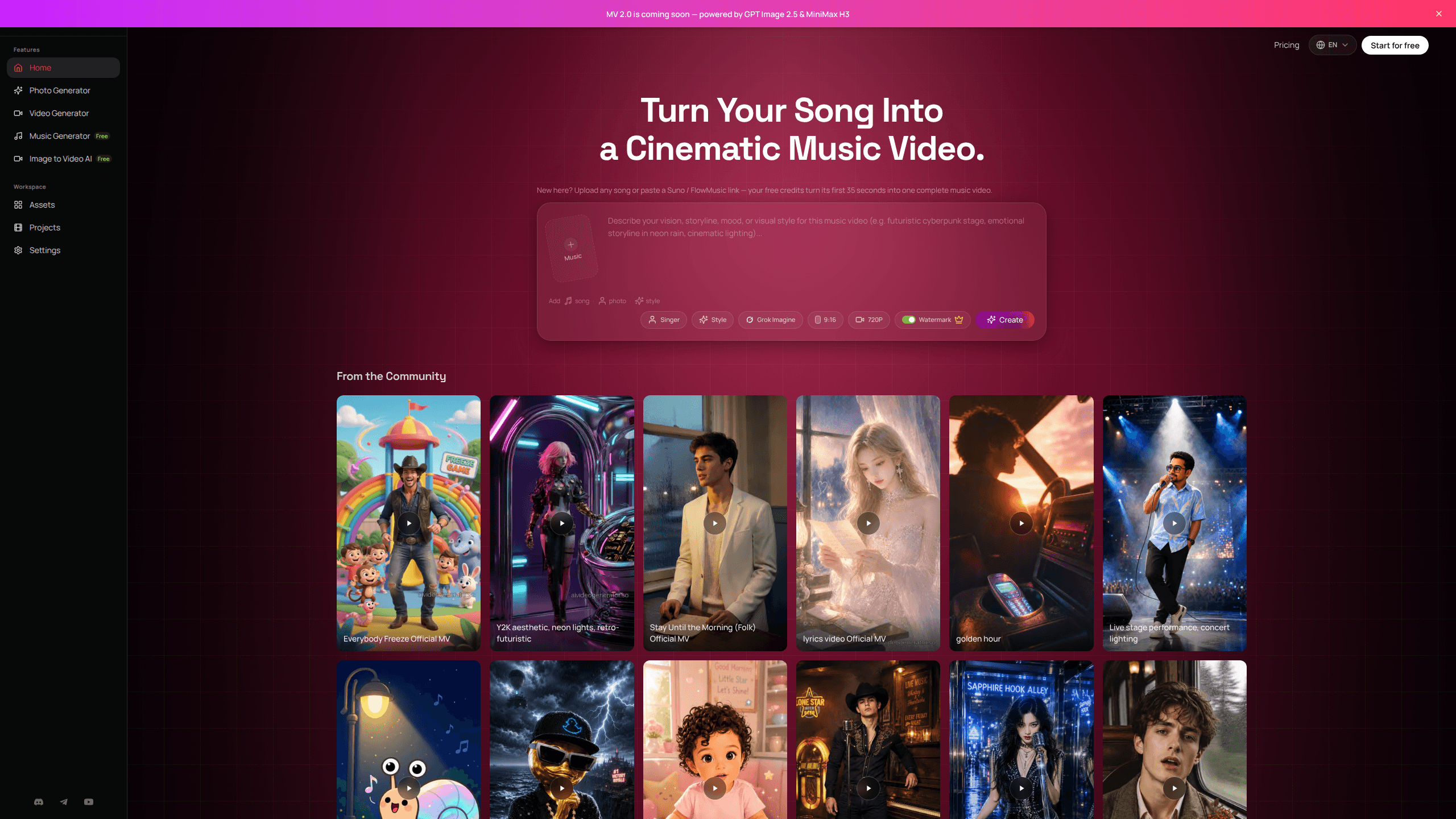
About AI Music Video Generator So
What Is AI Music Video Generator So
AI Music Video Generator So handles the whole video-making chain for you. Instead of stitching clips by hand, you give it music and one photo, and it builds a storyboard, generates first-frame images, produces image-to-video clips, adds lip-sync to the singing shots, and assembles a final export. The whole job runs in a browser, so there's nothing to install.
The problem it solves is simple. Making a music video usually means a camera, a performer, editing software, and hours of work. Here the tool trades all of that for a song file and a prompt. That's it. Singers get performance-style close-ups, and small labels get a full clip without renting a studio.
The main limit is length and control. Free songs cap at 35 seconds, and paid plans top out at 5 minutes. You also don't get frame-by-frame editing. The AI plans the shots, so the output depends on how well your style prompt guides it. Weak prompt, weak video.
Getting Started
- Open the workspace and upload your song as MP3, M4A, or WAV, or paste a Suno or FlowMusic link.
- Add one reference photo for the singer or subject, then write a short style prompt to set the look.
- Click Create and sign in when asked; new accounts come with 600 free credits.
- Review the generated storyboard and clips, then adjust the prompt if the direction is off.
- Export the finished cut at 720p, or at 1080p Full HD on Pro and above.
Product Information
A quick look at AI Music Video Generator So's pricing, supported platforms, and performance.
Best for
The users, tasks, and scenarios where this tool fits best.
Users
- Independent musicians
- Suno and FlowMusic creators
- Social media managers
Tasks
- Making a lyric-style performance video
- Turning a demo into a visual
- Cutting a promo clip from one photo
Scenarios
- Releasing a new single and needing a quick promo before the launch date.
- Posting daily short-form content without a production crew or editing skills.
- Testing a song's visual direction cheaply before committing to a paid video budget.
Key features
Lip-sync singing shots
The edit is built around performance moments. The AI plans close-up singing shots on your vocal lines and applies lip-sync, so the subject appears to sing the track rather than just mouthing along to a generic loop. That's the part most competitors treat as an extra. Here it's the point.
Multi-model pipeline
Under the hood, several models handle different stages: one for storyboard planning, image models for first frames, image-to-video models for motion, and a lip-sync model for the singing clips. You describe the song and the look. The tool decides which model runs when. You don't need to know what an i2v clip is to get one.
Upload or import any song
You can drag in your own MP3, M4A, or WAV, or paste a Suno or FlowMusic URL straight into the workspace. The link import saves a step for people who already generate music with those tools. Audio preprocessing on uploads is free.
Up to 1080p Full HD export
Every plan renders in 720p by default, including the free tier. Pro and above export at 1080p Full HD. If you're posting to a platform that compresses hard, the higher resolution gives the footage more to work with before it degrades. It helps.
Published credit pricing
The credit costs aren't hidden behind a vague "credits" label. The site lists the per-step math: 100 credits for storyboard planning, 12 per first-frame image, 4 per second of image-to-video, 4 per second of lip-sync, and 25 for the final edit. A typical 2-minute MV lands near 957 credits. That transparency makes budgeting a monthly plan straightforward.
Commercial license on paid plans
Every paid plan includes commercial rights for generated videos. For musicians selling merch or promoting a release, that matters more than the render quality. Free-tier output is watermarked and limited to personal use.
Photo-anchored character consistency
One reference photo anchors all shots. The same face carries across every scene, which avoids the drifting look you get when each frame is generated independently. You trade some visual variety for a stable subject.
Fast short-song workflow
The process is built to finish short songs in minutes, not weeks. Storyboard, frames, clips, and the edit run back to back, so a two-minute track can come back as a finished clip in a single sitting.
Pros and cons
Pros
- Published credit formula lets you estimate cost before you commit to a plan.
- Lip-sync is the core of the edit, not a bolt-on feature.
- Free tier includes 720p HD, so you can judge output quality before paying.
- Commercial rights come with every paid plan, starting at $9.99/month.
- Suno and FlowMusic link import skips the manual file transfer step.
Cons
- Songs are capped at 5 minutes on paid plans and 35 seconds on free, so long tracks need trimming.
- Only two aspect ratios (9:16 and 16:9) versus five on some rivals, which limits square and 4:3 formats.
- No frame-level editing; you steer the video through prompts, not a timeline.
- A typical 2-minute MV eats roughly 957 credits, so heavy use can outrun the smaller plans.
Frequently asked questions
It's a web app that turns an audio track into a video by generating and assembling the visuals for you. AI Music Video Generator So does this from a song plus one photo, planning shots and adding lip-sync without a camera or editing timeline.
Related content
Explore related tools, skills, and articles for AI Music Video Generator So.
AI Music Video Generator So Alternatives

Vadu AI
Vadu AI · Image · VideoVadu AI is a web-based AI video generator that turns written prompts or still images into short clips, and it can also generate images on its own. You type what you want, pick a model and style, and the platform renders the result in minutes. A free plan covers light testing, while paid tiers run from $9 to $77.40 per month based on how many credits you burn.

Mykaraoke Video
MyKaraoke Video · VideoMykaraoke Video is an online karaoke video maker and lyric video maker that turns any song into a finished, lyrics-synced video right in your browser. It handles the slow part for you. The AI pulls vocals out of the mix and locks the lyrics to the beat, then lets you customize background, fonts, and colors before exporting in 1080p MP4. If you make lyric videos for social media, party nights, or music promotion, it skips the software installs and manual timing work entirely. Want a karaoke video generator that doesn't eat your whole evening? That's the pitch here.

Finalframe
Finalframe · VideoFinalframe is a set of free, browser-based tools for grabbing exact frames out of a video clip. Its best-known feature, the Final Frame Extractor, lets you extract the last frame of any video so you can use it as the starting image for AI video tools like Luma Dream Machine, Runway, or Kling. Want to keep a clip going? That last frame is your starting point. The tool runs locally in your browser, needs no sign-up, and costs nothing. A separate paid AI video-generation app from the same team is currently offline while it's rebuilt.