

AI Website Redesign by Shuffle
Shuffle · Image · Coding
AI Website Redesign by Shuffle is a website redesign tool that takes a live URL and a short vision prompt, then produces several full redesigns of that page at once. Each redesign comes from a different AI model, so you compare versions side by side instead of trusting one black-box result. Once you pick a direction, you refine it visually in the Shuffle editor and export the result as clean code. It suits freelancers, agencies, and product teams who want to modernize a site without starting from a blank canvas.
About AI Website Redesign by Shuffle
What Is AI Website Redesign by Shuffle
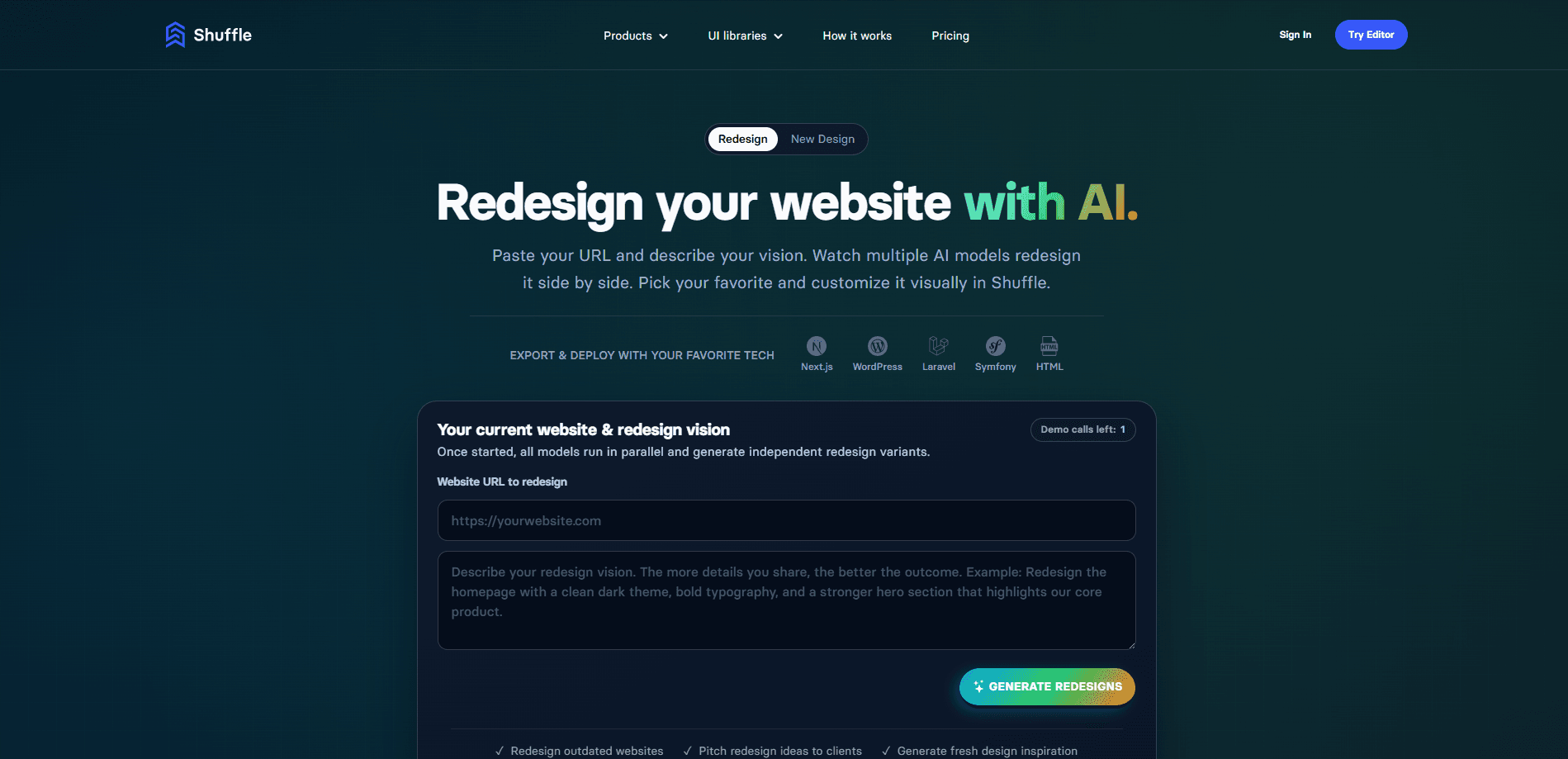
AI Website Redesign by Shuffle is a browser-based service from the makers of Shuffle Editor. You paste in the URL of a site you already have, describe what you want changed, and the tool runs several AI models in parallel to generate independent redesigns of that page. Nothing here is a one-shot magic trick. You get multiple versions, open them side by side, and judge which one actually fits.
The problem it targets is the slow, repetitive front-end work that eats a rebuild. A typical project starts with someone recreating a layout before they can even test an idea. This website redesign software skips that step by reading your existing page and proposing new versions, so your time goes into decisions rather than pixel plumbing.
The main limit is scope. It redesigns what a model can interpret from a single page URL and your prompt, so it isn't a full CMS migration or a backend builder. If your project depends on server logic, you'll still handle that part yourself. And a redesign still needs a human eye. AI output here is a starting direction, not a finished production site. That gap matters most once you move from a single page to a whole site, where consistency across dozens of templates becomes its own project.
Getting Started
- Create a Shuffle account, then open the AI Website Redesign page and enter the URL of the site you want to rebuild.
- Write a vision prompt that states your goal, the sections to fix, and the style direction you have in mind.
- Let the AI models run in parallel and wait for the independent redesign variants to load.
- Compare the results side by side and pick the version that best matches your intent.
- Open the chosen redesign in Shuffle, tweak the layout, components, and colors visually, then export the code.
Product Information
A quick look at AI Website Redesign by Shuffle's pricing, supported platforms, and performance.
Best for
The users, tasks, and scenarios where this tool fits best.
Users
- Freelancers
- Small agencies
- Founders and product teams
Tasks
- Redesigning an outdated website
- Comparing design directions
- Exporting production code
Scenarios
- Preparing two or three redesign concepts for a client pitch the next morning.
- Modernizing a legacy marketing site that still works but looks its age.
- Testing a new visual direction on one page before rolling it across a whole site.
Key features
URL-to-Redesign Workflow
You start with a URL. Not an empty canvas. The tool reads the page you point it at and builds an AI redesign from that content. No manual recreation of the layout before an idea is even testable. For anyone who's rebuilt the same header for the tenth time, that's the part that saves hours.
Multiple AI Models, Side by Side
One prompt goes out to several models, including Claude, GPT, and Gemini, and each returns its own take. This is the AI redesign generator at work: because the interpretations differ, you get real alternatives rather than four copies of the same idea, and comparing them tells you far more about your own brief than any single result would. The comparison view is where the product earns its keep.
Visual Customization Without Code
After you pick a redesign, the Shuffle editor takes over. You click an element, adjust it, swap components, change typography and colors. Skip the CSS. The editing stays visual, so a designer or marketer can finish a page without waiting on a developer.
Code Export to Your Stack
Every redesign ends as exportable code. The tool supports Next.js, Laravel, WordPress, Symfony, Tailwind CSS, and plain HTML, so the output drops into a stack you already run. That's the difference between a mockup and something you can actually ship.
Vision Prompt Guidance
Can a single prompt really change the result? Yes, and the tool nudges you toward better ones. Naming a goal like "increase SaaS trial sign-ups," listing specific changes such as "modernize the hero section," and adding style cues like "minimalist layout, deep blue palette" all steer the output. Vague briefs still work. They just produce vague redesigns.
Built on Shuffle Editor
The redesign feature sits on top of Shuffle Editor, which carries more than 80 UI libraries and over 13,400 ready-to-use components. So the redesign has a deep pool of building blocks to draw from, and everything stays editable in the same environment after generation. That matters when a good first draft still needs a hundred small fixes.
Pros and cons
Pros
- Turns a live URL into multiple full redesigns, so you skip rebuilding the layout from scratch.
- Side-by-side comparison across several AI models gives you genuine design options, not one forced result.
- Visual editing means you can finish and adjust a redesign without writing CSS.
- Code exports to Next.js, Laravel, WordPress, Tailwind CSS, and plain HTML for a real handoff.
- Draws on 80+ UI libraries and 13,400+ components through Shuffle Editor.
Cons
- It redesigns pages from a URL and prompt, so it won't handle CMS migrations or backend logic for you.
- Free use is limited by a small number of demo calls, so heavy testing needs a paid plan.
- The results are a starting direction, and shipping one still takes human review and cleanup.
- No public API is documented, so you can't automate the redesign workflow inside your own pipeline.
Frequently asked questions
It takes an existing website URL plus a text prompt and generates several redesigns of that page using multiple AI models. You compare the results side by side, pick one, customize it visually, then export the code.
Related content
Explore related tools, skills, and articles for AI Website Redesign by Shuffle.
AI Website Redesign by Shuffle Alternatives

X Ray Interpreter
X-ray Interpreter · ImageX Ray Interpreter is a web-based AI radiology tool that turns X-rays, CT scans, MRI, ultrasound, and PET images into plain-language reports. You upload a scan, get a preliminary X-ray interpretation in moments, then ask follow-up questions if something needs explaining. It works as a second opinion and a learning aid, not as a medical diagnosis.

Aieasypic
AIEasyPic · ImageAIEasyPic is an AI image generator that turns plain text prompts into finished artwork in seconds. You can also train custom models on your own photos, swap faces in existing images, and create short video clips from text, all from a browser. It suits casual creators who want quick visuals and hobbyists who want to build a personal model without touching any code.

Chargen
Chargen · ImageChargen is an AI character generator and worldbuilding toolkit built for Dungeons & Dragons and other tabletop RPGs. It turns a one-line idea into a painted character portrait, spins up NPCs, monsters, maps and encounters from the same session, and keeps every creature's details close at hand. The tabletop RPG art side runs on a credit system called Gold, while the text generators stay free for everyone.