
AiChatting.net
AiChatting.net · Chatbot
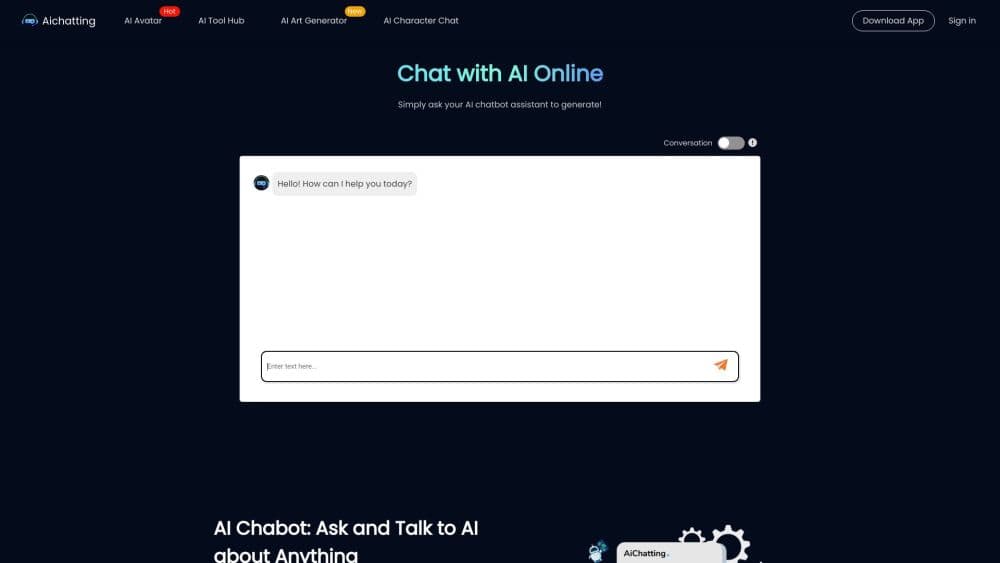
AiChatting.net is a free AI chatbot you can use in a browser without signing up. Type a question in any language, chat with AI characters, or upload an image to ask about it.
About AiChatting.net
What Is AiChatting.net
AiChatting.net is a web-based AI assistant built for people who want an answer fast and don't want to create an account first. Open the page and a chat box is already waiting. You type in any language and get a reply from the underlying GPT model. There's no setup screen, no email confirmation, and no card required to try it.
The draw is the low barrier. Most AI chat tools gate the first message behind a login, a phone number, or a region check. This one skips all of that. You can also pick from a set of AI characters if you want a specific kind of conversation, like a language tutor or a writing partner, rather than a blank chatbot.
Two limits shape how you use it. The free tier runs on a capped number of daily messages and accesses GPT-5.6 Luna only. The more capable GPT-5.6 Terra model and image chat sit behind the paid Pro plan. Chat history isn't stored on the site, which helps privacy but means you can't pick up an old thread later. That's a fair trade for anyone who mostly wants quick one-off answers.
Getting Started
- Open aichatting.net in a browser. No signup screen appears. Pick a language from the top menu if you want the interface localized.
- Type your question into the chat box, in any language you're comfortable with, and press send. The reply comes from GPT-5.6 Luna on the free tier.
- Upload an image and ask about it if you need to read a chart, a formula, a product label, or identify something in a photo. Image chat needs the Pro plan.
- Switch to an AI character from the characters page if you'd rather talk to a persona than a generic assistant.
- Sign in and upgrade only if you want unlimited chats, the advanced GPT-5.6 Terra model, or the mobile app. The free daily allowance keeps working without an account.
Product Information
A quick look at AiChatting.net's pricing, supported platforms, and performance.
Best for
The users, tasks, and scenarios where this tool fits best.
Users
- Casual users
- Students
- Writers
Tasks
- Getting a quick answer to a factual or how-to question
- Understanding an image
- Brainstorming with a chosen persona
- Practicing a language
Scenarios
- Asking a question on a shared or borrowed computer
- Reaching an AI chat when a main service is down or blocked
- Working on the go
Key features
No-Signup AI Chat
The core of the product is a chat box that works the moment the page loads. There's no registration wall, no phone verification, and no account to manage before your first question. That makes it a practical option when you want a single answer and don't want to commit to a platform. You can still sign in later to unlock the paid tiers, but you never have to.
GPT-5.6 Models
The free tier runs on GPT-5.6 Luna, and the paid Pro plan adds GPT-5.6 Terra along with image chat. The two models are pitched at different jobs: Luna handles everyday chat and basic text, while Terra covers the heavier requests and connects to the image features. On the free tier you get roughly 3,000 words of input and 1,500 words of output per message, with higher caps on Pro.
AI Characters
A library of 70+ AI characters lets you steer the conversation toward a specific voice or role. You can pick a language tutor, a creative writing partner, or a fictional persona instead of writing a fresh system prompt every time. It's a shortcut for anyone who wants to ask AI online in a set mode without doing the setup.
Image Chat and Visual Questions
On the Pro plan you can upload an image and ask about it. The AI reads charts, diagrams, formulas, product labels, and general photos, then answers in text. It's the feature that turns the tool from a text chatbot into something you can point at a screenshot and ask "what does this mean?"
Cross-Platform Access
Besides the browser, AiChatting.net ships iOS and Android apps, so the same assistant travels with you. The web version needs nothing installed, and the apps cover the moments when you're away from a computer. Because there's no stored chat history, each device starts from a clean slate.
Privacy-First Handling
The site states that it does not store your chat history. That's the main privacy claim, and it cuts both ways: nothing lingers on their side, and you can't scroll back to an old conversation. For quick questions you don't want logged, that's the point.
Pros and cons
Pros
- You can chat without creating an account, which removes the usual signup friction.
- The free tier covers everyday questions with GPT-5.6 Luna and a set daily message allowance.
- Image chat lets you ask about charts, formulas, and photos, not just type questions.
- The iOS and Android apps keep the same tool available away from a browser.
- The site says it doesn't store chat history, which suits quick, one-off questions.
Cons
- The stronger GPT-5.6 Terra model and image chat are locked behind the paid Pro plan.
- The free tier caps daily messages, so heavy use runs into the limit quickly.
- No stored history means you can't reopen an earlier conversation and continue it.
- There's no published API, so you can't wire the model into your own app or workflow.
Frequently asked questions
No. The chat box works as soon as the page loads, with no registration or phone check. You only sign in if you want to upgrade to a paid plan or unlock unlimited chats.
Related content
Explore related tools, skills, and articles for AiChatting.net.
AiChatting.net Alternatives

Knocket
Knocket (Tencent RTC team) · Productivity · Business · ChatbotKnocket is a free live chat and contact page tool that lets visitors message you from your website, app, or a shareable link, with every reply handled from Telegram or one inbox.
Agibot
Agibot · Productivity · AI Assistant · ChatbotAgibot is a personal AI agent for Mac that keeps running after you close the window, runs routines on a schedule, and works from Telegram or Slack with your own API keys.

Melete
Melete · Productivity · AI Assistant · ChatbotMelete is an AI workspace for teams where agents research, draft, and act in Slack, Notion, Linear, and GitHub. Shared memory and approval gates keep people in control.