

Ama
Ama · Productivity · Leaning
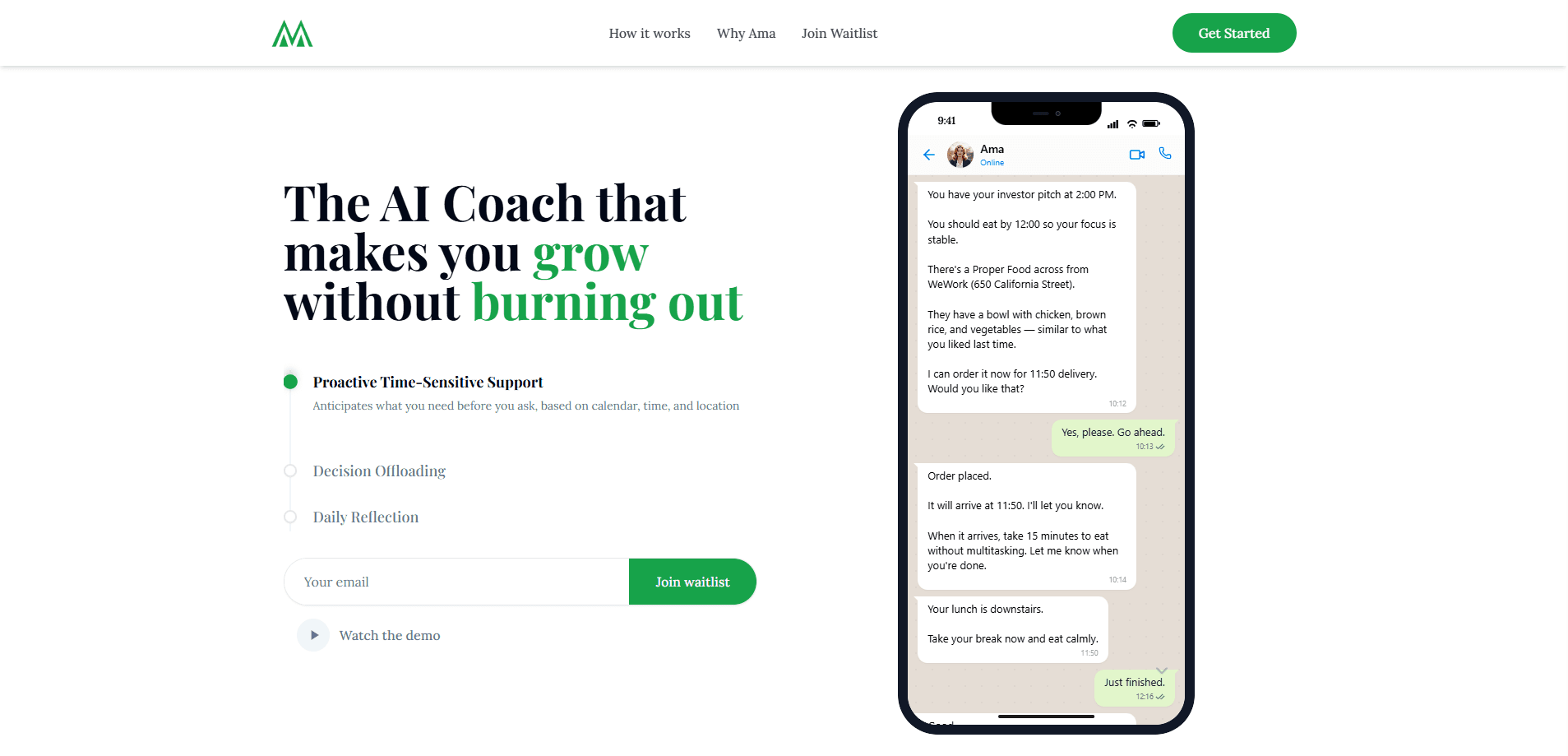
Ama is an AI coaching assistant that reaches out to you before you ask. It plugs into your calendar, location, and health data, then sends short text-style nudges that fit what's actually happening in your day. Instead of waiting for a prompt, it checks in around meetings, meals, and breaks, so the guidance arrives when it's useful rather than when you remember to look for it. The whole point is timing.
About Ama
What Is Ama
Ama is a proactive AI coach, and the closest comparison is a friend who happens to know your schedule. Most AI assistants sit still until you type something. Ama works the other way around. It watches your calendar, your location, and your health signals, then messages you first with something concrete to do. The site pitches it plainly as "the AI coach that texts you first."
The problem it targets is burnout. Ambitious people tend to over-schedule and skip the basics, then wonder why focus collapses by mid-afternoon. Ama's answer is small, timely prompts. It might tell you to eat before a 2 PM pitch. It can order the lunch itself. It can block a quiet window before a big call, or leave a gap so you don't run meetings back to back. Think of it as an AI burnout prevention tool that works in the background, nudging you toward the small habits that keep your energy steady across a long, demanding week.
The limits matter too, and they're worth knowing up front. Ama needs access to your calendar, location, and health data to work at all. If you're not comfortable granting that, the product loses most of its value. It also leans on text and voice rather than a dashboard. People who want charts and manual controls may find it too hands-off.
Getting Started
- Sign up at askama.co and connect the accounts you want Ama to read, starting with your calendar.
- Add location and health access so Ama can judge travel time, nearby food options, and recovery signals.
- Set your working hours and the kinds of nudges you want, from meal reminders to focus blocks.
- Let Ama message you through the day and reply to it in plain language when it asks.
- Review the voice reflections it schedules after key moments so the coaching gets sharper over time.
Product Information
A quick look at Ama's pricing, supported platforms, and performance.
Best for
The users, tasks, and scenarios where this tool fits best.
Users
- Founders and operators
- Remote and hybrid workers
- Anyone fighting burnout
Tasks
- Meal timing and ordering
- Pre-meeting focus blocks
- Post-event reflection
Scenarios
- A high-stakes investor or client pitch
- Days with back-to-back calls
- Travel days in an unfamiliar city
Key features
Proactive nudges that arrive unprompted
The core idea is that Ama messages you first. It reads your calendar and context, then sends a short, specific prompt when something needs attention. That flips the usual chatbot loop, where you have to know what to ask and when to ask it. Is that actually helpful? For most people buried in back-to-back calls, yes. You don't think about the right question at the right moment, so an assistant that raises its hand first closes a gap a normal chatbot leaves open.
Calendar, location, and health integration
Ama connects to the data that shapes your day: meetings, your location, and how your body's doing. That context is what makes a nudge land. A reminder to eat is generic. A reminder to eat before your 2 PM pitch, at a place across the street, is something you'll actually act on. In practice, it behaves like a personal AI assistant that already read your day.
Ordering and hands-on help
Ama goes past reminders in some cases. In the example on its site, it offers to order a specific lunch for delivery at a set time, then confirms when it arrives. That turns advice into a finished task rather than another item on your list. Small thing. Big difference when your day is packed.
Quiet windows and protected focus
Before a big meeting, Ama can block a stretch of time and promise not to interrupt it. It tells you when the window starts and stays out of the way. For people who let notifications run their day, that boundary is the selling point. No pings. No "quick questions." Just space to think.
Voice reflections after key moments
After an event, Ama can schedule a short voice check-in and ask you to rate how it went. You talk through what was on your mind. Then it stores the notes to inform later coaching. It's a lightweight way to build a record without writing anything down.
Text-first, conversational interface
You interact with Ama the way you'd text a person. No dashboards to configure, no forms to fill in mid-day. The trade-off? Power users who like manual control get less of it here than they would with a traditional scheduling app.
Pros and cons
Pros
- Messages arrive proactively, so you don't have to remember to check in.
- Ties coaching to real context from your calendar, location, and health data.
- Handles small tasks like ordering food, not just reminders.
- Voice reflections build a running record with almost no effort.
- Text-style interface is quick to pick up and fits into a normal day.
Cons
- Broad data access is required, which is a real privacy decision for many people.
- One price with no free tier, so there's no way to test it before paying.
- No public API, which rules it out for anyone hoping to build on top of it.
- No dashboard or manual controls, which frustrates users who want to plan their own way.
Frequently asked questions
Ama is an AI coaching assistant that proactively messages you based on your calendar, location, and health data. It sends timely nudges around meals, focus time, and rest. In some cases it handles small tasks like ordering food.
Related content
Explore related tools, skills, and articles for Ama.
Ama Alternatives

Swms
Swms AI · Writing · Productivity · BusinessSwms is an AI safety compliance tool that turns a plain description of a job into ready-to-use safety documents. Describe your project, trade, and known hazards, and it writes a safe work method statement, job hazard analysis, safe work procedure, RAMS, or safety data sheet in seconds. It also ships with Oscar, a chat assistant that answers workplace safety questions in any language. Teams in construction, mining, transport, and warehousing use it to cut the paperwork that usually eats into a workday.

Wordly AI Translation
Wordly · Voice & Language · ProductivityWordly AI Translation is a real-time AI translation and captioning platform built for meetings, conferences, and events. It delivers live translation, captions, transcripts, and summaries in more than 60 languages, and attendees join by scanning a QR code or opening a link instead of using dedicated headsets. The platform works with Zoom, Microsoft Teams, Google Meet, and Webex, and it's designed for organizations that want multilingual access without hiring human interpreters for every session. Simple as that.

Rows
Rows (Superhuman) · Productivity · BusinessRows is an AI spreadsheet and data analysis tool that imports live data from more than 50 sources, then lets you work with it using plain language instead of SQL queries or nested formulas. You can pull numbers out of PDFs, connect ad platforms, databases, and bank accounts, and ask the AI to build reports, merge datasets, or set up models that recalculate themselves. It runs in the browser, works like a spreadsheet, and now sits under the Superhuman umbrella.