

Amie
Amie · Productivity
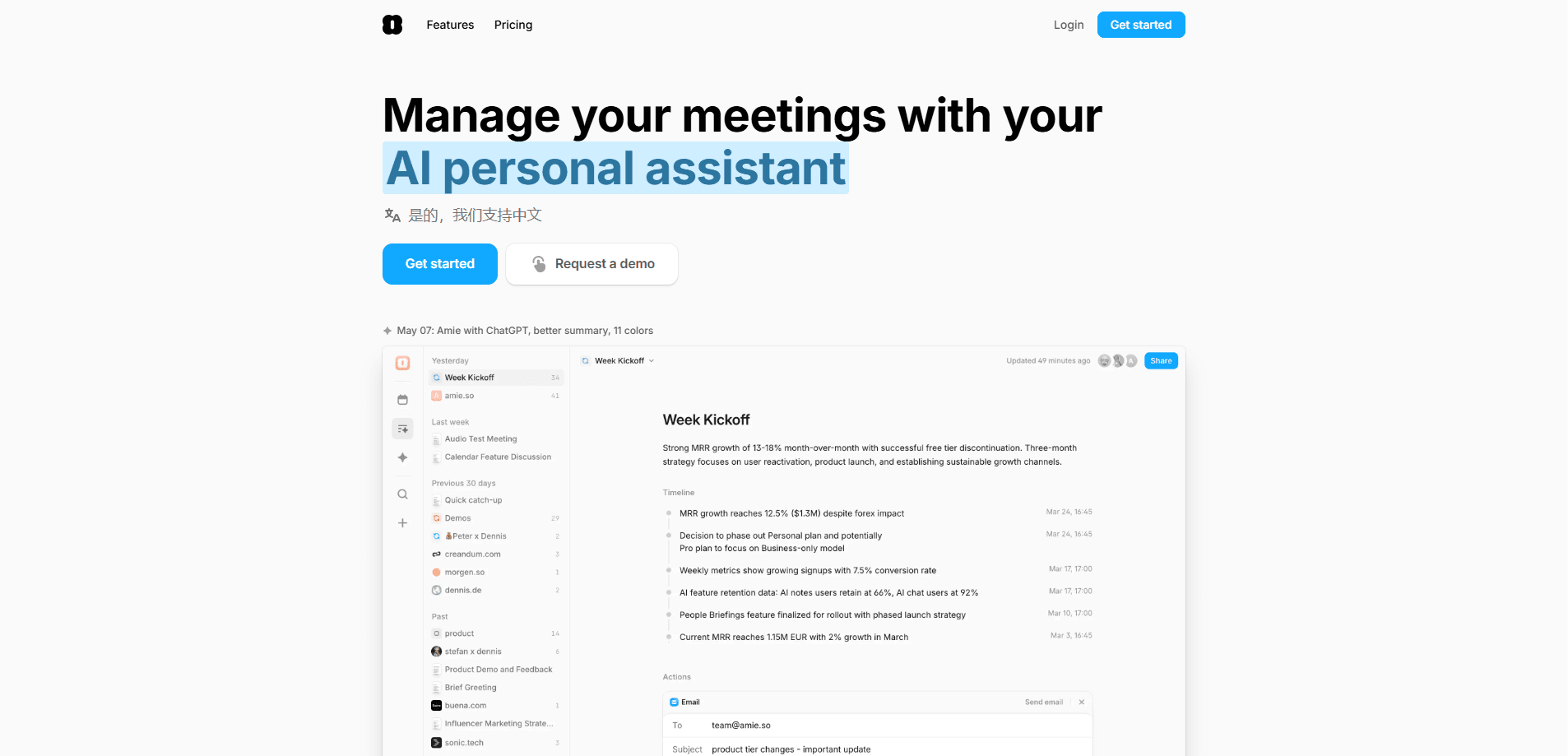
Amie is an AI note taker and calendar app that summarizes meetings without a bot joining the call. It turns recordings into notes, action items and answers you can query.
About Amie
What Is Amie
Amie is a calendar and task app that grew into an AI note taker for meetings. It records your calls from your own device instead of dialing a bot into the room, then writes up a summary, a list of action items and a transcript you can search later. The pitch is simple: the app should know your conversations and handle the busy work that follows them.
What separates Amie from older meeting tools is how the pieces connect. Notes sit next to the calendar event that produced them, tasks flow out of the summary, and an MCP connector lets outside AI apps such as Claude or ChatGPT read your meetings, calendar, emails and to-dos. Instead of one more summary generator, Amie tries to be the place your work actually lives.
The trade-offs are real. It leans on a desktop and mobile app rather than a browser-only tool, the most generous limits and admin controls sit in the higher paid plans, and the free tier is a seven-day trial rather than a lasting free account. If you want a free but permanent meeting recorder, this is not that.
Getting Started
- Create an account on the Amie site or in the desktop app, then install the app on macOS, Windows, iOS or Android.
- Connect your Google or Apple calendar so meetings appear inside Amie automatically.
- Start a recording from the notch control when a call begins, and pause it whenever you go off the record.
- Read the generated summary and action items, edit what the AI missed, then push tasks to your to-do list or share the notes.
Product Information
A quick look at Amie's pricing, supported platforms, and performance.
Best for
The users, tasks, and scenarios where this tool fits best.
Users
- Sales and customer success teams
- Founders and small teams drowning in back-to-back calls
- People who want their meetings inside a to-do list
Tasks
- Turning a recorded call into a summary and action items
- Asking questions across many meetings
- Keeping a CRM current
Scenarios
- A day of stacked video calls
- Staying in the same room for several meetings
- Feeding meeting context into other AI tools
Key features
Bot-free recording
Amie records calls from your own computer or phone instead of sending a bot into the meeting. That means no strange participant appears in the call and nobody gets a recording notice from a third party. You also control everything from a notch menu on the screen, so you can pause when the conversation goes off the record.
Meeting summaries and action items
Every recording turns into a written summary and a set of action items. Amie argues that generic AI summaries miss the point because they do not understand your business, so the app leans on your meeting and company context to turn talk into clear next steps. You edit the output, which keeps you in charge of what gets shared.
Amie Chat
Amie Chat lets you ask questions that stretch across many meetings rather than one. You can trace how a project evolved, find where a decision was made, or gather every objection a client raised. Paid tiers can also pick which AI model answers, which helps when different tasks need different models.
Calendar and task management
Amie started as a calendar, and that side still matters. Google and Apple calendars sync in, events and to-dos share one view, and meeting notes attach to the event that produced them. A calendar in the menu bar and a Pomodoro timer round out the day-to-day view.
Integrations and the MCP connector
Notes and tasks flow into tools such as Slack, Notion, Zapier and HubSpot, and an MCP connector exposes your meetings, calendar, emails and to-dos to AI apps like Claude and ChatGPT. For teams that build on top of their own data, that connector is often the reason to pick Amie over a plainer recorder.
Multi-language capture and speaker labels
Amie handles 17 languages with speaker labeling and many more without it, so a transcript reads like a script rather than an unbroken block of text. Speaker tags matter most in long calls, where knowing who owns a point is the first thing you need.
Pros and cons
Pros
- No bot joins your calls, so bot-free recording keeps meetings private and participants relaxed.
- Meetings live beside the calendar event that produced them, so notes and follow-ups stay in context.
- The MCP connector lets Claude, ChatGPT and similar apps read your meetings, calendar, emails and to-dos.
- Amie combines a calendar, a to-do list and meeting notes, which removes a few separate subscriptions.
- Speaker labels and multi-language support make long, mixed-language calls readable.
Cons
- There is no lasting free plan, so you get a seven-day trial and then have to pay.
- Bot-free capture depends on device audio, so a blocked permission or a bad microphone can leave a meeting unrecorded.
- The most useful controls, such as custom branding and advanced CRM and ATS integrations, sit behind the Business plan.
- It leans on desktop and mobile apps, so anyone wanting a browser-only button in a call gets less out of it.
Frequently asked questions
Amie is a calendar and task app with an AI note taker built in. It records your meetings, writes summaries and action items, and lets you ask questions across your recorded conversations.
Related content
Explore related tools, skills, and articles for Amie.
Amie Alternatives

Swms
Swms AI · Writing · Productivity · BusinessSwms is an AI safety compliance tool that turns a plain description of a job into ready-to-use safety documents. Describe your project, trade, and known hazards, and it writes a safe work method statement, job hazard analysis, safe work procedure, RAMS, or safety data sheet in seconds. It also ships with Oscar, a chat assistant that answers workplace safety questions in any language. Teams in construction, mining, transport, and warehousing use it to cut the paperwork that usually eats into a workday.

Wordly AI Translation
Wordly · Voice & Language · ProductivityWordly AI Translation is a real-time AI translation and captioning platform built for meetings, conferences, and events. It delivers live translation, captions, transcripts, and summaries in more than 60 languages, and attendees join by scanning a QR code or opening a link instead of using dedicated headsets. The platform works with Zoom, Microsoft Teams, Google Meet, and Webex, and it's designed for organizations that want multilingual access without hiring human interpreters for every session. Simple as that.

Rows
Rows (Superhuman) · Productivity · BusinessRows is an AI spreadsheet and data analysis tool that imports live data from more than 50 sources, then lets you work with it using plain language instead of SQL queries or nested formulas. You can pull numbers out of PDFs, connect ad platforms, databases, and bank accounts, and ask the AI to build reports, merge datasets, or set up models that recalculate themselves. It runs in the browser, works like a spreadsheet, and now sits under the Superhuman umbrella.