

Animate Anyone 2
Alibaba Group (Tongyi Lab) · Chatbot
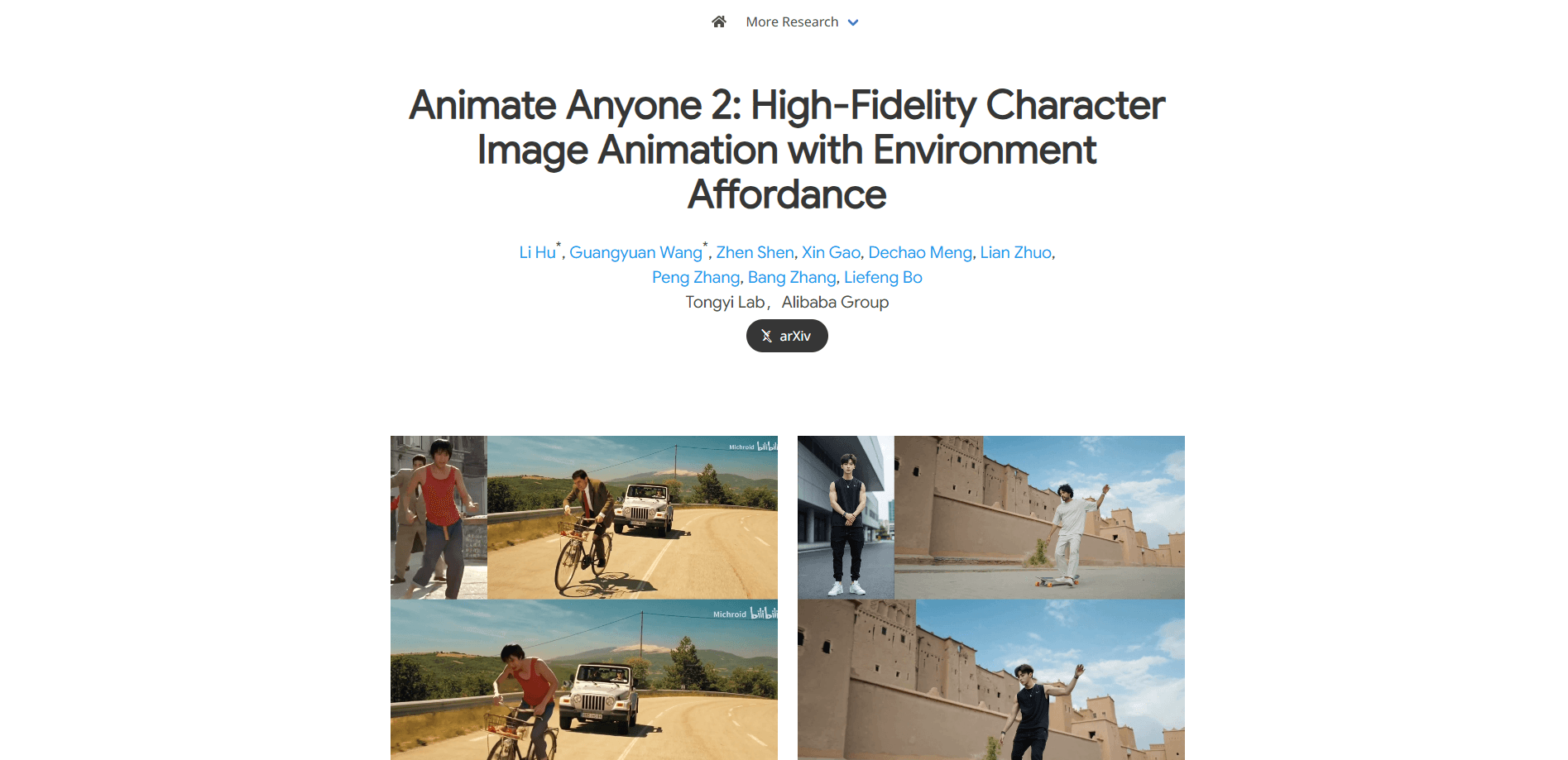
Animate Anyone 2 is Alibaba's AI character animation model that turns a still portrait into video and blends the character with the surrounding scene.
About Animate Anyone 2
What Is Animate Anyone 2
Animate Anyone 2 is a character animation model from Tongyi Lab at Alibaba Group. It follows the original Animate Anyone, which drove a still character with a pose sequence and little else. The sequel adds the environment. The model reads the background from a driving video, then places the animated character into that same space so the two fit together rather than look pasted on.
The problem it targets is a familiar one in image to video work. Early models could move a body, and they often left the person floating against a mismatched background. Animate Anyone 2 pulls environment details from the source clip and uses an object guider to keep things the character touches looking right. A person picking up a mug keeps a believable grip on the mug.
The catch is what the model is not. This is a research release, not a consumer app with a sign-up page and a monthly plan. The paper, demo clips, and API docs are public, but you reach the model through Alibaba Cloud rather than a friendly editor. It suits people who already work inside an API, and it leaves beginners without a browser tool to click.
Getting Started
- Open an Alibaba Cloud account and enable Model Studio, then create an API key for the region you plan to call.
- Prepare a character image and a driving video, or build a motion template first if you only have the image.
- Send a request to the animate-anyone-gen2 model with your image and template, then poll the task until it finishes.
- Download the finished clip, which comes out either against the original image background or the video background depending on the setting you pick.
Product Information
A quick look at Animate Anyone 2's pricing, supported platforms, and performance.
Best for
The users, tasks, and scenarios where this tool fits best.
Users
- Content creators who animate characters
- Short video and ecommerce teams
- Developers and researchers
- Animation and post-production studios
Tasks
- Turning a still portrait into a talking or moving subject
- Reproducing dance or sports motion
- Keeping character and scene in sync
- Preserving object interaction
Scenarios
- Making a single photo perform any video
- Building low-cost motion capture
- Assembling short-form ads in several markets
Key features
Environment Affordance
As a human video generator, this model leans on scene context more than motion alone. This is the headline change from the first Animate Anyone. The model treats the background as a set of conditional inputs, pulling the environment out of the driving video and generating the character to occupy it. The result is a character that shares lighting, floor contact, and spatial depth with the scene rather than sitting on top of it. For anyone who has stitched a green-screen effort together by hand, this is the part that saves the most time.
Object Guider and Spatial Blending
A lightweight object guider pulls features from the objects a character interacts with, then blends them into the denoising step through spatial blending. In practice, this is what keeps a hand wrapped around a cup or a foot planted on a skateboard. The feature matters because object interaction is where most image to video pieces look wrong, and it is the difference between a clip you can publish and one you can't.
Shape-Agnostic Mask Strategy
Instead of relying on a tight body outline, the model uses a shape-agnostic mask that marks the relationship between a character and the space around them. That makes it more tolerant of bodies that do not fit a standard silhouette, including different poses and proportions. It also helps when the character edge is hard to cut cleanly, which is common with loose hair or flowing clothes.
Pose Modulation
The model uses a pose modulation strategy so it can handle more varied motion than a single fixed pose skeleton allows. Twists, large limb movements, and quick changes in direction come through better. This widens the range of clips you can drive it with, from steady talking shots to full-body dance.
Image-to-Video Motion Transfer
At its base, Animate Anyone 2 moves the motion from a driving video onto a character image. You keep the look of your image and borrow the movement from the clip. Consistency of face and clothing carries across the frames, which is the property the whole Animate Anyone line is built on.
Background Handling Options
You can generate the output against the original image background or against the video background. The image background suits a portrait kept in its own setting, while the video background drops the character into the scene from the reference clip. The choice is a single parameter, and it decides how much of the environment the model reproduces.
API Access on Alibaba Cloud
The same capability ships as the AnimateAnyone gen2 model, listed as animate-anyone-gen2, through Alibaba Cloud Model Studio. Calls run as asynchronous jobs: you submit a task, then poll for the result. The API sits in specific Alibaba Cloud regions, and your key is tied to the region you signed up for, so cross-region calls fail.
Pros and cons
Pros
- Environment handling is the standout upgrade, so characters share a scene with their surroundings instead of floating over it.
- Object interaction stays believable, which fixes the weakest point of most earlier image to video tools.
- Motion transfer handles varied and complex movement, from talking shots to full-body dance.
- It's open in documentation terms, with a public paper, demo clips, and an API reference you can read before you commit.
Cons
- There's no polished consumer editor. You reach the model through Alibaba Cloud, so you need API comfort to use it at all.
- The API key is bound to one region, and calling it from another region fails, which trips up cross-border teams.
- Half-body portraits are not recommended for the video-background mode, since the model guesses at legs it can't see.
- As a research release, tips for beginners are thin. Expect to read the docs rather than follow a walkthrough.
Frequently asked questions
Animate Anyone 2 is a character animation model from Tongyi Lab at Alibaba Group. It takes a still character image and a driving video, then generates a moving clip of that character. Its main advance over the first Animate Anyone is reading the environment, so the animated character fits the scene.
Related content
Explore related tools, skills, and articles for Animate Anyone 2.
Animate Anyone 2 Alternatives

Knocket
Knocket (Tencent RTC team) · Productivity · Business · ChatbotKnocket is a free live chat and contact page tool that lets visitors message you from your website, app, or a shareable link, with every reply handled from Telegram or one inbox.
Agibot
Agibot · Productivity · AI Assistant · ChatbotAgibot is a personal AI agent for Mac that keeps running after you close the window, runs routines on a schedule, and works from Telegram or Slack with your own API keys.

Melete
Melete · Productivity · AI Assistant · ChatbotMelete is an AI workspace for teams where agents research, draft, and act in Slack, Notion, Linear, and GitHub. Shared memory and approval gates keep people in control.