

Anyvids
Anyvids · Video
Anyvids is an all-in-one AI video and image creation platform that gathers leading generative models into a single workspace. Instead of subscribing to several tools and moving files between them, you can generate cinematic product videos, social clips, images, and talking avatars from one dashboard. It suits content creators, marketers, and ecommerce teams who need finished visuals without a full production crew.
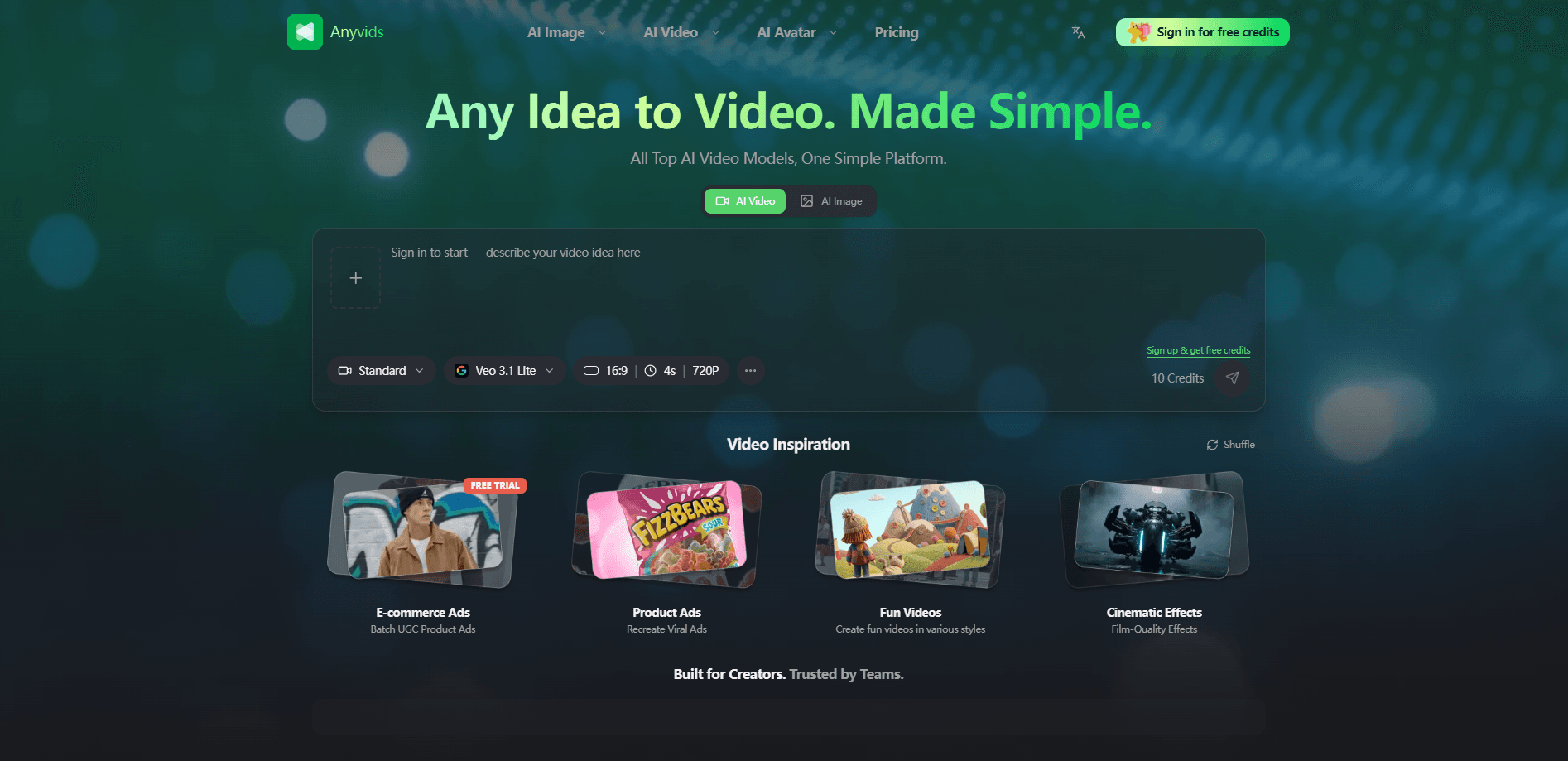
About Anyvids
What Is Anyvids
Anyvids is a web-based studio for AI-generated video and images. The pitch is simple. It hosts many of the popular models in one place. That roster spans Google Veo 3.1, Kling AI, Hailuo AI, Vidu, Wan AI, and Seedance 2.0. You can try each one on the same project without juggling separate accounts and credit systems. The platform runs on a credit model. You sign up, get a small batch of free credits, and spend them per generation. Simple enough.
The main problem it solves is fragmentation. Anyone who makes AI visuals for a living knows the drill: one subscription for video, another for images, a third for avatars, and a mess of downloads in between. Anyvids folds those into one library of tools, so you're comparing engines on a single project rather than managing four billing dashboards. That's the real reason people pick it over a single-model app.
The biggest limitation is that it's a cloud service, not a desktop editor, which means every render depends on a live connection to Anyvids servers. There's no offline mode, and heavy projects burn through credits quickly. If you need frame-level control or a local render pipeline, this won't replace a traditional editor. There's also no public API listed, so automation-minded teams are out of luck for now. So who is this actually for? Mostly people shipping marketing visuals fast.
Getting Started
- Create an account on the Anyvids website with your email, then claim the free starter credits offered at signup.
- Open a studio from the dashboard. Creative Studio, Commerce Studio, and Marketing Studio each group tools for a different job.
- Pick a model and mode. For a product ad you might choose Veo 3.1 Lite at 16:9 and 720p; for a talking avatar you'd switch to an avatar tool.
- Write a prompt or upload a source image, then generate. The credit cost of each run shows before you commit.
- Review the output, refine with another pass if needed, and download the finished video or image for publishing.
Product Information
A quick look at Anyvids's pricing, supported platforms, and performance.
Best for
The users, tasks, and scenarios where this tool fits best.
Users
- Content creators who post daily
- Ecommerce sellers
- Marketing teams
Tasks
- Product ad videos
- UGC-style clips
- Social media posts
- Image generation and editing
Scenarios
- Late-stage campaign prep when a launch date is fixed and there's no time to schedule a shoot.
- Testing a batch of ad creatives cheaply before committing budget to the winners.
- Scaling a small ecommerce store that needs fresh visuals every week but has no in-house designer.
- Solo creators filling a posting schedule across several platforms from one tool.
Key features
Multi-Model Access in One Workspace
Anyvids brings competing video and image models under one roof, from Google Veo 3.1 and Kling AI to Hailuo AI, Vidu, Wan AI, and Seedance 2.0. You can run the same prompt through different engines and see which one fits, without opening separate tabs or paying separate subscriptions. That comparison workflow is the core of what makes it useful.
AI Video Generator
The video generator, also sold as an AI video maker, turns text and images into finished clips. It covers cinematic product ads, brand spots, and short social videos, and you can control the model, aspect ratio, resolution, and duration. A standard preset such as 16:9 at 720p for four seconds shows the kind of granular choice you get on every single run before spending credits. No editing timeline required.
Avatars and Talking-Head Video
The avatar tools build AI avatar generator outputs: presenters that speak and emote on your behalf. That opens up review videos, explainer spots, and testimonial-style content when hiring on-camera talent isn't practical or affordable for a small team. For brands that need a consistent face across many clips, this is a practical shortcut.
UGC Video Generator
A dedicated UGC video generator builds reaction videos, reviews, and creator-style clips that look native to a feed. You get the look of a real person talking to camera without booking a shoot, which matters when you're producing dozens of ad variants every month. It's aimed at brands and creators who need trustworthy-feeling content at volume.
Creative, Commerce, and Marketing Studios
Rather than one flat toolbox, Anyvids groups its features into themed studios. Commerce Studio targets sellers who need listing visuals and try-on shots, while Marketing Studio leans toward ads and campaign work. Each studio points you toward relevant tools and presets instead of a blank prompt box, which cuts the guesswork for people who don't know which model to pick.
Film-Grade Effects and Motion Control
Effect presets aim to give outputs a cinematic look without manual grading. Motion control and character swap let you direct how subjects move and who appears on screen. That bridges the gap between a still image and a finished scene. Beginners get decent results fast. Advanced users get enough control to refine.
Image Generation and Editing
Anyvids handles stills as well as motion, from prompt-based generation to edits on source images. Thumbnails, product shots, and campaign graphics all come out of the same place, which keeps a project's visual style consistent across platforms and formats. Think of it as one AI creative toolkit rather than a stack of separate apps.
Credit-Based Generation
Every generation costs credits, and the platform shows the cost before you run it. Subscription credits reset each billing cycle and don't roll over, while add-on credits you buy separately never expire. That's a meaningful difference. Clear per-run pricing makes it easier to plan a budget than a flat-rate plan that hides usage limits.
Pros and cons
Pros
- Several top video and image models live in one account, so you don't pay for and manage multiple subscriptions.
- Credit costs are visible before each run, and add-on credits don't expire.
- Studios for commerce and marketing point you to the right tool instead of a generic prompt box.
- Avatar and UGC features cover content that would otherwise need real shoots.
- A free tier with starter credits lets you test the platform before paying.
Cons
- Subscription credits reset monthly and don't carry over, so unused budget is lost.
- Every generation spends credits, and heavy video projects can burn through them fast.
- No public API means teams can't automate or integrate it into their own pipelines.
- It's a web-only service with no offline mode, so it needs a stable internet connection.
Frequently asked questions
Anyvids is used to generate AI video and images, from cinematic product ads and UGC-style clips to avatars, social posts, and still graphics. It groups many leading models into one workspace so you can produce a range of visual content without switching tools.
Related content
Explore related tools, skills, and articles for Anyvids.
Anyvids Alternatives

ngram 2.0
ngram · Video · Marketingngram 2.0 is an AI video generator for teams. It turns a prompt, a screen recording, or a product URL into a narrated explainer, product demo, or AI avatar video, and every scene stays editable.

OpenScreen 2
OpenScreen (open-source project) · Video · ProductivityOpenScreen 2 is a free, open-source screen recorder and demo video editor for Windows, macOS, and Linux, with automatic zooms, styled frames, local captions, and agent edits.

Skreno
Skreno · Video · ProductivitySkreno is a browser screen recorder that captures a tab, a window or your whole display, then attaches AI transcripts, summaries and console logs to one share link.