

Arold AI Assistant for Airbnb
Arold · Productivity
Arold AI Assistant for Airbnb is a free Android app that helps short-term rental hosts draft and send guest replies in one tap.
About Arold AI Assistant for Airbnb
What Is Arold AI Assistant for Airbnb
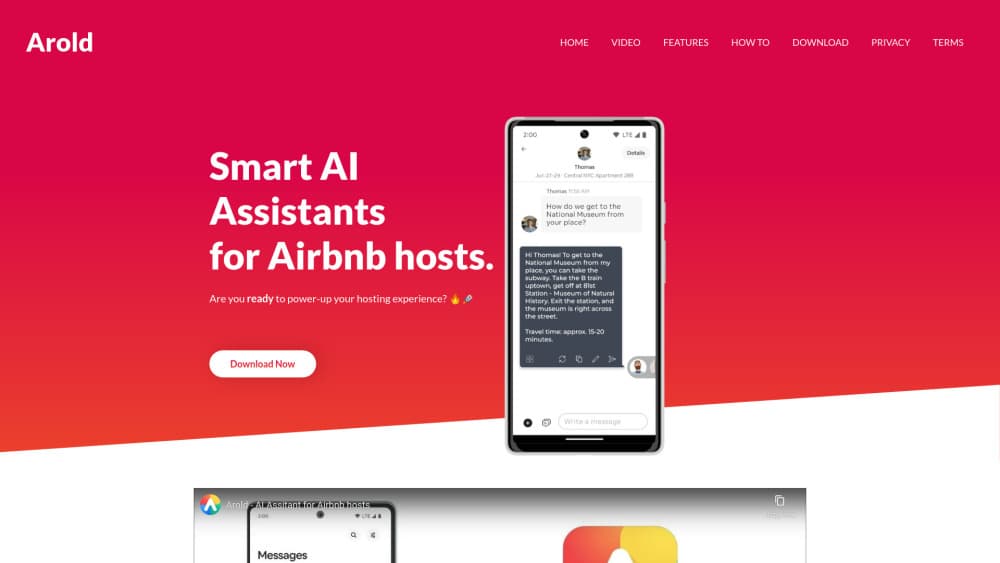
Arold is an Android app that works as an Airbnb host assistant. It plugs into your inbox and suggests a ready-to-send message you can review, edit, or approve with a single tap.
The goal is speed. Keep response times short, keep your tone friendly, and never write every line from scratch.
The app is made by hosts for hosts, and its small team frames this AI guest messaging app around one problem that eats up hours every single week, which is answering the same questions about check-in, WiFi, parking, and house rules for guest after guest. It's not affiliated with Airbnb, so treat it as a helper that sits beside your listing rather than something built into the platform itself.
The honest limit is scope. Arold only helps with written guest communication, and it doesn't manage calendars, pricing, or cleaning schedules. When a message needs a real human decision about a refund or a complaint, it can't act for you.
Getting Started
- Install Arold AI Assistant for Airbnb from the Google Play listing and open it.
- Connect the app to your Airbnb host inbox so it can read incoming guest messages.
- Teach your assistants the basics of your listing, then fine-tune them with your own questions and answers.
- Review the suggested reply, edit it if needed, and send it from a single tap.
Product Information
A quick look at Arold AI Assistant for Airbnb's pricing, supported platforms, and performance.
Best for
The users, tasks, and scenarios where this tool fits best.
Users
- New Airbnb hosts who get their first booking questions and don't know how to phrase replies
- Busy hosts juggling several listings
- Hosts whose English or writing confidence is shaky
Tasks
- Answering repeat questions about check-in, WiFi, and house rules
- Greeting a new guest and setting expectations before arrival
- Follow-ups after a guest checks in
Scenarios
- Evening inbox cleanups when you'd rather be off your phone
- Peak season stretches when messages pile up faster than usual
- Managing a listing you run from another time zone
Key features
One-tap smart replies
This rental host reply tool reads an incoming guest message and proposes a complete reply inside your inbox. You see the draft before it goes anywhere. Send it as is or tweak a line. For common questions it turns a two-minute reply into a few seconds. What you give up is full control over wording unless you edit it.
Custom assistants trained on your listing
Instead of one generic bot that answers everything the same way, Arold lets you build several assistants you teach about your specific property and the way you like to host your guests. You feed in the basics, then refine them with your own questions and answers as real guests ask new things. Over time the suggestions sound more like you and less like a script. How long does that training take? A short session to start, then small tweaks as you go. It's a light setup step, not a full knowledge base to maintain.
Review before sending
Nothing goes out without your approval. Every suggestion lands in front of you first, and you can edit or rewrite it before it's sent. That matters for hosts who worry about an AI saying something wrong to a paying guest. The trade-off is you still have to look at each message. It speeds you up rather than replacing you.
Friendly, consistent tone
The assistant keeps replies warm and courteous even on days when you're tired or annoyed. For hosts who dread sounding curt after a long day, that steady tone is the real value. You can still adjust individual messages, but the default keeps things polite and professional.
Simple single-purpose design
Arold does one job, so there's little to learn. You install it, connect your inbox, and start replying, with no pricing dashboard, channel manager, or guest-relationship feature set to configure before you can get started. The upside is a short learning curve. The downside is you'll still need separate tools for everything outside messaging.
Pros and cons
Pros
- Free to download, so hosts can test it without a commitment.
- Cuts reply time for routine guest questions down to a single tap.
- Assistants learn your listing and improve as you add your own answers.
- You review every message before it's sent, which keeps you in control.
- The interface is simple enough for hosts who aren't tech-savvy.
Cons
- Only handles guest messaging, so calendars, pricing, and scheduling need other tools.
- Works only on Android, leaving iPhone hosts without an option.
- Suggestions still need editing for unusual requests, so it won't run itself.
- Independent of Airbnb, so it depends on a stable connection to your inbox.
Frequently asked questions
It's an Android app that suggests and drafts automated guest replies to your Airbnb messages. You connect your host inbox, review each suggestion, and send it with a tap.
Related content
Explore related tools, skills, and articles for Arold AI Assistant for Airbnb.
Arold AI Assistant for Airbnb Alternatives

Swms
Swms AI · Writing · Productivity · BusinessSwms is an AI safety compliance tool that turns a plain description of a job into ready-to-use safety documents. Describe your project, trade, and known hazards, and it writes a safe work method statement, job hazard analysis, safe work procedure, RAMS, or safety data sheet in seconds. It also ships with Oscar, a chat assistant that answers workplace safety questions in any language. Teams in construction, mining, transport, and warehousing use it to cut the paperwork that usually eats into a workday.

Wordly AI Translation
Wordly · Voice & Language · ProductivityWordly AI Translation is a real-time AI translation and captioning platform built for meetings, conferences, and events. It delivers live translation, captions, transcripts, and summaries in more than 60 languages, and attendees join by scanning a QR code or opening a link instead of using dedicated headsets. The platform works with Zoom, Microsoft Teams, Google Meet, and Webex, and it's designed for organizations that want multilingual access without hiring human interpreters for every session. Simple as that.

Rows
Rows (Superhuman) · Productivity · BusinessRows is an AI spreadsheet and data analysis tool that imports live data from more than 50 sources, then lets you work with it using plain language instead of SQL queries or nested formulas. You can pull numbers out of PDFs, connect ad platforms, databases, and bank accounts, and ask the AI to build reports, merge datasets, or set up models that recalculate themselves. It runs in the browser, works like a spreadsheet, and now sits under the Superhuman umbrella.