

Arsaze
Sidhilynx · Video · Productivity
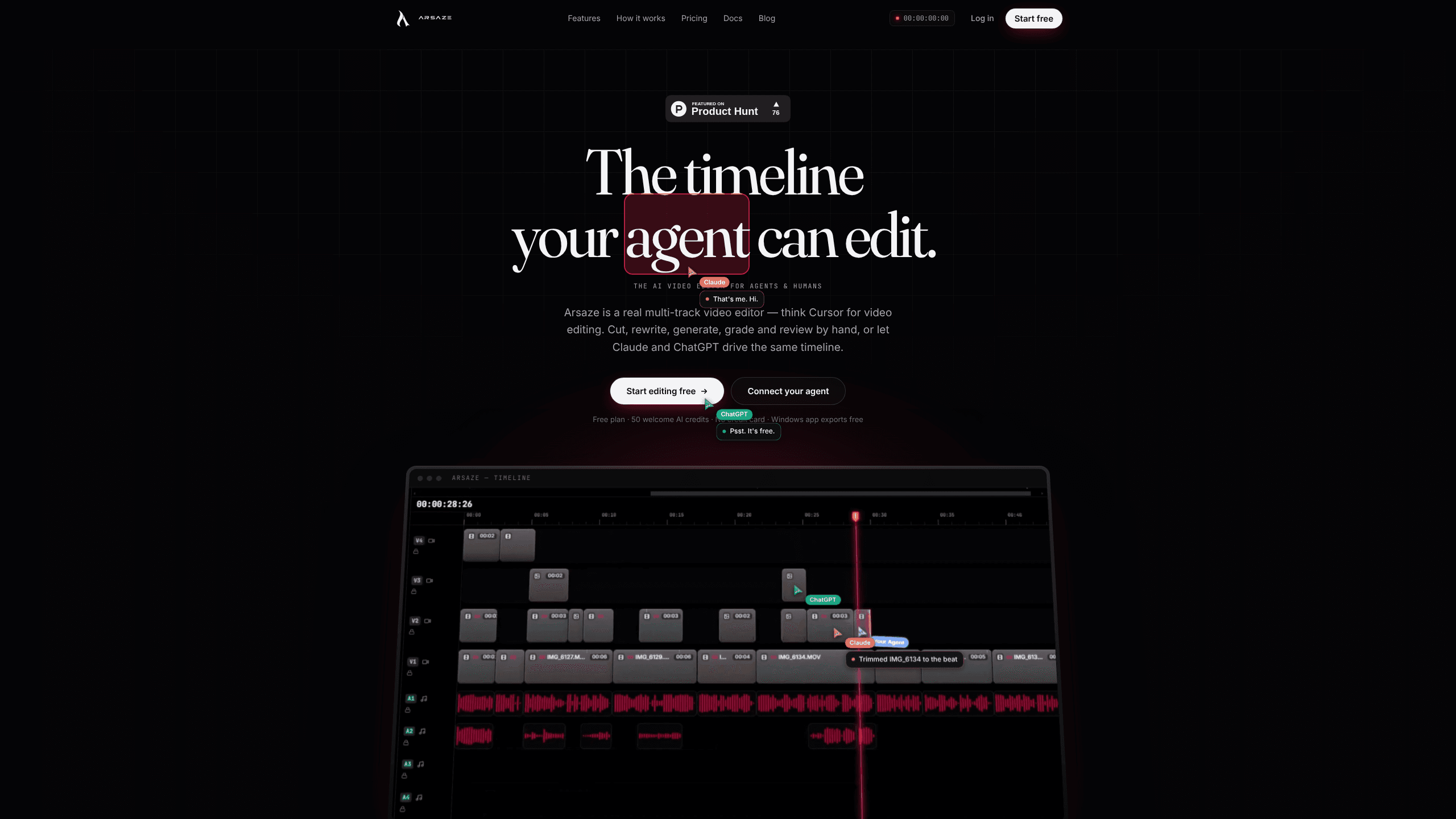
Arsaze is an AI video editor where Claude, ChatGPT or Gemini edits a real multi-track timeline while you watch, and you can take over by hand at any point.
About Arsaze
What Is Arsaze
Arsaze is a desktop and web video editor built around one idea: an AI agent should edit the same timeline a person edits, not a black box that spits out a finished file. You connect Claude, ChatGPT or Gemini through a remote MCP server, ask for a cut in plain words, and watch the AI timeline editing play out as the agent works.
The editor itself is a normal multi-track NLE. Tracks, clips, transitions, color, audio, captions and export all live in one window, and nothing is locked behind a paid plan. The AI is a second pair of hands on that timeline rather than a separate product bolted onto it.
Two things set it apart from other AI editing tools. The first is the Tab key, which repeats your last edit on the next clip in the way you just did it. The second is transcript editing: delete a word from the text and the matching video is cut, with the change tracked so you can put it back.
The limits are worth knowing before you commit. AI generation, cloud rendering and extra storage run on credits, and the paid plans are billed in Indian rupees. Free exports and free transcription only apply inside the desktop app, where the work runs on your own machine. That local-first setup is what makes it a workable free video editor for straightforward cuts.
Getting Started
- Create a free account at arsaze.com. No card is needed.
- Download the desktop app for Windows, macOS or Linux, or open a project in the browser.
- Import footage, then let Arsaze transcribe it if you plan to edit by text.
- Connect your AI client. In Claude, open Settings, then Connectors, then Add custom connector, and paste the server URL. ChatGPT and Grok take the same URL through their own connector screens.
- Ask for an edit in the chat, or press Tab to repeat your last manual cut. Review the result on the timeline and export.
Product Information
A quick look at Arsaze's pricing, supported platforms, and performance.
Best for
The users, tasks, and scenarios where this tool fits best.
Users
- Solo creators who already pay for Claude or ChatGPT
- Editors working with remote clients
- Small content teams without a dedicated assistant editor
Tasks
- Cutting silences and filler words from a talking-head video
- Assembling a first rough cut from a folder of clips
- Turning a long recording into short vertical clips
Scenarios
- A podcast episode with three speakers needs a clean 20-minute cut
- A brand video needs approval from a client in another time zone
- A weekly YouTube upload has to ship on a fixed day
Key features
Chat-Driven Timeline Editing
Arsaze runs a remote MCP server at api.arsaze.com/mcp, so an AI client can read your project and change it. The agent adds, trims, splits and ripple-deletes clips, applies transitions, and renders the result. The same setup covers ChatGPT video editing and Gemini, since all of them speak MCP. Each tool call plays back live in the editor, which means you see the edit as it happens instead of waiting for a finished file.
Tab Repeats Your Last Edit
Press Tab and Arsaze proposes the next edit on the timeline, done the way you just did it. Accept with Tab, dismiss with Esc. It's the closest thing to teaching the editor your rhythm: cut one interview answer tightly, then let the same treatment land on the next one. Arsaze says it is the first video editor with this behavior built in.
Document-Style Transcript Editing
The transcript is editable like a text document. Delete a word and the matching audio and video are cut from the timeline. Because every removal is stored as a tracked change, you can read the edit back and restore a sentence you decided to keep after all.
Frame-Accurate Review Links
Send a link and clients can watch the cut in a browser, pause on the exact frame and draw on it. Their notes come back attached to that frame, and an AI agent can read them and make the fixes. That replaces the usual loop of screenshots, timestamps typed by hand and a phone call to explain what "a bit later" meant.
Color, Audio and Caption Tools
The timeline carries the grading and sound work too. LUTs, color wheels, RGB curves and HSL secondaries cover color. Voiceover generation, automatic ducking, loudness normalization and sound effects cover audio. Captions can be generated automatically and edited in the same transcript view you use for cutting.
Free Renders on Your Own Machine
In the desktop app, exports render locally, so they don't consume cloud rendering time and carry no watermark. Transcription and background removal run on your computer for free as well. Paid credits only come into play for AI generation, cloud rendering and extra storage, which keeps the cost of a simple cut at zero.
Pros and cons
Pros
- The agent edits a real multi-track timeline, and every change is versioned, so a bad take is one step back rather than a rebuild.
- Connection is OAuth based with no API keys to paste, and it works with AI clients you may already pay for.
- Desktop exports are free, unwatermarked and rendered locally, which removes the credit anxiety most AI video tools create.
- Transcript cuts stay linked to the footage, so cleaning up filler words feels like editing a document.
- Review links with frame-level drawing give clients a way to point at a problem instead of describing it.
Cons
- Paid plans are billed monthly in Indian rupees through Razorpay, which can mean currency conversion fees and awkward invoicing outside India.
- AI generation, cloud rendering and extra storage all draw on credits, so heavier projects cost more than the plan price suggests.
- The desktop app needs macOS 14 Sonoma or newer on Apple silicon, or a 64-bit Linux build, so older machines are out.
- There is no native mobile editor. The AI employee can be messaged in Slack or Instagram, but frame-level work still happens on a computer.
Frequently asked questions
Arsaze is an AI video editor for Windows, macOS, Linux and the web. It pairs a standard multi-track timeline with a remote MCP server, so Claude, ChatGPT, Gemini or Grok can edit your project while you watch and take over whenever you want.
Related content
Explore related tools, skills, and articles for Arsaze.
Arsaze Alternatives

ngram 2.0
ngram · Video · Marketingngram 2.0 is an AI video generator for teams. It turns a prompt, a screen recording, or a product URL into a narrated explainer, product demo, or AI avatar video, and every scene stays editable.

OpenScreen 2
OpenScreen (open-source project) · Video · ProductivityOpenScreen 2 is a free, open-source screen recorder and demo video editor for Windows, macOS, and Linux, with automatic zooms, styled frames, local captions, and agent edits.

Skreno
Skreno · Video · ProductivitySkreno is a browser screen recorder that captures a tab, a window or your whole display, then attaches AI transcripts, summaries and console logs to one share link.