
Auto Stud AI
Auto Stud AI · Video · Leaning
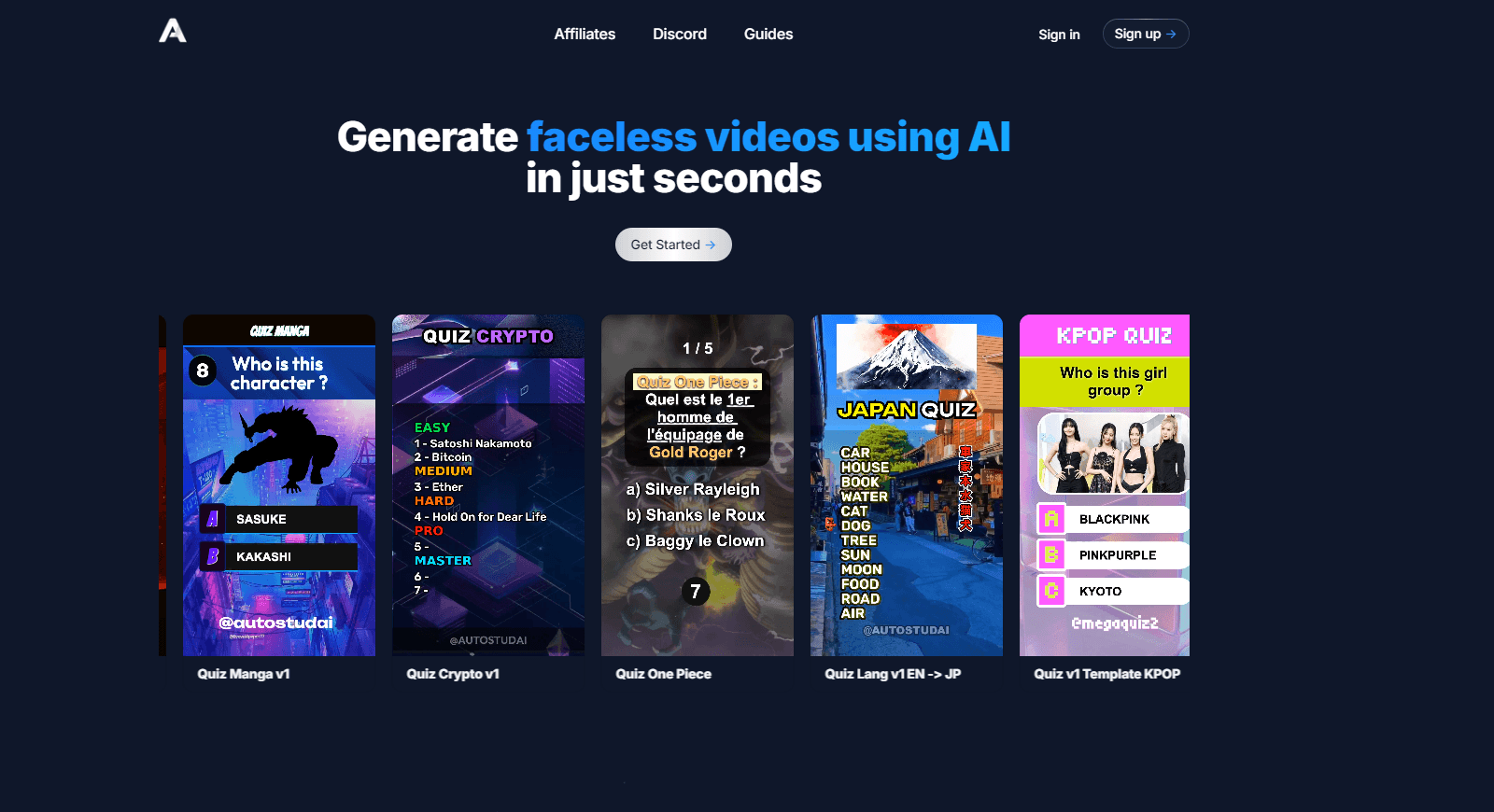
Auto Stud AI is a faceless video generator that turns a topic into quiz, ranking, and karaoke shorts for TikTok, YouTube, and Reels, with AI-written questions and templates.
About Auto Stud AI
What Is Auto Stud AI
Auto Stud AI builds short-form videos you never have to appear in. You type a topic, pick a template, and the platform writes the questions, adds voiceover, music, and effects, then renders a vertical clip ready for TikTok, YouTube Shorts, or Instagram Reels. Quiz formats carry most of it, but the same studio also handles rankings, karaoke, and narrated clips.
The pitch is volume. A creator channel lives or dies on posting often, and editing one quiz by hand takes hours. Auto Stud compresses that into minutes, which is why agency owners and faceless-channel builders are the people it's aimed at. Dozens of templates cover quiz styles like multi-level, language, and country, and a prompt builder fills in the questions with Claude, ChatGPT, or Gemini.
Set your expectations first. Credits decide how much you make, and heavier projects burn through a lower plan fast. The starter price is $19 a month, and the free door is a trial rather than a permanent tier. And like any AI content tool, the output is a strong draft, so the videos that perform still get a human pass on the questions before they go out.
Getting Started
- Open autostud.ai and start a free trial, with no card required to look around.
- Type a topic, choose a quiz template, and set the aspect ratio, length, and language.
- Let the AI draft the questions, then pick a voice, emojis, sound effects, and background music.
- Preview the clip, tune anything that reads wrong, and render it in 1080p for download.
Product Information
A quick look at Auto Stud AI's pricing, supported platforms, and performance.
Best for
The users, tasks, and scenarios where this tool fits best.
Users
- Faceless channel owners
- Social media agencies
- Language teachers and tutors
Tasks
- Making a quiz video
- Generating a ranking video
- Making a karaoke video
- Repurposing a social post
Scenarios
- Daily posting on TikTok and Reels
- Building a faceless YouTube Shorts channel
- Localizing content for new markets
- Automating publishing with a script
Key features
AI quiz generation
You give Auto Stud AI a subject and it writes the questions, the answer options, and the pacing on its own. It runs on Claude, ChatGPT, and Gemini behind the scenes, so each quiz gets fresh prompts instead of a reused bank. That's the difference between a channel that looks automated and one that reads like it was made on purpose.
Dozens of templates
The library covers the formats that travel on short-form feeds: multiple choice, multi-level, language quizzes, country quizzes, tier lists, and split-screen games like Would You Rather. Every template is editable, so you can keep the layout and swap the topic, colors, and text to match a channel's look.
Voiceover, music, and sound effects
Each video ships with a voice that reads the questions, background music under it, and sound effects on the beats where a quiz reveals an answer. Voices run through ElevenLabs, and you can change the language of the read to match the text. For a faceless channel, that audio layer is most of what makes a clip feel produced.
50+ languages
Auto Stud AI writes and voices quizzes in more than 50 languages, including English, Spanish, French, German, Japanese, and Korean. The language setting carries through the questions, the voiceover, and the on-screen text, which is the part that lets one format travel to a new audience without a rewrite.
Flexible length and aspect ratio
As a short-form video maker, Auto Stud AI adapts to any feed. You can build anything from a 59-second Short to a 20-minute video, in 9:16, 1:1, or 16:9. Vertical covers TikTok, Reels, and Shorts, while the wide 16:9 frame suits YouTube uploads and longer compilations. Matching the format to the platform before you render saves a re-export later.
Free standalone tools
Beyond the main studio, the site hosts a set of free single-purpose tools you can run without an account. They cover AI logo making, YouTube thumbnails, App Store screenshots, automatic subtitles, audio merging, and a karaoke maker. They're a low-risk way to test the output quality before you commit to a paid plan.
Dashboard and workspace controls
The dashboard holds your videos, renders, and credit balance in one place, and the same features are exposed through an API and an MCP endpoint. Renders are asynchronous and spend credits, so you watch the balance and poll or use a webhook for the finished mp4. It's the practical option if you want to script volume instead of clicking through it.
Pros and cons
Pros
- Dozens of editable quiz templates cut setup to minutes rather than hours.
- Voiceover, music, and effects come built in, so a faceless clip feels finished without extra tools.
- Tests 50+ languages across text and audio with one setting.
- The REST API and MCP endpoint let you automate posting volume from your own code.
- A free trial with no card makes the output quality easy to judge first.
Cons
- The free entry is a trial, and ongoing use runs on paid credits, the cheapest at $19 a month.
- Credit limits scale with the plan, so a busy channel can outgrow Starter quickly.
- It's built for fast template-driven output, so frame-level editing still happens in a separate editor.
- Questions are AI-written, and a wrong answer can slip through, so quizzes need a quick human check before publishing.
Frequently asked questions
Auto Stud AI generates faceless short-form videos from a topic. You pick a quiz, ranking, or karaoke template, and it writes the questions, adds voiceover and music, and renders a clip for TikTok, YouTube Shorts, or Instagram Reels.
Related content
Explore related tools, skills, and articles for Auto Stud AI.
Auto Stud AI Alternatives

ngram 2.0
ngram · Video · Marketingngram 2.0 is an AI video generator for teams. It turns a prompt, a screen recording, or a product URL into a narrated explainer, product demo, or AI avatar video, and every scene stays editable.

OpenScreen 2
OpenScreen (open-source project) · Video · ProductivityOpenScreen 2 is a free, open-source screen recorder and demo video editor for Windows, macOS, and Linux, with automatic zooms, styled frames, local captions, and agent edits.

Skreno
Skreno · Video · ProductivitySkreno is a browser screen recorder that captures a tab, a window or your whole display, then attaches AI transcripts, summaries and console logs to one share link.