
Autocropper
Tucker (independent developer) · Image
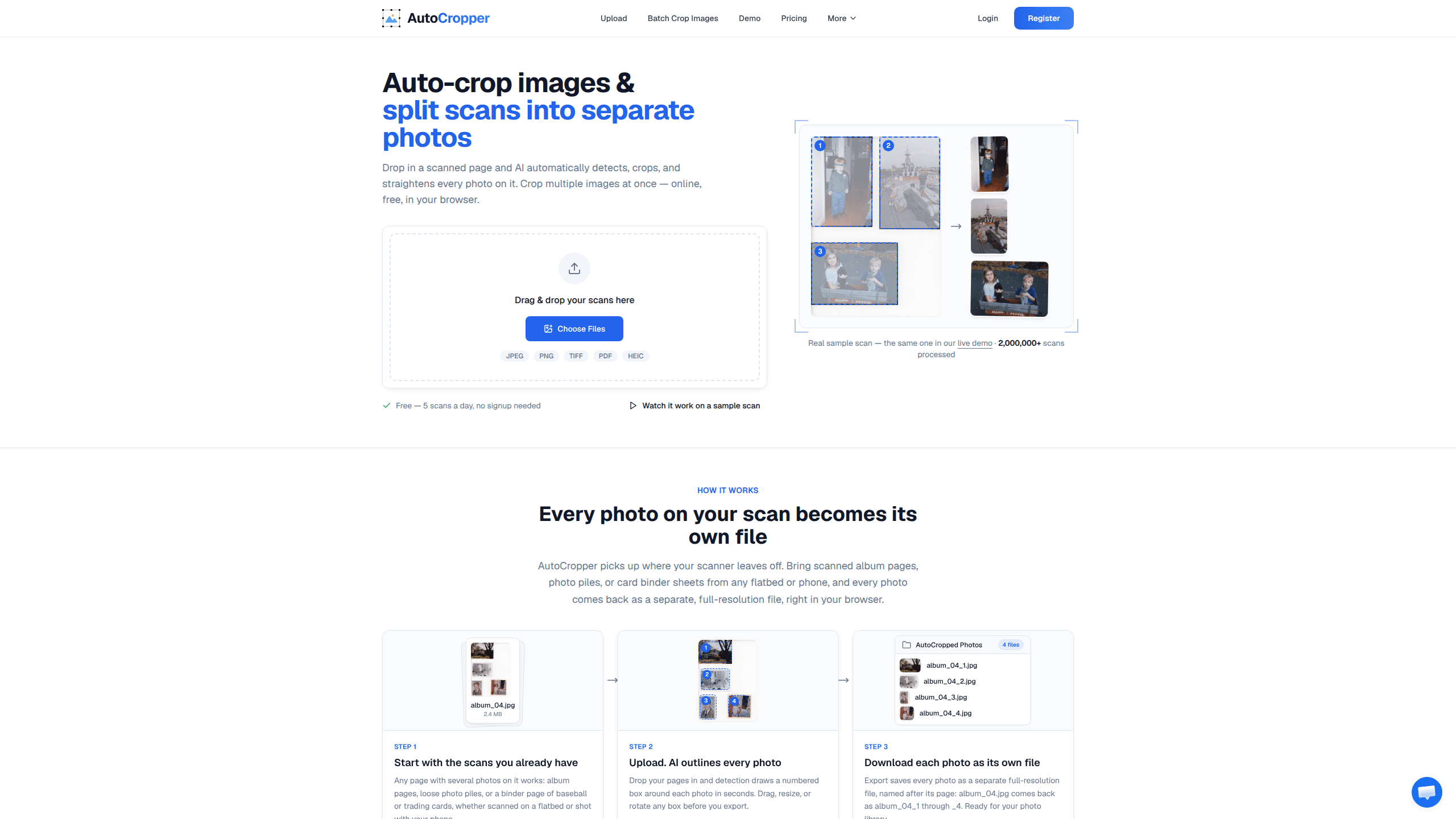
Autocropper is a browser-based AI photo cropper that turns a single scan holding several printed photos into separate, full-resolution image files. You drop in scans from a flatbed or phone camera, the tool detects and straightens every photo on the page, and you export each one as its own file. It's built for people who digitize a photo collection, whether that's photo albums, card binders or family archives, and who don't want to crop thousands of images by hand.
About Autocropper
What Is Autocropper
Autocropper is an online service that lets you auto-crop images from scans and split scans into separate photos. The problem it solves is simple: a flatbed scanner handles one page at a time, and if you cram four or five photos onto the bed to save time, you're left with one scan full of photos instead of separate files. Autocropper does that splitting for you, so you can scan fast and sort later.
It came out of a real annoyance. Tucker, the developer, spent a Christmas break in 2019 digitizing thousands of family photos with an Epson V600. The scanner's advertised "automatic photo detection" was painfully slow, so he started making single fast scans of as many photos as would fit, then wrote his own tool to cut them apart. "Surely there was a tool that could split these scans automatically?" There wasn't. That project became Autocropper.
The main limitation is what it can see. Detection works by finding rectangular shapes against a plain, usually white, scanner background. So what happens with busy backgrounds, overlapping photos, or pages that mix printed text and images? Those won't separate cleanly, and you still need to review the detected boxes before exporting.
Getting Started
- Scan your photos in bulk, placing as many as fit against the edges of the scanner bed. A phone photo of a page works too.
- Open Autocropper and drag your scans in. Accepts JPEG, PNG, TIFF, PDF and HEIC files.
- Let detection draw a numbered box around each photo, then drag, resize or rotate any box that's off.
- Review the crops in the sidebar, then hit Export to download each photo as a separate full-quality file.
Product Information
A quick look at Autocropper's pricing, supported platforms, and performance.
Best for
The users, tasks, and scenarios where this tool fits best.
Users
- Family archivists
- Card and photo collectors
- Small resellers on a deadline
Tasks
- Splitting a scan of multiple photos
- Straightening tilted photos
- Batch cropping the same layout
- Adding metadata to scans
Scenarios
- A weekend project to digitize a family photo album.
- A collector working through a binder of baseball or trading cards.
- A reseller preparing product photos from amateur scans.
Key features
Automatic Photo Detection
Autocropper uses a custom Python OpenCV algorithm to find the boundary coordinates of each photo against the scanner's white background. It spots any rectangle or square, which for a standard flatbed means three or four printed images per scan. You get numbered boxes you can adjust before exporting.
Multiple Photos From One Scan
This is the core of the tool. One scan with several photos on it becomes several separate files, each at full resolution. A file named album_04.jpg exports as album_04_1 through _4, so the link back to the source page is obvious.
Batch Upload and Processing
Paid plans remove the daily limits so you can upload dozens of scans at once and run batch photo cropping in bulk. The developer reports throughput around 12 photos per minute, which he frames as over 10x faster than using photo scanning software the same way.
Automatic Rotation Correction
Photos rarely sit perfectly square on a scanner bed. Autocropper detects a slight rotation angle on any photo and applies the matching correction, so straightened files come out without you nudging each one by hand.
Full-Quality Export, No Compression
Exports keep 100% of the original quality, with no compression applied. The trick is that only a small compressed copy is sent for detection while cropping runs in your browser against the full-size image, so a 20 MB scan can be processed in under four seconds.
Sync Crops
When a batch of images shares the same layout, you draw the crop once and sync it to every image you upload. The crops stay linked, so a single adjustment moves the box on all of them at the same time.
EXIF Encoding
You can encode hidden data into exported files, including title, description, tags and dates. Handy if you're building an archive where each photo needs its story attached.
Pros and cons
Pros
- Cuts the tedious part of bulk scanning: scan fast, split automatically, skip manual cropping.
- Keeps full resolution and skips compression, so exported photos don't lose quality.
- Detection and cropping happen in your browser, which keeps large scans off the server.
- A free tier with 5 images per day and every feature unlocked lets you test it on real scans first.
Cons
- Detection assumes photos sit on a plain, usually white background. Busy pages or overlapping prints won't separate cleanly.
- It's a desktop browser tool, so you can't process scans straight from a phone upload.
- The free plan caps you at 5 images per day and 3 files per batch, which stalls bigger projects fast.
- No public API means you can't wire Autocropper into an automated archiving pipeline.
Frequently asked questions
It lets you auto-crop images online from a single scan that contains several photos, splitting them into separate, individually cropped image files. You scan many photos at once, then let the tool cut them apart instead of cropping each one by hand.
Related content
Explore related tools, skills, and articles for Autocropper.
Autocropper Alternatives

X Ray Interpreter
X-ray Interpreter · ImageX Ray Interpreter is a web-based AI radiology tool that turns X-rays, CT scans, MRI, ultrasound, and PET images into plain-language reports. You upload a scan, get a preliminary X-ray interpretation in moments, then ask follow-up questions if something needs explaining. It works as a second opinion and a learning aid, not as a medical diagnosis.

Aieasypic
AIEasyPic · ImageAIEasyPic is an AI image generator that turns plain text prompts into finished artwork in seconds. You can also train custom models on your own photos, swap faces in existing images, and create short video clips from text, all from a browser. It suits casual creators who want quick visuals and hobbyists who want to build a personal model without touching any code.

Chargen
Chargen · ImageChargen is an AI character generator and worldbuilding toolkit built for Dungeons & Dragons and other tabletop RPGs. It turns a one-line idea into a painted character portrait, spins up NPCs, monsters, maps and encounters from the same session, and keeps every creature's details close at hand. The tabletop RPG art side runs on a credit system called Gold, while the text generators stay free for everyone.