
AutoCut
AutoCut · Video
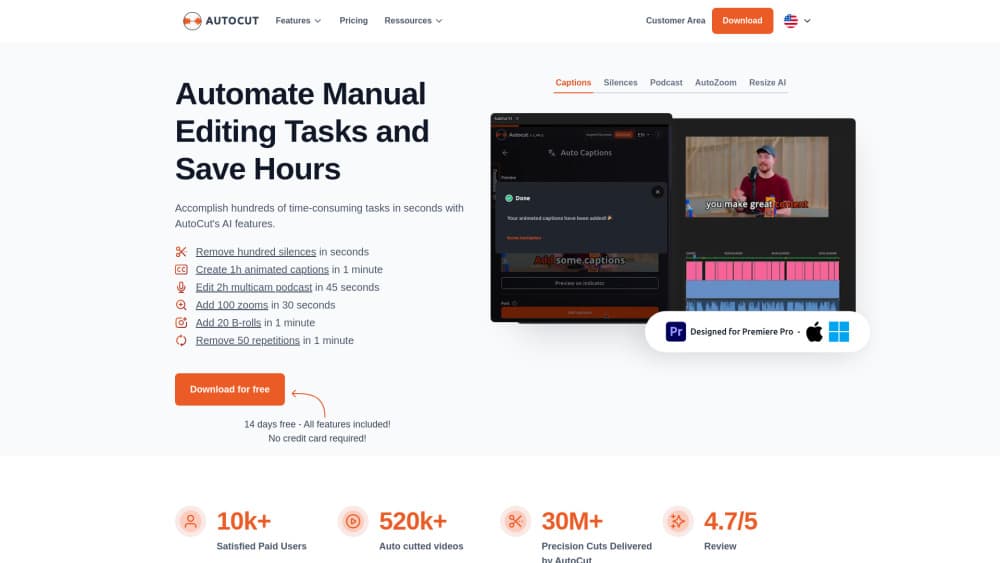
AutoCut is an AI video editing plugin for Premiere Pro and DaVinci Resolve that automates silences, captions, and podcast cuts.
About AutoCut
What Is AutoCut
AutoCut is a plugin you install inside Adobe Premiere Pro or DaVinci Resolve, not a separate app you export into. It plugs into the editor you already use and takes over the repetitive parts of an edit: the pauses you'd otherwise trim by hand, the captions you'd otherwise time manually, the camera switches a multicam podcast needs.
The pitch is simple. Most editors spend the bulk of a rough cut on work that follows a rule. Find the silence. Keep the best take. Drop the profanity. Add the zoom. AutoCut runs those rules for you and leaves the creative calls with a human. Tiffanie, a category colleague, called it "a rough cut you didn't make yourself" and that framing holds up.
The catch is scope. AutoCut isn't a standalone video editor, so if you don't already work in Premiere Pro or Resolve, there's nothing here for you. So why not test it on footage you already have? It's a paid tool with a 14-day free trial, so the honest question is whether the hours it saves on your own clips beat the monthly cost, and that answer depends entirely on how much raw footage you cut through each week.
Getting Started
- Install the plugin from the AutoCut site and log in inside Premiere Pro or DaVinci Resolve.
- Start your free 14-day trial, then pick the features you want for this project, like AutoCut Silences or AutoCaptions.
- Run the tool on your timeline and review the cuts, captions, or clips it generates.
- Fine-tune anything the automation missed, then export your video as usual.
Product Information
A quick look at AutoCut's pricing, supported platforms, and performance.
Best for
The users, tasks, and scenarios where this tool fits best.
Users
- YouTubers and podcasters who record long talking-head footage and want a rough cut in minutes
- Solo creators without an editing team
- Editors who already know their NLE
Tasks
- Silence removal across a full recording
- Captioning and translation
- Multicam podcast editing
- Short-form repurposing
Scenarios
- Turning a one-hour interview into a tight YouTube upload without watching the whole thing back.
- Cutting the pauses out of a webinar or course module before publishing.
- Reframing a horizontal edit for TikTok, Reels, and Shorts with AutoResize.
- Cleaning profanity from a livestream VOD before it goes public.
Key features
AutoCut Silences
This is the feature most people start with, and it's the one reviewers keep coming back to. It scans your audio for gaps and cuts them out, so a rambling take becomes something watchable without you scrubbing the waveform. That's the whole trick. The time it saves scales with how long you talk, which means a two-hour recording benefits far more than a thirty-second ad read.
AutoCaptions
AutoCaptions generates animated captions on your timeline, styles them, and can translate them, all without leaving the edit. Big win for bilingual creators. For anyone who posts in more than one language, the translation step alone removes a separate app from the workflow, and that matters when you're shipping the same video to three markets on the same afternoon.
AutoCut Podcast
Multicam podcast editing means deciding which camera is live at every moment. Tedious work. AutoCut Podcast detects who's speaking and switches angles automatically, so your first pass starts well past the blank timeline stage.
AutoZoom
Talking-head video goes stale without movement. AutoZoom adds timed zooms automatically instead of you placing keyframes by hand, and recent updates added highlight-aware timing and simulated camera movement. You get the energy of a manual auto zoom pass without the keyframe tedium, which is a trade most creators gladly make on long interview footage and vlog edits that would otherwise sit flat.
AutoViral
Point AutoViral at a long video and it scores the moments most likely to perform as viral clips, then preps them for vertical export. You still pick the winners, but you're choosing from a shortlist instead of watching the whole thing. Not ideal for every niche, but a big head start over scrubbing footage twice.
AutoB-Rolls and Storyblocks Footage
AutoB-Rolls drops relevant AI images and Storyblocks clips onto your timeline, which cuts the hunt for filler visuals on explainer and vlog edits. It's the closest AutoCut gets to covering the parts of an edit that aren't rule-based, which is why editors who lean on b-roll tend to notice the difference more than talking-head-only creators do.
AutoProfanity Filter
The filter finds profanity and bleeps, mutes, or removes it across the timeline. Podcasters and streamers who post public versions of unscripted audio reach for this one most. It's a small feature. It prevents a big headache.
Weekly Updates
AutoCut ships updates weekly, and the pace shows in the feature list above, which has grown well past its earlier silence-cutting focus. Newer tools appear inside the plugin, not in a changelog you have to chase down. That cadence matters for a plugin that lives inside someone else's software.
Pros and cons
Pros
- Runs inside Premiere Pro and DaVinci Resolve, so there's no export-and-reimport round trip and no quality loss between apps.
- Silence removal and captioning save hours on long talking-head footage, which is the core promise and it holds up in user reviews, with one podcaster reporting a six-hour edit down to about thirty minutes.
- The feature set is broad enough to cover a full rough cut, from silences to podcast angle switches to profanity cleanup.
- Weekly updates mean bugs and feature gaps tend to get addressed rather than sitting for months, since the team ships improvements on a steady cadence that keeps the plugin current with each host app release.
Cons
- No standalone app, so it's useless if you don't already edit in Premiere Pro or DaVinci Resolve.
- There's no permanent free plan, only a 14-day trial, so you'll pay to keep using it after the trial ends.
- Automated cuts still need review; the plugin catches most silences but you'll occasionally fix a trim it got wrong, especially on recordings with background noise or overlapping speakers.
- Pricing and feature access vary by tier, so it's worth checking which tools your plan actually unlocks before you commit.
Frequently asked questions
AutoCut is a plugin that automates repetitive video editing tasks inside Premiere Pro and DaVinci Resolve. It removes silences, generates captions, edits multicam podcasts, and makes short clips from long videos.
Related content
Explore related tools, skills, and articles for AutoCut.
AutoCut Alternatives

ngram 2.0
ngram · Video · Marketingngram 2.0 is an AI video generator for teams. It turns a prompt, a screen recording, or a product URL into a narrated explainer, product demo, or AI avatar video, and every scene stays editable.

OpenScreen 2
OpenScreen (open-source project) · Video · ProductivityOpenScreen 2 is a free, open-source screen recorder and demo video editor for Windows, macOS, and Linux, with automatic zooms, styled frames, local captions, and agent edits.

Skreno
Skreno · Video · ProductivitySkreno is a browser screen recorder that captures a tab, a window or your whole display, then attaches AI transcripts, summaries and console logs to one share link.