
BiblePics
SinaiPeak Technologies · Chatbot
BiblePics is an AI Bible study app that pairs every chapter with generated artwork, lets you chat with biblical figures, and answers Scripture questions with cited verses.
About BiblePics
What Is BiblePics
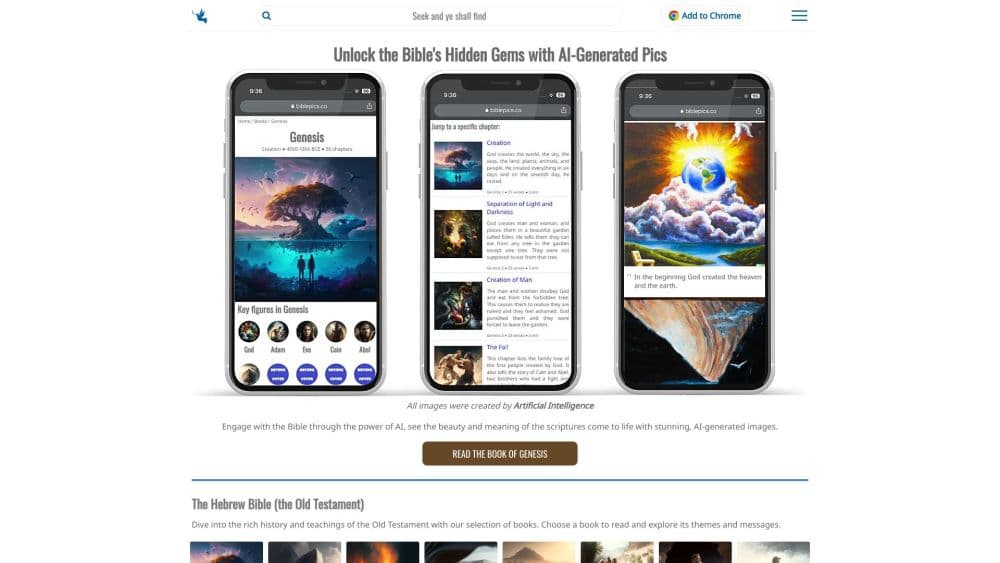
BiblePics is a web and Android app that treats Scripture as something to look at and talk about, not only read. Founded in 2023, it covers all 66 books chapter by chapter, with an illustration and a short summary attached to each one. On top of that reading layer sit the AI tools: character chats, search, a verse generator, trivia games, and printable coloring pages.
The artwork is the part people notice first. Each image is generated from keywords in the passage, so it sets a mood instead of documenting a scene. The official FAQ is upfront about this. The pictures are not literal depictions of events, and they should not be read as archaeology. That makes them useful for sparking interest and weak as a reference for what a first-century street actually looked like.
The second limit is scope. BiblePics is a study companion, not a church and not a commentary set. It has no denominational affiliation, and its answers come from a language model working with retrieved verses. That combination handles "what does the Bible say about anxiety" well enough for a personal reading session. It will not settle a doctrinal argument, and it does not offer original-language tools or scholarly notes.
Getting Started
- Open biblepics.co in a browser or install the Android app. Reading works without an account.
- Choose a book and a translation. The app ships with the King James Version and the NIV.
- Tap into a chapter to see its artwork and summary, then ask a question from the reading screen if something is unclear.
- Move to the chat tab to talk with Moses, David, Mary, or another figure, and save any verse you want to keep or share.
Product Information
A quick look at BiblePics's pricing, supported platforms, and performance.
Best for
The users, tasks, and scenarios where this tool fits best.
Users
- People opening the Bible for the first time
- Parents and Sunday school teachers
- Readers who stall out in the opening books
Tasks
- Building a daily reading habit
- Checking what Scripture says about a topic
- Making a shareable verse image
- Running a small group warm-up
Scenarios
- A commute with no signal
- A late-night question after a sermon
- A quiet ten minutes before work
Key features
Every Chapter, Illustrated
The illustrated Bible is the core of the product. All 66 books are divided chapter by chapter, and each chapter carries its own generated image plus a summary. More than 2,000 images are in the library. You can read in the King James Version or the NIV, mark your progress through a book, and download text for offline reading on Android.
Chat With Biblical Figures
You can chat with biblical characters such as Moses, David, Abraham, Noah, and Mary. Each one keeps a profile with family details, places, and a time frame, so a conversation has some grounding. The replies are AI-written in that character's voice, which makes for a memorable way to explore a story. Treat the answers as a prompt to go back to the text, not as a source on their own.
AI Bible Search That Shows Its Verses
Ask a plain question, like what the Bible says about grief or money, and the search returns a written answer with the verses it drew from. Seeing the references matters. You can check the passage yourself and judge whether the answer holds up. The same engine powers a topic explorer that groups common questions by subject.
Verse Generator for Sharing
Type a theme or a feeling, and the Bible verse generator produces an inspirational verse image you can send to someone or post. It is the fastest feature to understand and the one most likely to leave the app, since images are free to reuse with a credit to BiblePics.
Reading Plans, Devotionals, and Prayer Tools
Bible reading plans break Scripture into daily portions. The weekly devotional adds a reflection and a prayer every Sunday. Inside the app you also get daily quests, a prayer partner for what is on your mind, prayer circles for praying with friends, and a progress system built on trophies.
Trivia, Wordle, and Coloring Pages
Bible trivia and a Biblical Wordle give the app a game layer, useful for families and classes. The coloring pages cover 103 Bible stories and print from the site, which makes them a rare offline-friendly resource in an AI product.
Pros and cons
Pros
- Reading is free and needs no account, so the barrier to trying it is close to zero.
- Every chapter has an image and a summary, which keeps long stretches of Scripture from feeling like a wall of text.
- Offline downloads on Android make it usable on a commute or a flight.
- The interface and content cover 26 languages, well beyond the usual English-first Bible app.
- Images can be reused for personal or commercial work with a credit line, a generous terms compared with most AI art tools.
Cons
- The art is illustrative rather than accurate, so it can plant wrong visual assumptions about people, clothing, and architecture.
- Some features sit behind BiblePics Pro, and the in-app range of $4.99 to $29.99 does not make clear which plan unlocks what until you reach the payment screen.
- Answers come without scholarly commentary or original-language tools, which limits its value for serious study and for anyone preparing a sermon.
Frequently asked questions
Yes. Reading, the illustrated chapters, and the core AI tools work without paying. A BiblePics Pro subscription unlocks additional features inside the mobile app.
Related content
Explore related tools, skills, and articles for BiblePics.
BiblePics Alternatives

Knocket
Knocket (Tencent RTC team) · Productivity · Business · ChatbotKnocket is a free live chat and contact page tool that lets visitors message you from your website, app, or a shareable link, with every reply handled from Telegram or one inbox.
Agibot
Agibot · Productivity · AI Assistant · ChatbotAgibot is a personal AI agent for Mac that keeps running after you close the window, runs routines on a schedule, and works from Telegram or Slack with your own API keys.

Melete
Melete · Productivity · AI Assistant · ChatbotMelete is an AI workspace for teams where agents research, draft, and act in Slack, Notion, Linear, and GitHub. Shared memory and approval gates keep people in control.