
BlitzToksAI
Doychin Ivanov · Video
BlitzToksAI is an AI TikTok video generator that turns a script or a topic into a finished faceless short video with narration, matched images and music, billed by credits.
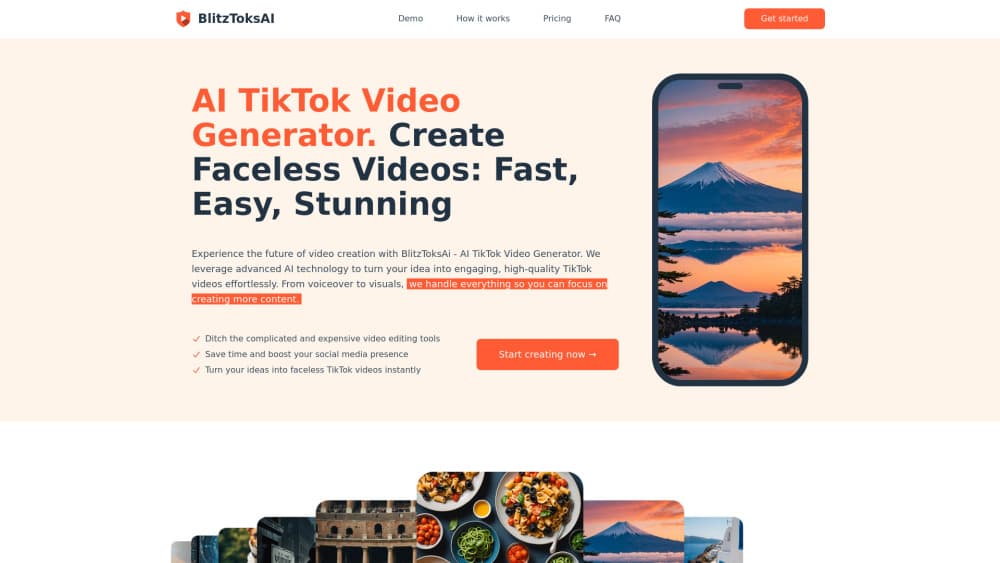
About BlitzToksAI
What Is BlitzToksAI
BlitzToksAI is a browser-based AI video generator built for faceless TikTok videos. You paste a script or type a topic, pick a narrator voice and a music track, and the tool builds a vertical short video from generated images, spoken narration and background sound. The result downloads as an mp4 file that you upload to TikTok yourself.
Every render is a faceless video, with AI pictures and an AI narrator instead of a person on camera. The product is built for speed, not fine control. There's no timeline, no keyframes and no layer stack. The whole point is that one person can keep a daily posting schedule without learning an editor or paying one.
That trade has a visible cost. Images are picked by the model, and you can't upload your own yet, which the official FAQ lists as a planned feature. Visuals follow the script's wording rather than a brand look, so two accounts writing similar scripts end up with similar-looking footage. It works for story, quiz and fact channels. It falls short for product shots or anything that needs real footage of real things.
Getting Started
- Sign in on the BlitzToksAI site with a Google account or an email address.
- Buy credits from the billing page. There's no plan to choose, since the tool runs pay as you go.
- Paste a script, or type a topic and let the built-in writer draft one for you.
- Pick a narrator voice and a music track, then start the render.
- Download the mp4 and post it, or schedule it, from your own TikTok account.
Product Information
A quick look at BlitzToksAI's pricing, supported platforms, and performance.
Best for
The users, tasks, and scenarios where this tool fits best.
Users
- Solo faceless channel owners
- Creators who have never touched an editor
- Small teams testing TikTok angles
Tasks
- Story, quiz and fact shorts
- Turning written posts into vertical video
- Voicing silent-screen formats
- Keeping a posting streak alive
Scenarios
- Running a themed account on a 30-day streak
- Launching a niche channel on a small budget
- Handing production to an assistant
Key features
Topic to Script in One Step
Type a subject and the built-in writer drafts the narration for you. This is the feature that removes the blank page, and it matters most for people who know the angle they want but stall on the wording. You can still paste your own script if you'd rather keep control of every line.
Narrator Voices with Different Tones
Each video gets a spoken read from a set of professional voices rather than a single default. The voice sets the mood of the whole clip, so a calm documentary read and a fast, upbeat read feel like different channels even with the same script. Swapping the voice is the fastest way to re-test a video that underperformed.
Automatic Image Matching
The tool reads the script and selects images scene by scene, so the visuals change as the narration moves. You don't storyboard anything. The catch is that image choice stays on the model's side, which is why the visual style of a BlitzToksAI video reads as generic rather than branded.
Built-In TikTok Sound Library
Music comes from a library of trending TikTok-style tracks, chosen at the same step as the voice. Trending audio is one of the few levers a small account has for reach, and picking it inside the tool saves a separate step in a stock audio site or the TikTok app itself.
One-Click Render to MP4
The text to video pass assembles images, narration and music in a single render, and the output is a standard mp4. Nothing else needs to be exported, synced or muxed, which is the part that usually eats an afternoon in a normal editor. The file goes straight into TikTok or any other short-form platform.
Credit Billing Without a Subscription
You buy pay as you go credits and spend them on renders. There's no monthly charge and no plan tier to sit in, so a quiet month costs nothing. For anyone running several test channels, that structure makes more sense than paying per seat for software they use twice a week.
Pros and cons
Pros
- A script becomes a finished mp4 in one pass, with no timeline editing at any point.
- Credits replace subscriptions, so an idle month doesn't bill you.
- The topic-to-script writer covers the part most people stall on.
- It runs in a browser on an ordinary laptop, with no install and no GPU.
- Voice and music come from the same run, so you can skip separate text to speech and stock audio services.
Cons
- Your own images and footage aren't supported yet, which rules out product shots and anything brand-specific.
- Per-video pricing isn't published on the site, so you can't work out the cost of a batch until you sign in and open billing.
- Image selection is model-driven, so accounts with similar scripts end up with a similar look.
- There's no scene-level edit. If one image misses, you re-render the whole video instead of fixing that clip.
Frequently asked questions
A vertical short video in mp4 format, built from AI-generated images, an AI voiceover and a music track. You write or generate the script, choose the voice and the song, and the tool renders the file that you then publish from your own account.
Related content
Explore related tools, skills, and articles for BlitzToksAI.
BlitzToksAI Alternatives

ngram 2.0
ngram · Video · Marketingngram 2.0 is an AI video generator for teams. It turns a prompt, a screen recording, or a product URL into a narrated explainer, product demo, or AI avatar video, and every scene stays editable.

OpenScreen 2
OpenScreen (open-source project) · Video · ProductivityOpenScreen 2 is a free, open-source screen recorder and demo video editor for Windows, macOS, and Linux, with automatic zooms, styled frames, local captions, and agent edits.

Skreno
Skreno · Video · ProductivitySkreno is a browser screen recorder that captures a tab, a window or your whole display, then attaches AI transcripts, summaries and console logs to one share link.