

BrickCenter
BrickCenter · Image · Chatbot
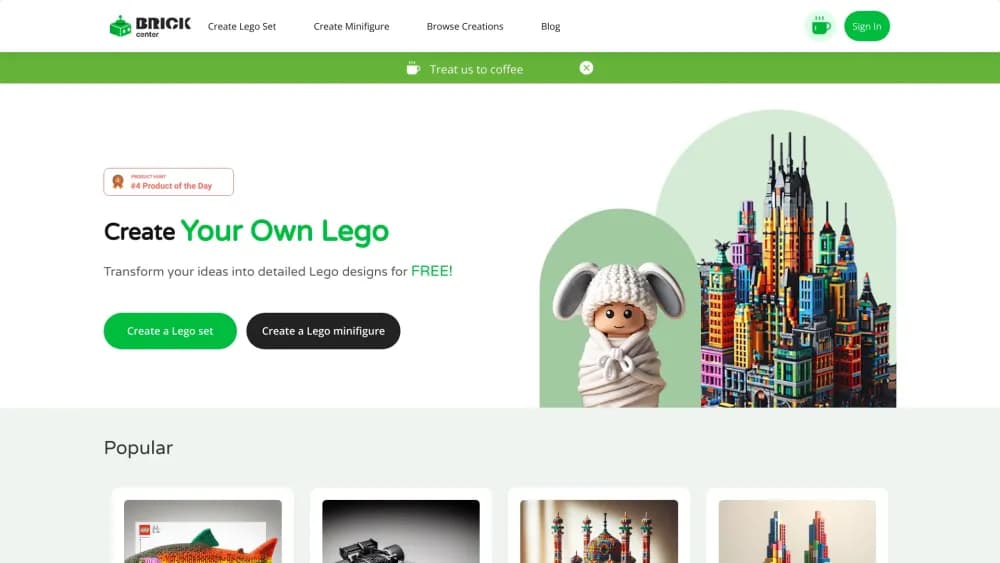
BrickCenter is an AI brick generator that turns a text prompt into a custom brick set image and a photo into a brick minifigure, then animates either one as a short video.
About BrickCenter
What Is BrickCenter
BrickCenter is a web app that designs brick models for you. Type a description such as a vintage camper or a dragon, and it returns a picture of the set built from plastic bricks. Upload a portrait instead, and it builds a custom brick minifigure that looks like the person in the photo. Both paths end in the same place: an image you can download, plus a button that turns it into a five second animation.
The appeal is the gap between an idea and something you can hold. Sketching a brick model by hand takes hours in a CAD tool, and hiring a designer costs more than most hobbyists want to spend. BrickCenter skips that step and gives you a visual reference in under a minute, which is enough for a birthday gift concept, a poster, or a starting point for a real build.
The limit is what comes out. You get a rendered picture or a clip, not a parts list, not a step by step build guide, and not a box of bricks. Treat it as AI toy design software that stops at the concept stage. Nothing on the site describes a bill of materials for the model it generates. The official changelog also stops at March 2024, so the public roadmap is hard to read.
Getting Started
- Open brickcenter.net and pick a path: Create Brick Set for a text prompt, or Create Minifigure for a photo upload.
- Describe the model in plain words, or upload a forward facing portrait under 3.5MB. The site says uploaded photos are used for that one generation and not stored.
- Press create and wait for the render. A free account covers a handful of images in total, so spend them on prompts you actually want.
- Download the image, or press Animate to get a five second video. On a paid plan, the animation draws three images from your monthly quota.
Product Information
A quick look at BrickCenter's pricing, supported platforms, and performance.
Best for
The users, tasks, and scenarios where this tool fits best.
Users
- Brick hobbyists who want a reference image before buying parts
- Gift shoppers and party planners
- Toy photographers and small creators
Tasks
- Turning a rough idea into a visual
- Making a minifigure from a face
- Producing a short loop for social
- Exploring a theme before committing
Scenarios
- A kid's birthday is in two weeks and you want a brick themed invitation
- You're planning a MOC and can't decide on a color scheme
- A small team needs avatar art for a landing page
Key features
Text to Brick Set
You describe the model and the AI returns a picture of it built from bricks. The prompt box is plain language, so "a red pickup truck with a roof tent and a dog in the back" works better than a list of dimensions. Each run costs one image from your quota, and a free account gets a total of four images to test the output style.
Photo to Minifigure
The minifigure tool takes a portrait and rebuilds it as a brick figure. The site asks for a forward facing photo under 3.5MB and says the upload is used only for that generation. Results keep the recognizable parts, such as hair shape, glasses, and facial hair, which is what makes the output feel personal rather than generic.
Five Second Animations
Every creation has an Animate button that produces a short MP4 clip of the model. Five seconds is short. It's still enough for a social post or a looping header. Paid plans charge three images per animation, so the real cost is three times a still.
Community Catalog and Gallery
Browse Creations sorts public designs into vehicle, animal, sci-fi, toy, DIY, and brick animation sections. It works as a prompt library: find a model close to what you want, read how it was described, then write your own version. Pro accounts can post to the gallery.
Saved Library and Edits
Designs sit in your profile, so you can come back to a render later and adjust it instead of starting over. That matters when a prompt almost works and you want to change one detail without losing the rest.
Downloads and 3D Output
Images download at high resolution on paid plans, and the FAQ mentions a 3D brick model file that you can send to a printer. The creation flow itself centers on images and clips, so treat the 3D file as a bonus to verify before you plan a print.
Pros and cons
Pros
- Low entry price: Premium runs $4.9/mo for 30 images and Pro $9.9/mo for 150, which is cheap next to commissioning a designer for one concept.
- Two input types in one place: prompts and photo uploads share an account, a gallery, and the same animation button.
- Free tier lets you judge the style: four images is enough to see whether the render quality fits your project before you pay.
- Commercial rights on paid plans: Premium and Pro both include usage rights, which matters for sellers and client work.
- Animation is built in: no separate video tool, and the clip exports as MP4.
Cons
- Quotas run out fast: 30 images a month is ten animations, and a serious prompt session can burn that in an afternoon.
- No parts list or instructions: the output is a picture, so you still need a separate tool or manual work to turn it into a real build.
- No printing or kit service: you download files and handle production yourself, which adds a step the site doesn't cover.
- Stale public roadmap and no refunds: the changelog's last entry is March 2024, the API isn't documented, and memberships are non refundable once activated.
Frequently asked questions
Yes, there's a free plan with no card needed. It covers four images in total, and the site's FAQ still says three, so plan for a handful rather than a monthly allowance. Paid plans start at $4.9/mo.
Related content
Explore related tools, skills, and articles for BrickCenter.
BrickCenter Alternatives

X Ray Interpreter
X-ray Interpreter · ImageX Ray Interpreter is a web-based AI radiology tool that turns X-rays, CT scans, MRI, ultrasound, and PET images into plain-language reports. You upload a scan, get a preliminary X-ray interpretation in moments, then ask follow-up questions if something needs explaining. It works as a second opinion and a learning aid, not as a medical diagnosis.

Aieasypic
AIEasyPic · ImageAIEasyPic is an AI image generator that turns plain text prompts into finished artwork in seconds. You can also train custom models on your own photos, swap faces in existing images, and create short video clips from text, all from a browser. It suits casual creators who want quick visuals and hobbyists who want to build a personal model without touching any code.

Chargen
Chargen · ImageChargen is an AI character generator and worldbuilding toolkit built for Dungeons & Dragons and other tabletop RPGs. It turns a one-line idea into a painted character portrait, spins up NPCs, monsters, maps and encounters from the same session, and keeps every creature's details close at hand. The tabletop RPG art side runs on a credit system called Gold, while the text generators stay free for everyone.