
Buildermark
Gelatinous Development · Coding
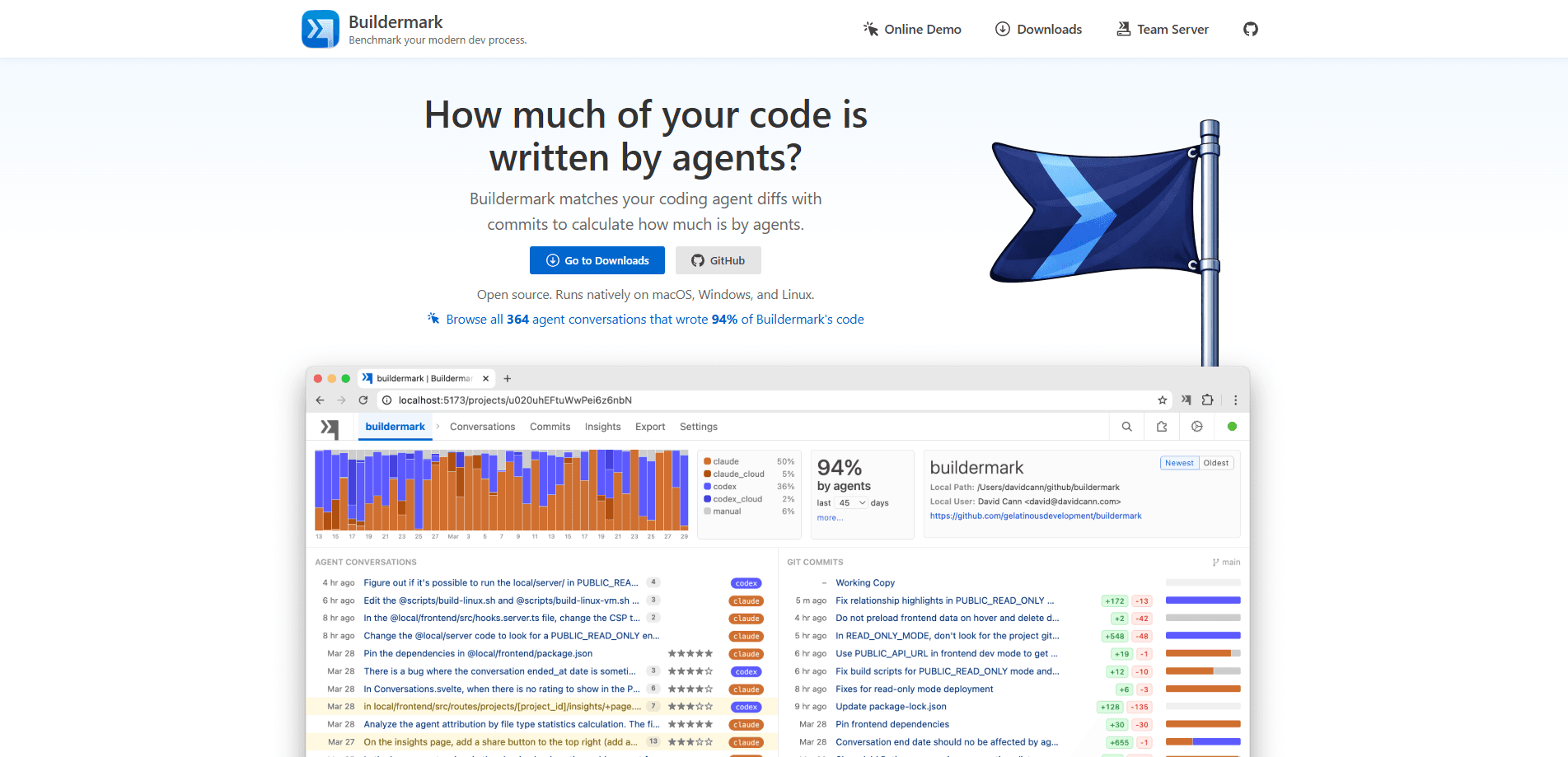
Buildermark is an open-source, local-first measurement tool that tracks and analyzes how much of your codebase is generated by AI coding agents. It matches your coding agent logs with git commits to attribute every line, then shows you the result the moment you commit. Everything runs on your own machine, with no accounts and no cloud sync.
About Buildermark
What Is Buildermark
Buildermark answers a question most teams have stopped asking out loud: how much of this code did an agent actually write? Call it an AI coding agent tracker with one job. The AI code attribution tool matches the diffs from your coding agent conversations against the diffs in your git commits, then reports the exact percentage of each commit that came from an agent. No agent hooks. No manual tagging.
The appeal is that it stays out of your way. A local app container runs a Go server on localhost:55022 and serves a web UI on your machine. Your data never leaves your computer, which matters if you work on private repos or under strict compliance rules. As a local-first developer tool, that's the whole point. Buildermark is open-source code analytics you can read and audit yourself, released under the MIT license.
The honest limitation is scope. The desktop app needs macOS 15 or Windows 10, and Linux users get a CLI only. The Team Server that would roll these numbers up across an org is still on the waitlist, not shipping. If you need cross-team dashboards today, Buildermark isn't there yet. No org view. Not yet.
Getting Started
- Download the desktop app for macOS or Windows, or install the Linux CLI.
- Let Buildermark import your agent conversations automatically, adding shared folder paths if you pull history from VMs or containers.
- Let it load your git history so it has commits to match against.
- Review the agent attribution percentages per commit, or open the web UI at localhost:55022 for the fuller breakdown.
- Optionally rate agent conversations yourself, or let the agent log its own critique with the /rate-buildermark skill.
Product Information
A quick look at Buildermark's pricing, supported platforms, and performance.
Best for
The users, tasks, and scenarios where this tool fits best.
Users
- Solo developers who use multiple coding agents and want a straight answer on how much code the agents wrote
- Engineering leads evaluating whether AI coding agent adoption is actually changing output
- Privacy-conscious teams that can't send source history to a third-party cloud
Tasks
- Measuring agent attribution on a repo
- Benchmarking agents against your own codebase
- Archiving coding agent conversations
- Rating agent output
Scenarios
- Trying to justify or question an AI coding budget with numbers instead of vibes
- Working on a private codebase where a hosted analytics service isn't an option
- Comparing two agents on the same project before committing your team to one
Key features
Agent attribution per commit
Buildermark matches your coding agent diffs with commits and attributes each line to an agent or a human. You get the exact percentage of a commit written by an agent, with no reliance on agent hooks and no manual tagging. The formatting-agnostic matcher holds up against auto-formatters, reorderings, and line-ending noise.
Conversation ratings
You can rate agent conversations manually, or let the agent log its own critique through the /rate-buildermark skill. That turns raw chat history into a signal you can compare across sessions and agents.
Agent benchmarking
Because the tool knows how much each agent contributed to your actual codebase, it can compare how Claude, Codex, Gemini, and Cursor perform on your real work. That's more useful than a synthetic benchmark, since the code is yours.
Local-first data handling
Your data never leaves your machine. There's zero analytics and zero telemetry, the app runs entirely on localhost:55022, and the only outbound request is a check for updates. Buildermark is MIT licensed, so the claim is verifiable rather than a promise.
Auto-import for conversations and commits
Conversations from Claude Code, Codex, Gemini, and other agents are imported automatically, and you can add shared folder paths to pull from VMs and containers. Git history loads on its own, and the diff matching runs afterward.
Native notifications
Attribution shows up in your notification center the moment you commit, so you see the agent percentage for each commit without opening a dashboard. It works across macOS, Windows, and Linux.
Browser extensions for cloud agents
Chrome, Firefox, and Safari extensions import conversations from cloud-based agents like Claude Code Cloud and Codex Cloud. You click through each conversation's page, wait a few seconds, and the extension confirms the import.
Pros and cons
Pros
- Runs fully local on localhost:55022, so private repos stay private
- MIT licensed and open source, which makes the privacy claims auditable
- Formatting-agnostic diff matching survives auto-formatters and moved code
- Covers the major agents in one place: Claude Code, Codex, Gemini, and Cursor
- Native notifications put attribution in front of you without a separate dashboard
Cons
- The desktop app is macOS 15+ and Windows 10+ only, so Linux users get a CLI with no GUI
- Team Server for org-wide rollups is still on a waitlist, so there's no cross-team view yet
- There's no public API, which limits building custom reporting on top of it
- Cloud agent conversations need a browser extension click-through rather than syncing on their own
Frequently asked questions
It measures how much of your code was written by AI coding agents. The goal is simple: measure AI-generated code and turn it into a percentage. It matches agent conversation diffs to your git commit diffs and reports a percentage per commit.
Related content
Explore related tools, skills, and articles for Buildermark.
Buildermark Alternatives
Forefront
Forefront · CodingForefront is a web platform for building with open-source AI. It lets you fine-tune leading open-source language models on your own data, evaluate how they perform, and run them through an API or export them to host yourself. Developers who want the convenience of a closed-source platform but insist on owning their models and data are the target audience here.

Startkit
StartKit.AI · CodingStartkit is a boilerplate for building AI SaaS and AI wrapper products. Think of it as an AI startup boilerplate with the boring parts already wired up: authentication, Stripe and Lemon Squeezy payments, usage limits, transactional email, and an AI API starter that talks to OpenAI, Anthropic, Groq, or Llama. You clone the repo, set your price, and start on the part of your product that people actually pay for. It's Next.js under React and Tailwind, so most of the boilerplate code already feels familiar.
Testim
Tricentis · CodingTestim is an AI-powered test automation platform for building and running end-to-end tests across web, mobile, and Salesforce applications. It leans on machine learning to keep tests stable when an interface changes, so teams spend less time fixing broken selectors. Not bad for an automated testing tool you can start using today. You create tests by recording actions in a browser, then optionally add JavaScript when you need more control. It's a solid pick for busy QA teams.