

Buzzy
Creati.ai · Video
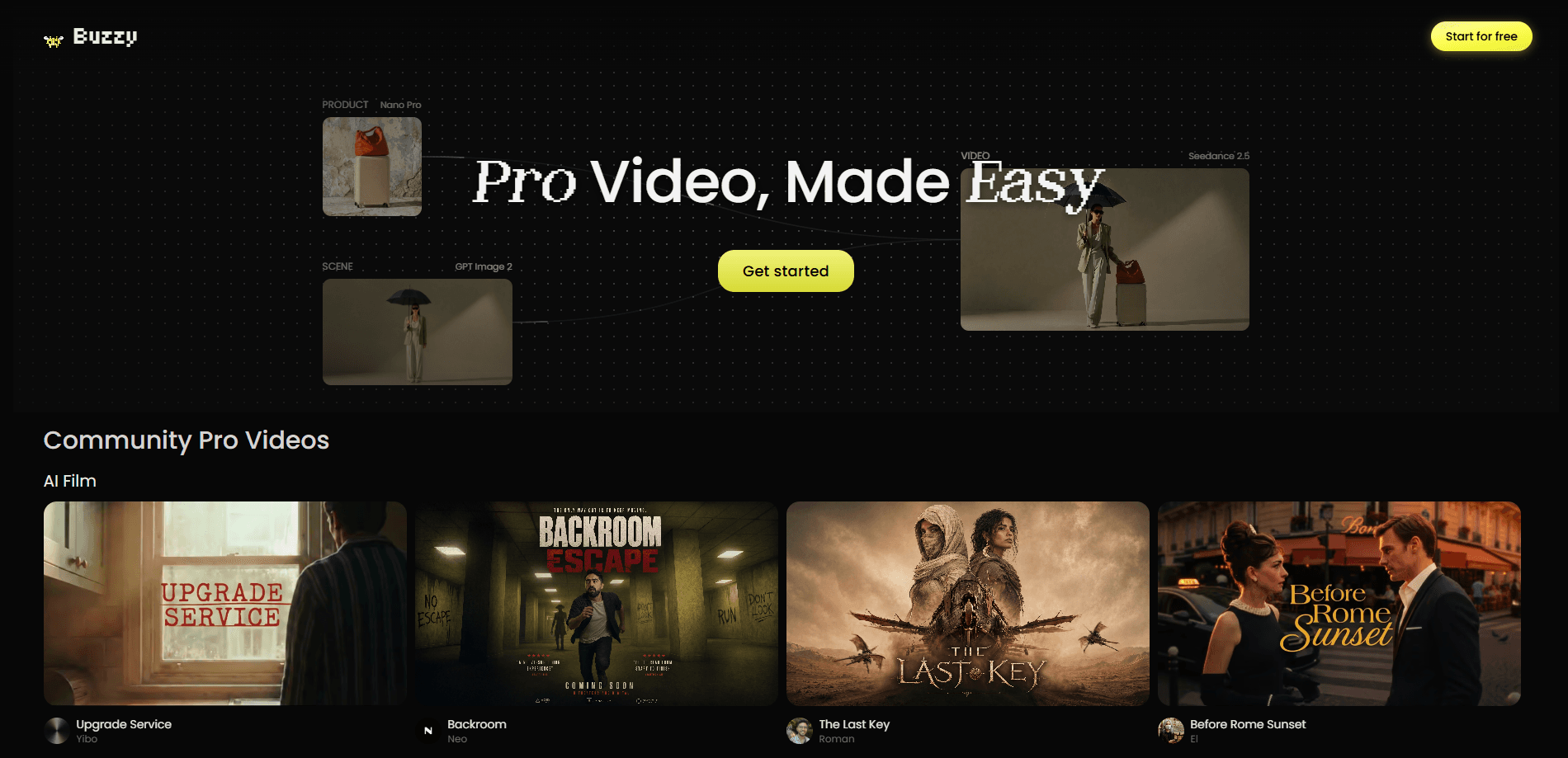
Buzzy is a browser-based AI video engine that turns editing into a chat. Instead of a timeline full of keyframes and keying tools, you describe what you want and it makes the change on an agentic canvas. The pitch is long-form AI films and commercials, not just short clips, with characters that stay recognizable across shots and control that goes down to the detail. It runs in the browser and is aimed at everyone from solo creators to small merchants and marketers who need product footage without a studio.
About Buzzy
What Is Buzzy
Buzzy is an AI video engine built by Creati.ai, a company founded by former ByteDance product lead Ella Zhang. The team positions it as a "Photoshop moment" for video: a creative tool you edit by talking to it, rather than by learning a dense professional interface.
The core idea is conversational editing. You upload footage or start fresh, then ask for changes in plain language. Remove the passersby walking through the background. Fix the flat lighting. Swap the product on the table for another one. Change the camera angle or the backdrop entirely. Each request is handled as an edit on a persistent canvas, so you can iterate back and forth across many turns without rebuilding the shot from scratch.
What separates it from single-prompt clip generators is the focus on longer work. Buzzy talks about generating whole commercials and narrative films, keeping characters and visual style consistent from one scene to the next. That consistency problem is the hard part in AI video, and it's the one the product stakes its claim on.
The limits are worth naming. It's a young, browser-only product, so heavy projects depend on your connection and the company's compute. Conversational editing gives you reach, but it trades away some of the frame-level precision a traditional editor offers. And because the field moves fast, features and pricing are likely to shift.
Getting Started
- Open the Buzzy site in your browser and create an account.
- Start a project and either upload existing footage or begin from a text description.
- Describe the result you want in the chat, such as removing an object, changing the background, or replacing a product.
- Review the result on the agentic canvas and keep refining with follow-up requests until it matches your intent.
- Export the finished clip or assemble several scenes into a longer film or commercial.
Product Information
A quick look at Buzzy's pricing, supported platforms, and performance.
Best for
The users, tasks, and scenarios where this tool fits best.
Users
- Solo content creators
- Small online merchants and product marketers
- Brand and ad teams working on commercials
Tasks
- Conversational editing
- Character-consistent scene generation
- Trend-driven ideation
Scenarios
- Replacing a product in an existing clip
- Cleaning up location footage
- Prototyping a commercial
Key features
Conversational Video Editing
Every change happens through a chat. You type what you want, and Buzzy acts on the canvas. It works like a conversational video editor rather than a timeline. Typical requests include removing background passersby, correcting exposure, swapping objects, and changing the viewpoint. Because the tool holds context across turns, you can stack small fixes rather than trying to describe everything in one prompt.
Agentic Canvas
The editing surface keeps your shot and the running history of changes in one place. This is what lets a conversation feel cumulative instead of starting over each time. You see the current state. You ask for the next tweak. The canvas updates. It's closer to working alongside a collaborator than driving a generator one shot at a time.
Long-Form Film and Commercial Generation
Buzzy aims past the five-second clip. It's built to assemble longer sequences, including ads and narrative films, where a single scene is only part of the story. AI film generation at this length means handling continuity and pacing across shots, which is where many clip generators fall apart.
Character Consistency
Keeping a character recognizable across scenes is the feature the product leans on hardest. When you generate multiple shots of the same person or product, Buzzy tries to hold their look steady. For anything serialized, like a multi-scene ad or an episodic film, this is the difference between a usable result and a pile of mismatched frames. It decides whether the footage comes together at all.
Trend-Driven Inspiration
The engine surfaces formats and directions drawn from what's working around the web. Rather than facing a blank prompt, you start with a suggestion you can bend to your own project. It's a nudge for the ideation phase. It won't replace your own creative call.
Browser-Based Access
Buzzy runs in the browser, so there's nothing to install. You open a tab and work. No downloads. No setup. It also means collaboration and access are bound to the web app rather than a local machine, which suits teams that move between devices. Why does that matter? Because a tool that's always one tab away gets used more than one that needs a launch ritual.
Multi-Turn Refinement
Because each request builds on the last, you can take a rough first pass and narrow it down over many iterations. Change the lighting. Then the angle. Then the product. Then the background, one step at a time. The multi-turn loop is the intended way to work, not a fallback.
Pros and cons
Pros
- Editing by conversation lowers the barrier for people who don't know professional video tools.
- The focus on long-form output and character consistency targets a real gap in AI video.
- Browser-based access means no heavy install or specialized hardware.
- Multi-turn refinement lets you iterate toward a specific result instead of gambling on one prompt.
- Useful for product and merchant videos where a studio shoot isn't practical.
Cons
- It's a young product, so features and pricing can change without much notice.
- Browser-only and compute-heavy, which can mean waiting and dependence on a stable connection.
- Conversational control is broad but not frame-accurate in the way a traditional NLE is.
- Official pricing details aren't clearly published, which makes budgeting harder.
- Character consistency, while the headline feature, is hard to guarantee for demanding projects.
Frequently asked questions
Buzzy is a browser-based AI video engine from Creati.ai. It works as a conversational editor: you describe edits in plain language and it applies them on an agentic canvas, aimed at longer films and commercials rather than only short clips.
Related content
Explore related tools, skills, and articles for Buzzy.
Buzzy Alternatives

ngram 2.0
ngram · Video · Marketingngram 2.0 is an AI video generator for teams. It turns a prompt, a screen recording, or a product URL into a narrated explainer, product demo, or AI avatar video, and every scene stays editable.

OpenScreen 2
OpenScreen (open-source project) · Video · ProductivityOpenScreen 2 is a free, open-source screen recorder and demo video editor for Windows, macOS, and Linux, with automatic zooms, styled frames, local captions, and agent edits.

Skreno
Skreno · Video · ProductivitySkreno is a browser screen recorder that captures a tab, a window or your whole display, then attaches AI transcripts, summaries and console logs to one share link.