

Car Part Identifier
Car Part Identifier · Image
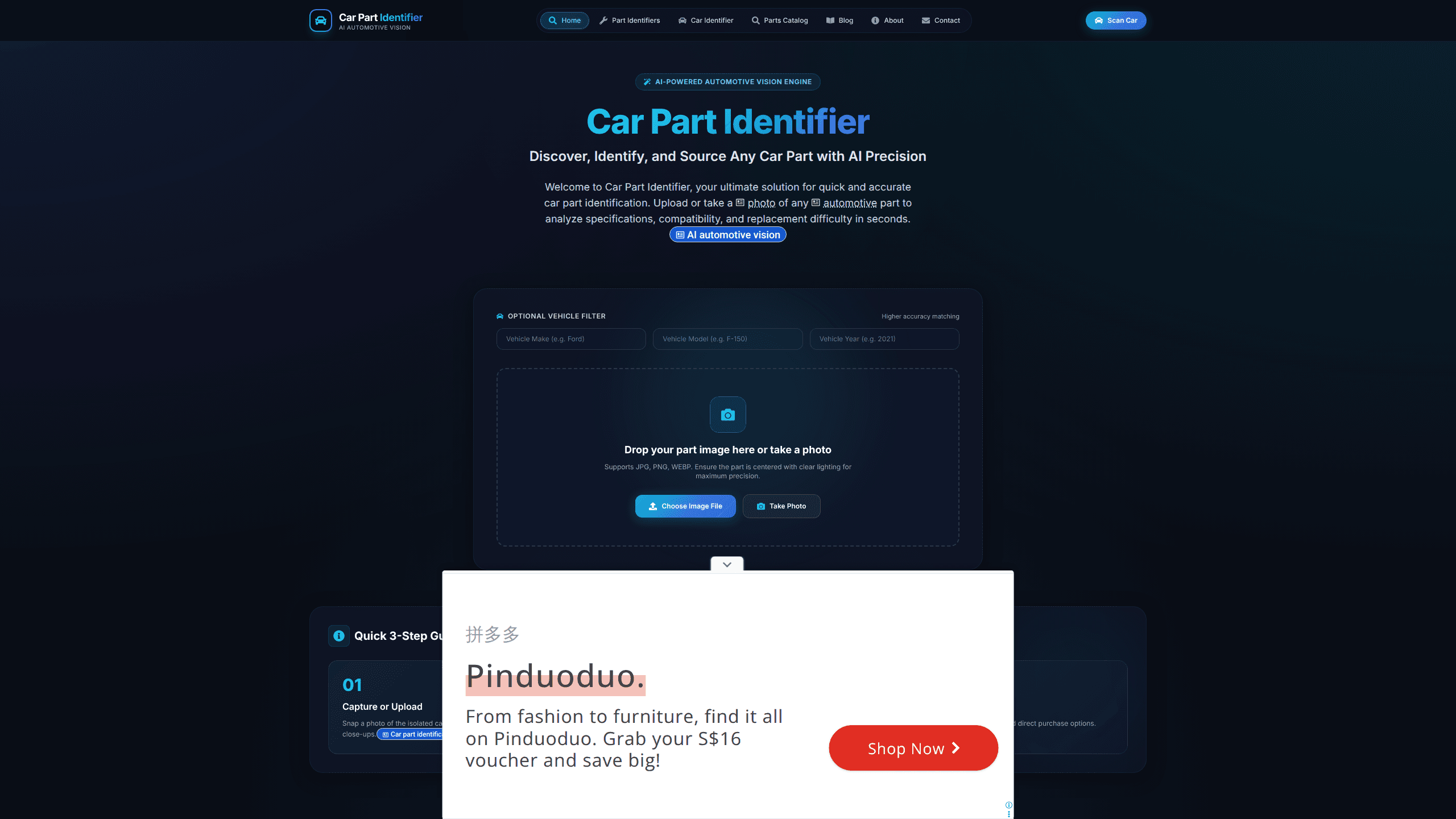
Car Part Identifier is an AI tool that reads a photo of a car component and tells you what the part is, which vehicles it fits, and how hard it's to replace. Snap a picture of an isolated part. The app's vision model matches it against a large automotive catalog covering more than 20 global automakers, then points you toward OEM and aftermarket options. It runs on mobile and desktop browsers. A free Android app adds scanning on the go.
About Car Part Identifier
What Is Car Part Identifier
Car Part Identifier is an AI-powered automotive vision tool built for anyone who has ever held a mystery bracket, sensor, or filter and had no idea what it was called. Instead of scrolling forums or hauling the part to a shop, you photograph it and let a neural vision model do the work. The service analyzes the part's shape, layout, and visible specs, then returns an identity, a compatibility list, and a replacement difficulty score.
The tool leans on OEM and aftermarket matching. It cross-references parts against Ford, Toyota, BMW, Audi, Nissan, Honda, Mercedes, and other major brands. So the output goes beyond a name. It tells you whether the part fits your vehicle and where to buy a replacement. There's also a separate mode for identifying a whole car. Photograph a complete vehicle to pull trim, engine, fuel range, and tire specs.
The main limitation is accuracy on messy inputs. The site itself notes that the part should be centered and well lit for the best results, which means blurry photos, cluttered backgrounds, and heavy shadows can all throw off a match and send you chasing the wrong component entirely. It's a helper, not a certified parts catalog, so always confirm a part number before you order something expensive. Treat it as a fast automotive part finder, not the final word.
Getting Started
- Open the Car Part Identifier website or install the free Android app.
- Snap a clear, well-lit photo of the part on its own, or upload an existing JPG, PNG, or WEBP image.
- Optionally add your vehicle's year, make, and trim to narrow the compatibility match.
- Review the identified part, its difficulty score, and the suggested OEM or aftermarket links.
- Confirm the part number against your vehicle's manual or a dealer before buying.
Product Information
A quick look at Car Part Identifier's pricing, supported platforms, and performance.
Best for
The users, tasks, and scenarios where this tool fits best.
Users
- DIY mechanics
- Car owners on a budget
- Salvage and junkyard hunters
- Curious enthusiasts
Tasks
- Identifying an unlabeled part
- Checking compatibility
- Estimating repair difficulty
- Finding a replacement
- Identifying a whole vehicle
Scenarios
- A part breaks and you don't know its name
- Pre-purchase inspection of a used car
- Sorting a box of spare parts
- Roadside troubleshooting
Key features
AI Visual Recognition
The core engine is a trained neural network that evaluates thousands of automotive components, from electrical sensors to filter assemblies and body trims. It's AI car part identification in the simplest form: you give it one photo, and it returns a match with the part's identity. Accuracy depends on image quality, so a clean, centered shot gives the best result.
OEM and Aftermarket Matching
Identification alone isn't enough if you can't buy the part. The tool cross-references each match for compatibility across Ford, Toyota, BMW, Audi, Nissan, Honda, Mercedes, and more than 20 global automakers. That means the output includes both original-equipment references and aftermarket alternatives, so you can compare price and availability. For many buyers, that OEM part lookup is the whole point.
Vehicle Specification Filter
You can narrow the search by vehicle year, make, and trim level before scanning. This matters, because the same-looking part often fits several model years with different specs, and a bracket that bolts onto a 2018 model may not clear the mounting points on a 2021 refresh. Adding your vehicle details cuts the guesswork and lowers the odds of buying a part that won't fit. Small step. Big difference.
Installation Difficulty Score
Every identification comes with an estimated replacement difficulty rating: Easy, Moderate, or Difficult. It's a simple signal, but a useful one. So what does that score actually change? If a job lands on Difficult, you know it's probably time to talk to a mechanic rather than spend a Saturday in the garage, wrestling with a component that needs a lift and specialized tools you don't own.
One-Click Marketplace Links
Once a part is identified, the app surfaces direct purchase options rather than leaving you to hunt. You get a running start on sourcing the replacement, whether you want OEM or a cheaper aftermarket equivalent. It won't complete the purchase for you, but it removes the guesswork about where to look. That saves real time.
Cross-Platform Scanning
The tool works on smartphones, tablets, and desktop browsers. In practical terms, that means you can scan a part in the garage on your phone or upload a batch of photos from a laptop later, comparing results side by side across a whole afternoon of repairs without juggling multiple apps or accounts. The free Android app adds on-the-go scanning for people who do most of their work away from a desk. No account required for a quick scan, either, which keeps the barrier low when you just need a fast answer.
Full-Vehicle Scanner Mode
A separate mode reads an entire car rather than a single part. Photograph a complete vehicle and it pulls trim specs, engine details, fuel ranges, and tire dimensions. It's a different use case from part identification. It's aimed at people sizing up a car rather than fixing one.
Pros and cons
Pros
- Turns a photo into a usable part name and fitment list, which saves a lot of forum digging.
- Covers more than 20 major automakers, so it's not locked to a single brand.
- The difficulty score gives a quick read on whether a repair is a DIY job or not.
- Free Android app plus web access means you can use it wherever the repair happens.
- Marketplace links shorten the path from "what is this" to "where do I buy it."
Cons
- Accuracy falls off with blurry, cluttered, or poorly lit photos, and the site says so directly.
- No published pricing tiers, so it's unclear what a paid plan would add if one exists.
- It's a helpful reference, not an authoritative catalog. Always verify a part number before ordering.
Frequently asked questions
Car Part Identifier is an AI tool that identifies car parts from a photo. You upload or take a picture of a component, and its vision model returns the part's identity, compatibility across major automakers, a replacement difficulty score, and purchase links.
Related content
Explore related tools, skills, and articles for Car Part Identifier.
Car Part Identifier Alternatives

X Ray Interpreter
X-ray Interpreter · ImageX Ray Interpreter is a web-based AI radiology tool that turns X-rays, CT scans, MRI, ultrasound, and PET images into plain-language reports. You upload a scan, get a preliminary X-ray interpretation in moments, then ask follow-up questions if something needs explaining. It works as a second opinion and a learning aid, not as a medical diagnosis.

Aieasypic
AIEasyPic · ImageAIEasyPic is an AI image generator that turns plain text prompts into finished artwork in seconds. You can also train custom models on your own photos, swap faces in existing images, and create short video clips from text, all from a browser. It suits casual creators who want quick visuals and hobbyists who want to build a personal model without touching any code.

Chargen
Chargen · ImageChargen is an AI character generator and worldbuilding toolkit built for Dungeons & Dragons and other tabletop RPGs. It turns a one-line idea into a painted character portrait, spins up NPCs, monsters, maps and encounters from the same session, and keeps every creature's details close at hand. The tabletop RPG art side runs on a credit system called Gold, while the text generators stay free for everyone.