

Chat
repaera · Coding · Chatbot
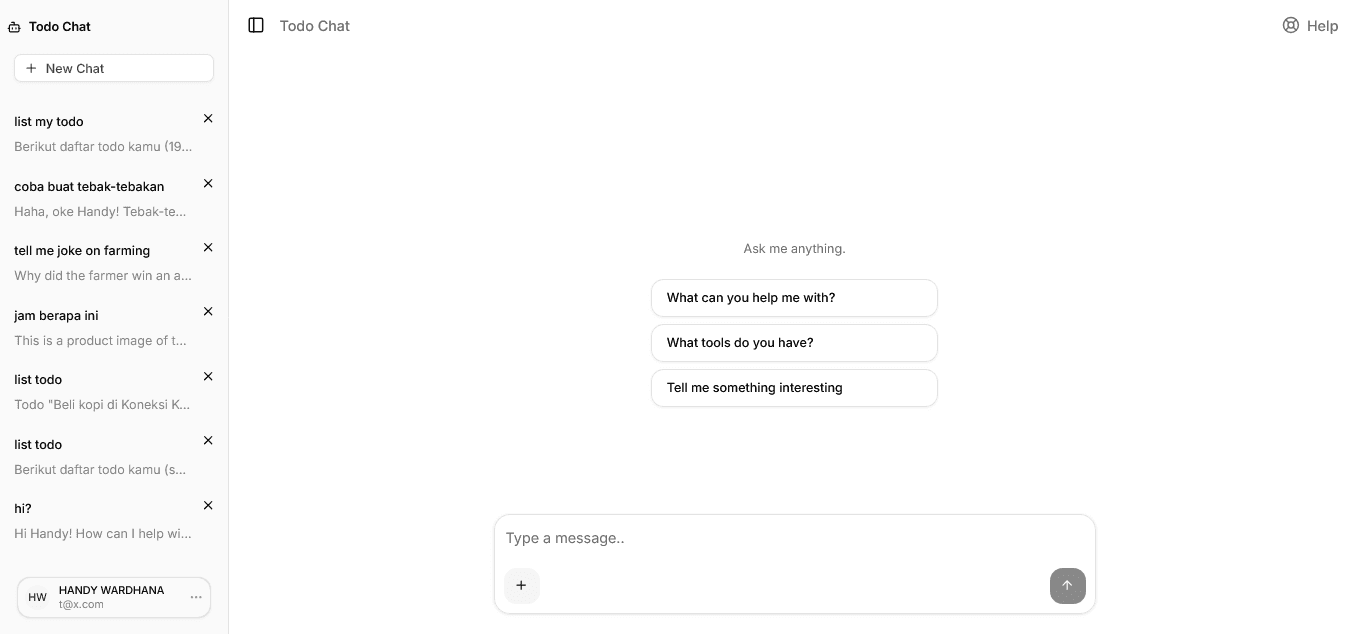
Chat is an open-source AI chat client that turns any Model Context Protocol (MCP) server into a conversational interface. Instead of clicking through forms, you talk to a delivery service, a booking tool, or a task manager in plain language, and the assistant calls the right tools behind the scenes. It's built for developers and teams who want a ready-made chat front end for their own MCP backend, not another closed consumer app. The pitch is simple: a real natural language conversation instead of a menu of buttons. If you've ever tried to build this yourself and ended up fighting streaming edge cases, file upload timing, and session handling, you already know why bundling all of that into one repository is worth the setup cost.
About Chat
What Is Chat
Chat is a general-purpose chat interface for services that expose an MCP server. You point it at one backend, and it handles the conversation layer: streaming responses, image attachments, history, authentication, and localization. The project ships as a Next.js app you deploy yourself, so the same codebase can power many different products with different names and AI personas.
The core problem it solves is the gap between "I have an MCP server" and "my users have a chat UI that actually works." Building that layer from scratch means auth, streaming, file uploads, i18n, and bot integrations. Chat bundles all of it. That saves weeks of glue work. But nothing is magic here.
The main limitation is that it connects to exactly one MCP server per deployment, which is a deliberate design constraint rather than an oversight or a missing feature that might arrive later. You pick either a generic MCP backend or the TypeScript embedded-UI variant, and setting both is rejected at runtime. It's also self-hosted software, so you're responsible for the database, storage, and LLM provider keys.
Getting Started
- Clone the repository from GitHub and install dependencies with your package manager.
- Set your environment variables, including the LLM provider key and either
MCP_URLorMCP_APPS_URL. - Configure an email provider plus a database and Cloudflare R2 storage for production use.
- Run the app locally to test the chat flow, authentication, and image uploads.
- Deploy to your host of choice and customize the app name, persona context, and locale strings.
Product Information
A quick look at Chat's pricing, supported platforms, and performance.
Best for
The users, tasks, and scenarios where this tool fits best.
Users
- Developers with an existing MCP server
- Teams shipping multiple branded products
- Support and ops staff
Tasks
- Wiring a delivery, booking, or task service into a chat experience
- Adding image-based requests
- Running the same bot on Telegram, Slack, or WhatsApp
Scenarios
- Early product demos where you need a convincing chat UI fast
- Internal tools where plain-language access beats a form-based interface
- Multi-region launches
Key features
MCP Tool Integration
Chat connects to a single external MCP server over Streamable HTTP and lets the assistant call its tools mid-conversation. You choose one mode: a generic MCP_URL backend, or MCP_APPS_URL for a TypeScript setup with embedded UI. The runtime rejects both at once, so there's no ambiguity about which backend answers. Setup is quick. This is the feature that makes the app useful for any domain, from handyman booking to task management.
Deployment Customization
The app name, AI persona context, and locale strings are all configurable from one codebase. That means a single repository can back several products, each with its own branding and assistant behavior, which is a real advantage for agencies and platform teams running more than one service under the same roof. One branch to update. Multiple products live.
Streaming Responses and Markdown
Responses arrive in real time with typing indicators, so the chat feels responsive rather than frozen. Assistant messages render as Markdown, which covers tables, lists, code blocks, and links. If your service returns structured data, it shows up readable. No raw text dumps. That matters for anything more complex than a one-line reply.
Image Attachments with Crop
Users can attach images to a message, and a mandatory crop dialog runs before anything is sent. The image is compressed and uploaded to Cloudflare R2 only at send time, so there's no premature upload and no background heartbeat to manage. The assistant can also embed images back into its replies using standard Markdown syntax, shown as square cards that open full-size on click.
Multi-Language Support
Chat detects the user's language from IP geolocation using IPinfo Lite, with an Accept-Language fallback, and lets people override it in Settings. The custom i18n system covers both interface strings and AI system prompts across English, Indonesian, Korean, Japanese, Spanish, Chinese, German, Dutch, French, and Italian. No third-party i18n library is required.
Conversation History and Limits
History is persistent, with cursor-based pagination and infinite scroll as the list grows. There's also an optional per-user weekly message quota. Ten messages left? An amber banner warns the user. Once the limit is hit, sending returns a 429 until the next window. That gives operators a simple cost control without extra tooling.
Multi-Platform Bots
Through the Chat SDK, you can connect Telegram, WhatsApp, Slack, Teams, Google Chat, Discord, GitHub, and Linear. Each platform turns on only when its environment tokens are present, and every one supports the full LLM and MCP tool flow. It's a practical way to meet users where they already chat, and it turns a single backend into a multi-platform chatbot without extra code.
Pros and cons
Pros
- Ready-made chat layer covers auth, streaming, history, uploads, and localization, saving weeks of build time.
- One codebase supports multiple branded deployments through configurable names and personas.
- Wide LLM provider support, including OpenAI, Anthropic, Google Vertex AI, AWS Bedrock, and OpenRouter.
- Multi-platform bots let you reach users on Telegram, Slack, WhatsApp, and more with the same backend.
- Automatic locale detection handles language switching without manual setup.
Cons
- Connects to only one MCP server per deployment, so multi-backend setups need separate instances.
- Self-hosting means you manage the database, object storage, and LLM keys yourself, which rules out non-technical users.
- Requires Node and TypeScript experience to configure and deploy, so it isn't a plug-and-play download.
- Bot integrations depend on environment tokens, so a misconfigured token silently leaves a platform offline.
Frequently asked questions
Chat is a self-hosted interface that lets people talk to any service exposing an MCP server in natural language. You deploy it, connect your backend, and the assistant calls your tools to answer requests.
Related content
Explore related tools, skills, and articles for Chat.
Chat Alternatives
Forefront
Forefront · CodingForefront is a web platform for building with open-source AI. It lets you fine-tune leading open-source language models on your own data, evaluate how they perform, and run them through an API or export them to host yourself. Developers who want the convenience of a closed-source platform but insist on owning their models and data are the target audience here.

Startkit
StartKit.AI · CodingStartkit is a boilerplate for building AI SaaS and AI wrapper products. Think of it as an AI startup boilerplate with the boring parts already wired up: authentication, Stripe and Lemon Squeezy payments, usage limits, transactional email, and an AI API starter that talks to OpenAI, Anthropic, Groq, or Llama. You clone the repo, set your price, and start on the part of your product that people actually pay for. It's Next.js under React and Tailwind, so most of the boilerplate code already feels familiar.
Testim
Tricentis · CodingTestim is an AI-powered test automation platform for building and running end-to-end tests across web, mobile, and Salesforce applications. It leans on machine learning to keep tests stable when an interface changes, so teams spend less time fixing broken selectors. Not bad for an automated testing tool you can start using today. You create tests by recording actions in a browser, then optionally add JavaScript when you need more control. It's a solid pick for busy QA teams.