

ChatPDF
ChatPDF GmbH · Productivity
ChatPDF is an AI PDF assistant that answers questions about your documents, summarizes long reports, and points to the pages it used. It runs in a browser with no sign-up.
About ChatPDF
What Is ChatPDF
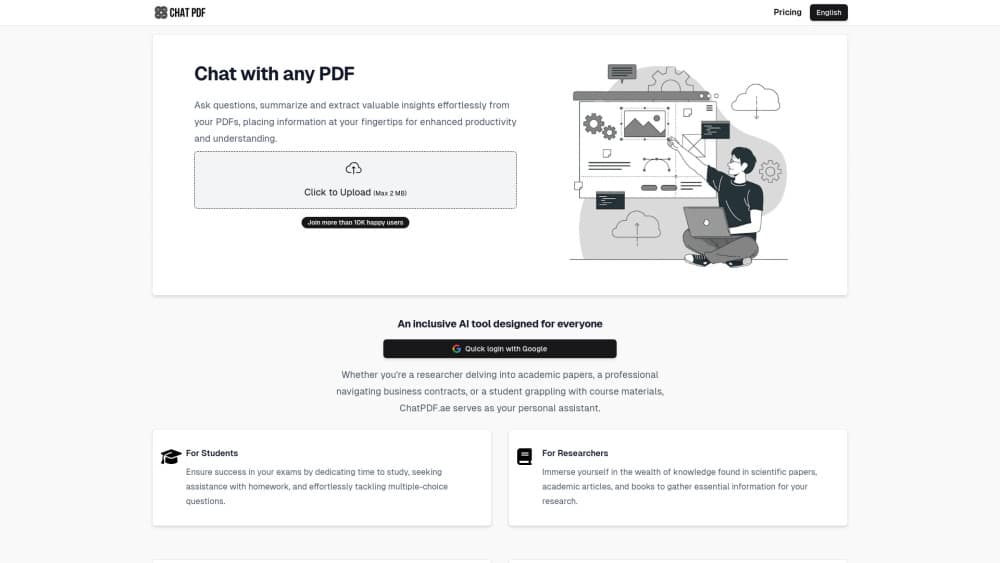
ChatPDF is a document assistant from ChatPDF GmbH that turns a static file into something you can question. Upload a paper, a contract, or a scanned manual, then type what you want to know. The tool reads the document, finds the relevant passages, and writes an answer with citations that link back to the page. Think of it as an AI PDF reader with a chat box attached.
The appeal is speed on documents you would otherwise skim for an hour. Students use it to pull definitions and arguments out of textbooks, researchers use it to triage a folder of papers, and office teams use it to check terms inside long contracts. You can chat with a PDF online from any browser, and there's a mobile app for reading on the go.
The limits are worth knowing before you commit. The free tier allows two document analyses a day, and the paid tier raises that ceiling rather than removing every constraint. Answers come from the text you uploaded, so a blurry scan with poor OCR gives weak results. ChatPDF also won't tell you whether a paper's conclusions are correct. It only tells you what the paper says.
Getting Started
- Open chatpdf.com in a browser or install the iOS or Android app. No account is needed for a first test.
- Drag a file into the upload box, or paste text and links with Ctrl+V. PDF, Word, PowerPoint, Markdown, and plain text files all work.
- Wait for the document to be indexed. A short paper takes seconds, a few hundred pages takes longer.
- Ask a plain question in the chat panel, such as "what sample size did they use" or "list the termination clauses".
- Click a citation to jump to the matching page in the side-by-side view, then keep asking follow-up questions in the same thread.
Product Information
A quick look at ChatPDF's pricing, supported platforms, and performance.
Best for
The users, tasks, and scenarios where this tool fits best.
Users
- Students
- Researchers
- Professionals
Tasks
- Summarizing a 200 page report
- Finding a single clause in a contract
- Translating a foreign language paper
- Comparing two versions of the same document
Scenarios
- The night before an exam, when you need the main arguments of six chapters and don't have time to reread them.
- Due diligence on a stack of filings, where the question is narrow and the page count is not.
- Reading a product manual or a lease written in a language you don't speak.
Key features
Answers With Page Citations
Every answer can carry a citation that jumps to the source page. This is the feature that separates a PDF AI tool from a general chatbot, because you can verify a claim in one click instead of scrolling through the file. Citations also make the output easier to defend in academic or legal work.
Multi-File Conversations
You can group documents into folders and question them in a single thread. Ask which of five papers used a specific method, or which contract has the shorter notice period. The tool keeps the sources separate, so an answer about one file doesn't get mixed with another.
Summaries on Demand
A summarize PDF command compresses a long document into the main points. It works best on structured material such as research papers and reports, where headings already signal what matters. For a messy scanned file, expect a rougher summary and check the citations.
Side-by-Side Reading
The chat sits next to the document, so you read the answer and the original passage at the same time. Click a citation and the PDF scrolls to the right spot. This layout matters more than it sounds, since verifying an answer is most of the work in serious document review.
Translation Between Languages
ChatPDF accepts files in any language and answers in the language you ask in. Upload a paper in Japanese and ask in English, or the reverse. The translation is generated as part of the answer, so terminology can drift on very technical material and needs a check.
More Than PDFs
Word documents, PowerPoint decks, Markdown notes, and plain text files can be uploaded alongside PDFs. That covers most of what a student or an office worker actually has on disk, and it means one chat can hold a slide deck and the report it summarizes.
Pros and cons
Pros
- No sign-up needed for a first document, so you can test the tool in under a minute.
- Citations link to the exact page, which makes fact checking fast and keeps the output usable in academic work.
- Multi-file folders handle comparison tasks that a single-document reader can't do.
- The free plan is genuinely usable at two documents a day, not a one-time demo.
- Mobile apps and a browser version share the same account, so a chat started on a laptop continues on a phone.
Cons
- Two documents a day runs out quickly during exam season or a busy review week, and ChatPDF Plus costs $19.99 a month in the US.
- Scanned files with poor text quality produce weak answers, so you may need a separate OCR pass before uploading.
- There's no public API, which rules it out for teams that want to automate PDF question answering inside their own software.
- Answers stay inside the document, so the tool won't bring in outside context or judge whether a source is reliable.
Frequently asked questions
It's a reader for long documents. You upload a file, ask questions in plain language, and get answers with links to the pages they came from. Summaries, clause hunting, and cross-document comparison are the three tasks it handles best.
Related content
Explore related tools, skills, and articles for ChatPDF.
ChatPDF Alternatives

Swms
Swms AI · Writing · Productivity · BusinessSwms is an AI safety compliance tool that turns a plain description of a job into ready-to-use safety documents. Describe your project, trade, and known hazards, and it writes a safe work method statement, job hazard analysis, safe work procedure, RAMS, or safety data sheet in seconds. It also ships with Oscar, a chat assistant that answers workplace safety questions in any language. Teams in construction, mining, transport, and warehousing use it to cut the paperwork that usually eats into a workday.

Wordly AI Translation
Wordly · Voice & Language · ProductivityWordly AI Translation is a real-time AI translation and captioning platform built for meetings, conferences, and events. It delivers live translation, captions, transcripts, and summaries in more than 60 languages, and attendees join by scanning a QR code or opening a link instead of using dedicated headsets. The platform works with Zoom, Microsoft Teams, Google Meet, and Webex, and it's designed for organizations that want multilingual access without hiring human interpreters for every session. Simple as that.

Rows
Rows (Superhuman) · Productivity · BusinessRows is an AI spreadsheet and data analysis tool that imports live data from more than 50 sources, then lets you work with it using plain language instead of SQL queries or nested formulas. You can pull numbers out of PDFs, connect ad platforms, databases, and bank accounts, and ask the AI to build reports, merge datasets, or set up models that recalculate themselves. It runs in the browser, works like a spreadsheet, and now sits under the Superhuman umbrella.