

ChatTube
ChatTube · Marketing · Chatbot
ChatTube is an AI YouTube chat tool that turns any video into a conversation, a timestamped summary, a translated transcript, or a mind map, right in the browser.
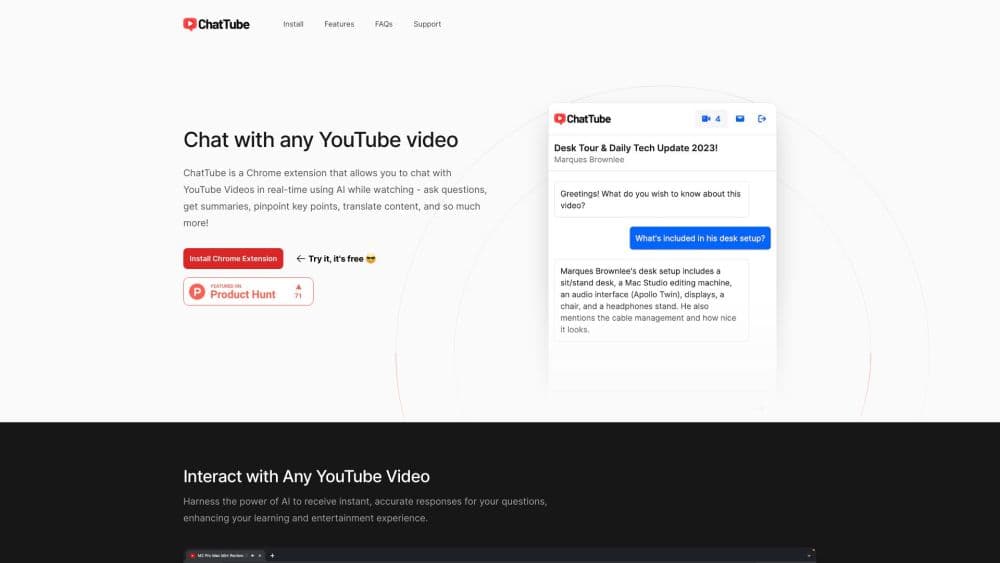
About ChatTube
What Is ChatTube
ChatTube is a browser extension and web app for people who want to chat with YouTube videos instead of watching them twice and taking notes by hand. Paste a link, and it pulls the video's text, then lets you ask questions, generate a summary, translate the captions, or turn the whole thing into a mind map. The Chrome extension adds a side panel to the YouTube watch page. The web version covers Firefox, Safari, and anything else with a modern browser.
The product sits between watching and skimming. A two-hour lecture, a podcast episode, or a hardware review holds a handful of useful points, and finding them usually means dragging the progress bar. ChatTube answers with clickable timestamps, so a reply sends you to the minute that supports it. That link back to the source is the part that makes it usable as an AI video assistant rather than a summary machine.
Three limits matter before you pay. It works on YouTube, not on local files or other video hosts. New accounts start with 3 credits, so a free run is a test rather than a routine. Videos without captions need transcription, and the length cap depends on your plan.
Getting Started
- Install the extension from the Chrome Web Store, or open chattube.io in your browser. Sign in with Google or an email address.
- Open a YouTube video and start the ChatTube panel, or paste a video link into the web app.
- Choose a tab: Chat for questions, Summary for key points, Transcript for text and translation, or Mind Map for a visual outline.
- Set your preferred chat language from the settings icon if English isn't your first choice.
- Come back later and pick up the same conversation from your video history.
Product Information
A quick look at ChatTube's pricing, supported platforms, and performance.
Best for
The users, tasks, and scenarios where this tool fits best.
Users
- Students and self-learners
- Researchers and analysts
- Content creators and marketers
- Language learners
Tasks
- Summarizing a long lecture or podcast
- Finding a specific answer inside a video
- Producing a transcript for notes or subtitles
- Turning a video into a mind map
Scenarios
- Deciding whether a two-hour video deserves your time
- Working through a video in a language you don't speak
- Catching up on a channel's backlog before a project
Key features
Chat With Any YouTube Video
The core tool is a chat panel that reads the video's transcript and answers questions about it. You can ask what a speaker meant, request a list of tools mentioned in a tutorial, or push for a simpler explanation of one section. Every answer keeps the context of that specific video, and you can continue the thread later. The official FAQ states that the chatbot uses ChatGPT to analyze video content, so the quality of the reply follows the quality of the transcript.
Timestamped Summaries
The YouTube video summarizer breaks a video into labeled sections with bullet points, and each point carries a clickable timestamp. That turns a summary into a table of contents you can act on. Instead of reading a wall of text and guessing where a topic starts, you click and land on the exact moment. Summaries can be generated in your preferred language, which helps with talks recorded in a language you read slowly.
Transcript Generation and Translation
The YouTube transcript generator pulls the existing captions and presents them with timestamps, and the YouTube transcript translator converts them into more than 10 languages, including Spanish, German, French, Japanese, Korean, and Chinese. You can translate between two non-English languages as well, such as Spanish to German. Finished captions download as TXT, Word, or PDF, and every line keeps its original timing. Product names and technical terms are left in place rather than translated into something unrecognizable.
Transcription for Videos Without Captions
Plenty of videos have no captions at all, especially in less common languages. ChatTube sends the audio through OpenAI's Whisper model, which supports more than 98 languages, and builds a transcript from scratch. The length cap depends on the plan: 45 minutes per video on Essential, 2 hours on Growth, and 4 hours on Pro. Podcast episodes get a larger allowance, up to 6 hours on the top plan.
YouTube Mind Map Export
The mind map view reorganizes a video into a hierarchy of sections and nodes. Each node is clickable and jumps to the matching timestamp, so the map works as a navigation tool rather than a static picture. You can export the result and share it with someone who needs the same overview. It's the fastest way to see how a long tutorial is structured before you commit an afternoon to it.
Saved Chats and Video History
Every conversation is stored per video, so returning to a link brings back the earlier thread. A separate video history lists everything you've processed, which helps when a project spans a dozen videos and you can't remember which one covered a detail. The chat language setting stays with your account too, so replies arrive in the language you picked.
Pros and cons
Pros
- Answers include clickable timestamps, so you can verify a claim in the video instead of trusting the summary.
- One tool covers chat, summaries, transcripts, translation, and mind maps, which replaces three or four separate subscriptions.
- Videos without captions still work through Whisper transcription, a gap that many YouTube chat tools leave open.
- The web app covers Firefox and Safari, so the Chromium-only extension isn't the only way in.
- Caption translation handles more than 10 languages and keeps the original timing on every line.
Cons
- New users get only 3 free credits, so the free plan is closer to a trial than a usable tier.
- Everything runs on YouTube. Vimeo links, local files, and screen recordings aren't supported.
- The comment section is ignored, and the official FAQ lists comment analysis as a roadmap item rather than a shipped feature.
- Long videos without captions hit a hard cap on cheaper plans, which rules out full-length courses on Essential.
Frequently asked questions
ChatTube lets you ask questions about a YouTube video, generate a summary, read or translate its transcript, and convert it into a mind map. It runs as a Chrome extension and as a web app, and every answer links back to a timestamp in the video.
Related content
Explore related tools, skills, and articles for ChatTube.
ChatTube Alternatives

Tractionwave
TractionWave · Image · MarketingTractionWave is an AI attention heatmap tool for static ads. Upload a PNG or JPG and it returns predicted attention, ranked hotspots, and fixes before you spend budget.

OpenSEO - AI Visibility
EveryApp · Coding · Marketing · BusinessOpenSEO is an open source SEO platform for keyword research, backlinks, rank tracking, site audits, and AI visibility, with usage-based pricing and MCP access for AI agents.

Plugins Radar
Plugins Radar · Marketing · BusinessPlugins Radar tracks where your ChatGPT plugin ranks in directory and in-chat search, which competitors outrank it and what changed, with hourly checks on 9,885 listings.