
CigLit
Manoj Kommineni · Marketing · AI Assistant
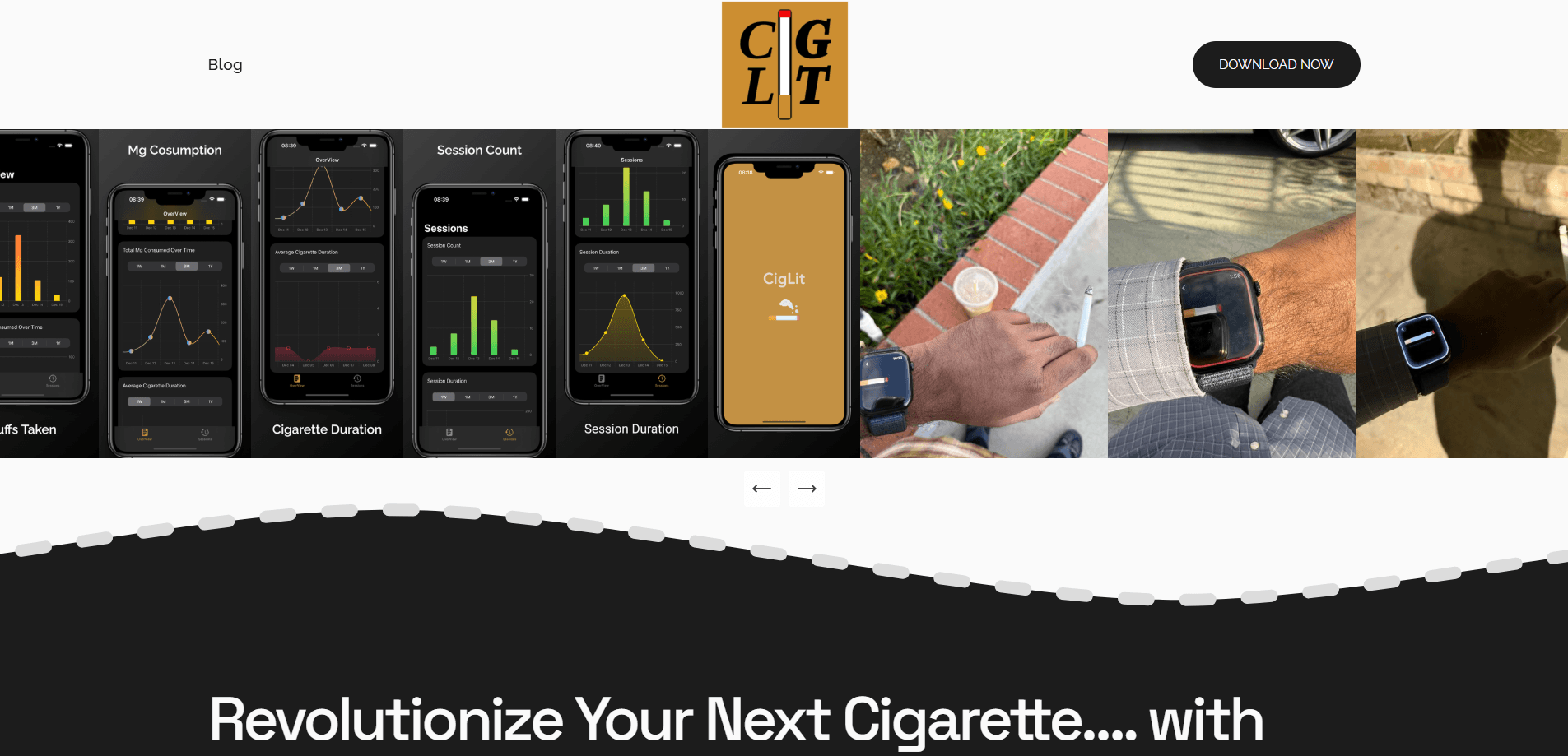
CigLit is a tobacco consumption tracker and smoking tracker for iOS and Apple Watch. It logs drags and rest states during each smoking session, then charts nicotine intake and daily habits over time.
About CigLit
What Is CigLit
CigLit is a health and fitness app that counts what most trackers ignore: the shape of a smoking session, not just the number of cigarettes. As a cigarette tracker, it pairs an iPhone and an Apple Watch, uses the watch to detect when you lift a cigarette to your mouth, and turns those moments into a record of drags, rests, and elapsed time. The tagline on its site is Track. Analyze. Transform.
The problem it targets is honest measurement. A pack count tells you roughly how much you smoked, but not how long each cigarette lasted or how hard you drew on it. CigLit measures those details through a calibration step you run once, then keeps a timeline that breaks down smoking habits by day, week, month, and year. That history is what makes trends visible.
The limits are worth stating plainly. CigLit ships for iOS 17 and Apple Watch only, so there's no Android build and no web dashboard. Detection leans on the watch's motion sensing, which means you get the most from it while wearing the device. It's a one-time purchase with no free tier, and it isn't a medical tool, so treat its nicotine estimates as a guided reading rather than a clinical measurement.
Getting Started
- Install CigLit from the App Store on an iPhone running iOS 17 or later.
- Pair an Apple Watch and open the app to sync the two devices.
- Run the calibration once: set your smoking orientation so the app learns how you hold and raise a cigarette.
- Smoke as usual, using your watch hand so the app can capture drag and rest states.
- Open the timeline to review your sessions, nicotine intake, and daily, weekly, monthly, and yearly trends.
Product Information
A quick look at CigLit's pricing, supported platforms, and performance.
Best for
The users, tasks, and scenarios where this tool fits best.
Users
- Smokers who want real numbers
- People cutting back or quitting
- Apple Watch owners
- Health-focused self-trackers
Tasks
- Logging a smoking session
- Estimating nicotine intake
- Reviewing trends
- Spotting patterns
Scenarios
- Building a case for quitting
- Monitoring a slow cutback
- Checking a stressful period
- Backing up a doctor's question
Key features
Smoking calibration
Before tracking starts, CigLit asks you to calibrate once with your Apple Watch so it learns your smoking orientation, meaning how you hold and raise a cigarette. That setup is what lets the app tell a drag apart from a rest during a real session. If your habits or how you hold a cigarette change, you can recalibrate. It's a small chore up front that decides how accurate everything after it turns out.
Drag and rest detection
The app watches a session frame by frame and separates drags from rests using the watch's motion data. That distinction is the point: two people can smoke the same number of cigarettes and still consume very different amounts of nicotine depending on how they draw. CigLit saves those metrics as you smoke, so a session becomes a set of measured events instead of one rounded-off count.
Nicotine intake estimates
From the captured drags and the time each session takes, CigLit reports an estimate of nicotine consumed in milligrams. This turns an abstract habit into a number you can actually track and compare week to week. It's a guided reading rather than a lab result, but the trend is what matters most when you're watching a change.
Timeline analytics
CigLit keeps a running timeline and lets you look at it by day, week, month, or year. The point of stretching the view is to catch patterns that a single day hides. You see whether the count is creeping up, whether weekends differ from weekdays, and whether a period of cutting back is holding. Long-range charts make slow changes visible.
Session duration and statistics
Beyond the raw count, the app tracks how long the average cigarette and session last. Duration often shifts before the cigarette count does, so it's an early signal of a habit changing. CigLit pulls these into easy-to-read stats for daily smoking habits, giving you a fuller portrait than a simple tally.
Real-time activity view
While a session is running, the app shows time spent smoking and the current count of cigarettes or sessions as they happen. Watching the number climb in real time is a different kind of feedback than reviewing it later. For people trying to slow down, seeing the meter run is often the nudge that works.
Apple Watch tracking
The core tracking lives on the Apple Watch, which is what makes hands-busy tracking possible: you raise the watch hand to smoke, and the app follows along. Background run support means the app can keep logging without you holding it open. It's built for the iPhone and Watch pairing rather than a phone alone.
Trend insights for reflecting, reducing, or quitting
The data is organized around three uses the app names directly: reflect, reduce, or quit. Reflection needs a clear baseline, cutting back needs a trend line that shows progress, and quitting needs a before-and-after picture to compare against. The same timeline serves all three depending on which one you're doing.
Pros and cons
Pros
- Measures session shape, counting drags and rests rather than just cigarettes.
- Estimates nicotine intake in milligrams, so quantity has a unit you can compare over time.
- Daily, weekly, monthly, and yearly timelines make slow trends easy to see.
- Runs on Apple Watch, so you can track while your hands are occupied.
- Costs $1.99 once with no subscription, so there's no recurring bill.
Cons
- iOS 17 and Apple Watch only, which leaves out Android users and anyone without a watch.
- No free plan, so you have to pay before you can see whether the tracking suits you.
- Accuracy depends on wearing the watch and smoking with the watch hand, so uncalibrated or phone-only use is weaker.
- Nicotine figures are estimates, not clinical measurements, which limits how you should read them.
Frequently asked questions
CigLit is a tobacco consumption tracker for iOS and Apple Watch. It records drags and rest states during each smoking session, then estimates nicotine intake and charts your habits over time.
Related content
Explore related tools, skills, and articles for CigLit.
CigLit Alternatives

Tractionwave
TractionWave · Image · MarketingTractionWave is an AI attention heatmap tool for static ads. Upload a PNG or JPG and it returns predicted attention, ranked hotspots, and fixes before you spend budget.

OpenSEO - AI Visibility
EveryApp · Coding · Marketing · BusinessOpenSEO is an open source SEO platform for keyword research, backlinks, rank tracking, site audits, and AI visibility, with usage-based pricing and MCP access for AI agents.

Plugins Radar
Plugins Radar · Marketing · BusinessPlugins Radar tracks where your ChatGPT plugin ranks in directory and in-chat search, which competitors outrank it and what changed, with hourly checks on 9,885 listings.