

Circled
Circled · Marketing · Chatbot
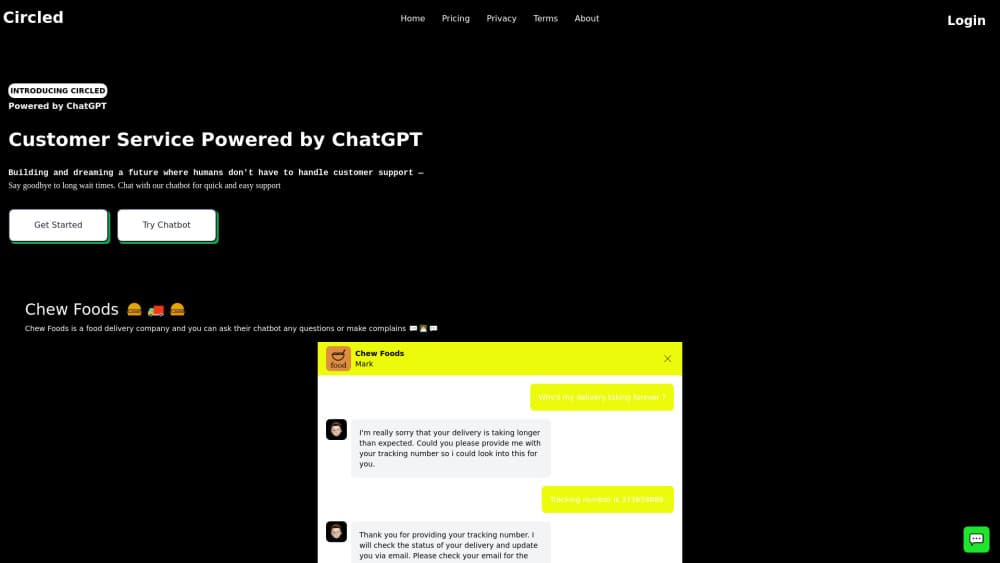
Circled builds a support chatbot from your own help pages and documents, then adds it to your site as a chat widget or an embedded frame. It answers customer questions all day.
About Circled
What Is Circled
Circled is an AI chatbot builder for customer support, marketed as a ChatGPT chatbot for service teams. You point it at material your team already wrote: a help center page, a shipping and returns policy, a price list, the answers your staff types out twenty times a week. The chatbot replies from those pages instead of inventing something, which keeps its answers tied to what your business actually says.
The product lives on your website. Visitors get a chat bubble in the corner of every page, or a frame inside one page you pick. They can ask where they already are instead of hunting for a contact form.
The limits matter as much as the features. Circled only knows the material you hand it, so a question your docs never covered is a question it should pass to a person. It won't handle judgement calls, exceptions, or an apology. The site also says usecircled.xyz was registered by someone else, expired, and was rebuilt by an independent operator, so check who you're buying from before you send traffic or payment.
Getting Started
- Gather your source material: help pages, policy pages, price lists, and the questions your team answers most often.
- Email the team with your site link and a rough monthly support volume to get a quote, since pricing isn't listed up front.
- Set the chatbot's name, tone, and rules, including which questions it answers and when it should hand over to a person.
- Paste the snippet for the corner bubble or the embedded frame and test it with real questions from your inbox.
Product Information
A quick look at Circled's pricing, supported platforms, and performance.
Best for
The users, tasks, and scenarios where this tool fits best.
Users
- Small shop owners
- Booking services
- Software teams with a documentation page
- Solo founders
Tasks
- Answering repeat questions
- Explaining policies before a purchase
- Sorting requests before a human sees them
Scenarios
- After-hours coverage
- Launch week spikes
- Visitors who write in another language
Key features
Answers Grounded in Your Own Material
Circled learns from pages and documents you supply, then answers from that content instead of guessing. A help page, a returns policy, and a price list are enough to start. When the material doesn't cover a question, the chatbot is meant to say so and hand over rather than invent a policy.
Chat Bubble or Embedded Frame
You get two ways to place the chatbot. The bubble sits in the corner of every page and follows visitors around the site. The frame sits inside a single page you choose, which suits a checkout or a contact page where you want the conversation to stay in view.
Instructions for Tone and Scope
You set the name it answers under, the tone it uses, and the rules it follows. That includes which topics it handles, what it says when it doesn't know, and where it sends people who need a human. Clear rules matter more than a long prompt, because the chatbot repeats them on every reply.
Handover to a Person
The chatbot can pass a conversation to your team when a question needs judgement, an exception, or an apology. You decide where that handover goes, whether it's an inbox, a live chat queue, or a booking link. This is the part worth testing hardest before launch.
Multilingual Replies
Circled can answer in one language or several, and the pricing page treats that as a cost factor. For a shop selling into more than one market, a single chatbot covers questions that would otherwise wait for someone who speaks the language.
Copy-Paste Setup
Setup runs on a snippet, not a plugin stack, so it works with a custom site as well as a storefront builder. There's no separate app for visitors to install, and no code review needed beyond pasting the tag into your template.
Pros and cons
Pros
- Answers stay tied to your own pages, which makes wrong policies less likely than with a chatbot working from general knowledge.
- Two placement options cover both a site-wide helper and a single high-intent page.
- Rules for tone and handover are set in plain language, so a support lead can adjust them without a developer.
- A single chatbot can answer in several languages, which suits stores selling across borders.
- Setup is a copy-paste snippet, so a small team gets support automation running without an integration project.
Cons
- No price is published. You have to email for a quote, which slows down comparison shopping against tools with public plans.
- There's no free plan or self-serve trial listed, so testing means talking to sales first.
- No public API or developer documentation is available, which rules it out if you need to pull transcripts into your own systems.
- The chatbot can only answer from supplied material, so gaps in your docs turn into handovers or dead ends.
Frequently asked questions
Circled is a customer support chatbot builder. It reads the pages and documents you provide, then answers visitor questions on your website through a chat bubble or an embedded frame.
Related content
Explore related tools, skills, and articles for Circled.
Circled Alternatives

Tractionwave
TractionWave · Image · MarketingTractionWave is an AI attention heatmap tool for static ads. Upload a PNG or JPG and it returns predicted attention, ranked hotspots, and fixes before you spend budget.

OpenSEO - AI Visibility
EveryApp · Coding · Marketing · BusinessOpenSEO is an open source SEO platform for keyword research, backlinks, rank tracking, site audits, and AI visibility, with usage-based pricing and MCP access for AI agents.

Plugins Radar
Plugins Radar · Marketing · BusinessPlugins Radar tracks where your ChatGPT plugin ranks in directory and in-chat search, which competitors outrank it and what changed, with hourly checks on 9,885 listings.