

Cliplama
Cliplama · Video
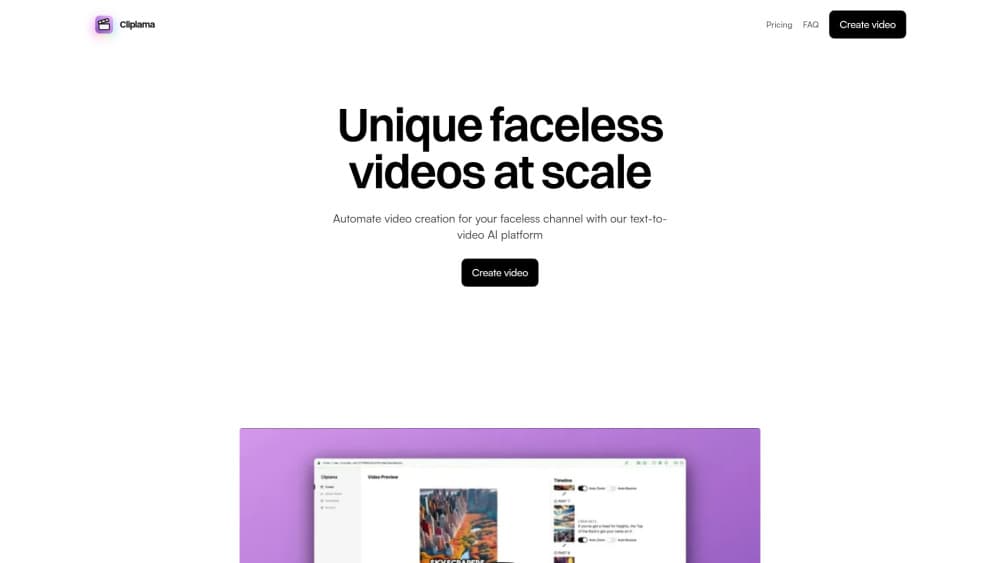
Cliplama is an AI text-to-video platform that turns a prompt or script into a faceless vertical video with narration, captions and music, then schedules it to TikTok.
About Cliplama
What Is Cliplama
Cliplama builds short vertical videos without a camera, a presenter, or a timeline editor. You describe the video you want, pick a voice, and the platform assembles stock-style visuals, narration, captions, transitions, and background music into a clip sized for TikTok, Reels, and YouTube Shorts. The pitch is speed: a finished video in minutes, not an afternoon in Premiere.
The product sits in the faceless channel niche, where the account never shows a person on screen. Plenty of channel owners search for a faceless video generator for exactly this reason. That format works well for story channels, motivation pages, list videos, and niche explainers. It also explains the tool's shape. There's no multi-track editing, because the audience for Cliplama isn't editors. It's someone who wants to publish daily and doesn't want to learn an editor. A short form video maker with one button beats a professional suite they'll never master.
The limits follow the same logic. As a text to video tool, Cliplama stops short of frame-level control. Creative control stops at the prompt, the voice, and the text style. If a scene lands wrong, your realistic options are rewriting the description or generating again, which costs another credit. Long-form work is supported up to six minutes, yet the pacing and visuals stay in short-form territory. Treat Cliplama as a publishing engine, not a replacement for an editor when a video needs precise timing.
Getting Started
- Create an account at app.cliplama.com. The free plan needs no credit card and includes one video.
- Describe the video in plain text, or paste a script you already wrote. Longer scripts map to the medium and long credit tiers.
- Choose a voice style and a text style. ElevenLabs voices are included on the paid plans, and the free tier uses the default set.
- Generate the video, review the result, and download it without a watermark.
- Connect your TikTok account if you want to schedule TikTok videos in advance. YouTube scheduling is listed as coming soon.
Product Information
A quick look at Cliplama's pricing, supported platforms, and performance.
Best for
The users, tasks, and scenarios where this tool fits best.
Users
- Solo creators running a faceless TikTok page
- YouTube Shorts channels in story or motivation niches
- Social media managers who need volume
- Beginners who have never opened editing software
Tasks
- Turning a written script into a narrated video
- Batch-producing list videos
- Scheduling a week of posts in one sitting
- Testing hooks for paid ads
Scenarios
- A channel that publishes while you sleep
- A niche page with no on-camera talent
- A first month of content for a new brand account
Key features
Prompt or Script to Finished Video
The core loop takes a description or a full script and returns an assembled video with images, narration, captions, transitions, and music. The output is already sized for vertical feeds, which is what most people want from an AI TikTok video generator. You don't drag clips around or set keyframes. That's the trade: less control, far less time. For a daily posting schedule, the trade usually pays off.
Voice Styles With ElevenLabs on Paid Plans
Paid tiers include ElevenLabs voices, which is the main reason the narration sounds less robotic than the default text-to-speech most generators ship. An AI voiceover video lives or dies on that voice, and this is the setting worth paying for. The free plan uses the standard voice set, so listen to both before you commit. Voice choice affects watch time more than most visual settings, especially on story channels.
Automatic Captions and Text Styles
Captions are generated with the video, and the text style picker changes how they look on screen. This matters on TikTok, where a large share of viewers watch muted. The styling options are presets rather than a font editor, so expect a curated look rather than a custom brand kit.
AI Background Music
Each video gets an AI-generated background track instead of a licensed music library. The upside is no copyright claims from a song you don't own. The downside is that you can't pick a trending sound, which is still one of the strongest discovery levers on TikTok.
Scheduling to TikTok, With YouTube Promised
You can connect a TikTok account and queue videos for future publishing, which turns the tool into a lightweight faceless channel automation system. YouTube scheduling appears on the roadmap as coming soon, so plan to download and upload manually if Shorts are your main channel today.
Credit-Based Generation Tiers
One credit covers a short video up to one minute, two credits cover a two to three minute video, and three credits cover a four to six minute video. Basic gives 25 credits a month, Creator gives 60, and Pro gives 150. The tiering rewards short clips, which is the format the platform is built around.
Pros and cons
Pros
- Fast path from idea to published clip, with no editing skills required.
- No watermark on any plan, including the free tier.
- ElevenLabs narration on paid plans raises the perceived production quality.
- TikTok scheduling is built in, so the workflow ends at publishing instead of at download.
- Credit pricing is transparent: you can estimate cost per video before subscribing.
Cons
- No timeline editor, so fixing one bad scene means regenerating the whole video and spending another credit.
- YouTube scheduling is still marked as coming soon, which leaves Shorts creators on a manual upload path.
- No licensed or trending music library, and trending sounds drive discovery on TikTok.
- Visual control stops at presets, so branded templates and precise brand colors aren't possible.
Frequently asked questions
Cliplama makes vertical short videos for TikTok, Instagram Reels, and YouTube Shorts. You supply a description or script, and the platform adds visuals, narration, captions, transitions, and music. There's no filming and no presenter.
Related content
Explore related tools, skills, and articles for Cliplama.
Cliplama Alternatives

Vadu AI
Vadu AI · Image · VideoVadu AI is a web-based AI video generator that turns written prompts or still images into short clips, and it can also generate images on its own. You type what you want, pick a model and style, and the platform renders the result in minutes. A free plan covers light testing, while paid tiers run from $9 to $77.40 per month based on how many credits you burn.

Mykaraoke Video
MyKaraoke Video · VideoMykaraoke Video is an online karaoke video maker and lyric video maker that turns any song into a finished, lyrics-synced video right in your browser. It handles the slow part for you. The AI pulls vocals out of the mix and locks the lyrics to the beat, then lets you customize background, fonts, and colors before exporting in 1080p MP4. If you make lyric videos for social media, party nights, or music promotion, it skips the software installs and manual timing work entirely. Want a karaoke video generator that doesn't eat your whole evening? That's the pitch here.

Finalframe
Finalframe · VideoFinalframe is a set of free, browser-based tools for grabbing exact frames out of a video clip. Its best-known feature, the Final Frame Extractor, lets you extract the last frame of any video so you can use it as the starting image for AI video tools like Luma Dream Machine, Runway, or Kling. Want to keep a clip going? That last frame is your starting point. The tool runs locally in your browser, needs no sign-up, and costs nothing. A separate paid AI video-generation app from the same team is currently offline while it's rebuilt.