

ClipNow
ClipNow · Video
ClipNow turns long recordings into vertical shorts for TikTok, Reels, and YouTube Shorts, with AI moment picking, auto captions, and 9:16 reframing. Three free credits at sign-up.
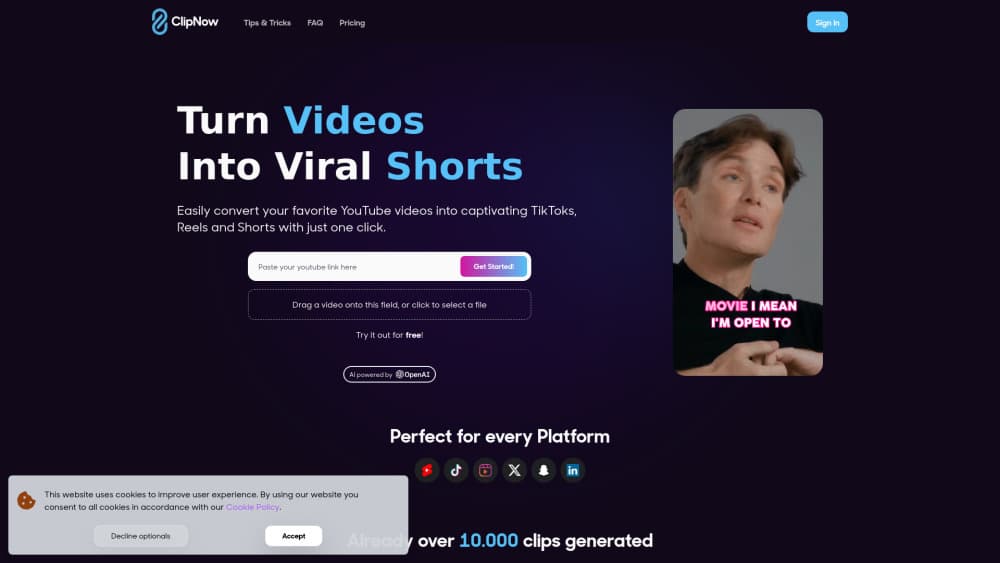
About ClipNow
What Is ClipNow
ClipNow is an AI video clipping tool for people who already have footage and no time to cut it. You upload a file or paste a YouTube link, and the service hands back a batch of short clips, each reframed to vertical video with subtitles burned in. The whole job runs in a browser tab, so there's nothing to install.
The product targets video repurposing rather than editing from scratch. A one-hour podcast becomes a dozen podcast clips. A webinar becomes a week of TikTok clips. You pick the ones worth posting, tweak the captions if you want, and download.
Two things set the boundaries. It works best on talking-head footage, since the crop logic follows a face and the captions follow speech. And it's credit-based: one credit renders one clip, so heavy users watch the meter. The clipnow.ai domain now forwards to Frameway AI, a chat-first video editing platform, which suggests the brand has moved on. The feature set and ClipNow pricing described here reflect how the tool was documented through 2025.
Getting Started
- Create an account on clipnow.ai and claim the three free credits that come with a new sign-up.
- Add source footage by dragging a video file into the upload area or pasting a YouTube URL. Videos of ten minutes or more give the AI enough material to work with.
- Start the analysis and wait a few minutes. The AI scans the audio and frames, scores candidate moments, and cuts them into separate clips.
- Review the results in the editor. Swap caption animations, fix a misheard word, and adjust the crop if the face tracking drifts off center.
- Download the clips you like and post them to TikTok, Instagram Reels, or YouTube Shorts. Watermarks come off on paid plans.
Product Information
A quick look at ClipNow's pricing, supported platforms, and performance.
Best for
The users, tasks, and scenarios where this tool fits best.
Users
- Podcasters
- Solo video creators
- Social media managers
- Coaches and course sellers
Tasks
- Cutting a podcast episode into podcast clips
- Repurposing a webinar recording
- Mining a livestream for highlights
- Testing hooks before a full edit
Scenarios
- Keeping a posting schedule without an editor
- Launching a channel from existing material
- Running paid social for a small brand
Key features
AI Clip Detection
The core of the product is moment selection. ClipNow reads the transcript and the audio signal, then scores candidate segments for hook strength, completeness, and pacing before cutting them into individual files. You get a batch of candidates instead of one long export, and you can throw away the weak ones. For long-form video to shorts work, that first pass is where most of the time savings come from.
Vertical Reframing and Face Tracking
Horizontal footage gets cropped to 9:16 for TikTok, Reels, and Shorts, and the crop window follows the speaker's face as they move. On a single-camera podcast setup the result usually looks deliberate. On wide shots with several people in frame, the crop can hop between faces, so check each clip before you post.
Auto Captions with Animation Styles
Captions are generated automatically and burned into the video, with a claimed accuracy rate of 99 percent for clear speech. Several animation styles are included, and the count depends on your plan, ranging from three styles on the entry tier to ten on the top one. You can edit the text line by line, which matters when names and technical terms get misheard.
Multi-Language Support
The caption engine covers the major languages, so footage recorded in Spanish or German can ship with matching subtitles instead of English ones. That opens up cross-market posting from a single source recording. Quality tracks how clean the audio is, and heavy accents still need a manual pass.
Resolution and File Size by Plan
Output quality scales with the plan. The entry tier renders at 1080p with a 1GB upload ceiling, the middle tier goes to 1440p and 2GB, and the business tier reaches 4K with 4GB. If you shoot in 4K and want to keep it, budget for the top plan rather than assuming the base one will do.
One-Click Browser Workflow
Everything happens in the browser: upload or paste a link, wait for processing, edit captions, download. There's no desktop install, no plugin, and no render queue to manage locally. Processing takes around five minutes on a typical upload, longer on hour-plus recordings.
Pros and cons
Pros
- Moment detection does the tedious part, so you review candidates instead of scrubbing a two-hour timeline for auto captions and hooks.
- Face tracking keeps the speaker centered in vertical video without manual keyframing.
- Captions ship burned in and editable, which cuts a second pass in a separate subtitle app.
- The browser-only workflow means no install and no local rendering load.
- Annual billing brings the effective monthly price down, and unused workflows can be topped up with one-off credits.
Cons
- The credit model charges per clip, so a 50-credit plan disappears quickly if you generate ten candidates per episode and only keep three.
- Entry pricing at $59.99/mo is steep next to competitors that start near $15, and the cheap tier caps you at 1080p.
- Face tracking struggles on wide group shots, which means manual checks on panel recordings.
- There's no published API, so teams that want clipping inside their own pipeline can't wire it in.
Frequently asked questions
It takes a long video and returns several short vertical clips with captions already rendered. You upload once and get a batch of candidates to review, which is the video repurposing step that usually eats an afternoon.
Related content
Explore related tools, skills, and articles for ClipNow.
ClipNow Alternatives

Vadu AI
Vadu AI · Image · VideoVadu AI is a web-based AI video generator that turns written prompts or still images into short clips, and it can also generate images on its own. You type what you want, pick a model and style, and the platform renders the result in minutes. A free plan covers light testing, while paid tiers run from $9 to $77.40 per month based on how many credits you burn.

Mykaraoke Video
MyKaraoke Video · VideoMykaraoke Video is an online karaoke video maker and lyric video maker that turns any song into a finished, lyrics-synced video right in your browser. It handles the slow part for you. The AI pulls vocals out of the mix and locks the lyrics to the beat, then lets you customize background, fonts, and colors before exporting in 1080p MP4. If you make lyric videos for social media, party nights, or music promotion, it skips the software installs and manual timing work entirely. Want a karaoke video generator that doesn't eat your whole evening? That's the pitch here.

Finalframe
Finalframe · VideoFinalframe is a set of free, browser-based tools for grabbing exact frames out of a video clip. Its best-known feature, the Final Frame Extractor, lets you extract the last frame of any video so you can use it as the starting image for AI video tools like Luma Dream Machine, Runway, or Kling. Want to keep a clip going? That last frame is your starting point. The tool runs locally in your browser, needs no sign-up, and costs nothing. A separate paid AI video-generation app from the same team is currently offline while it's rebuilt.