

Clixie AI Interactive Video Platform
Clixie AI · Video · Leaning
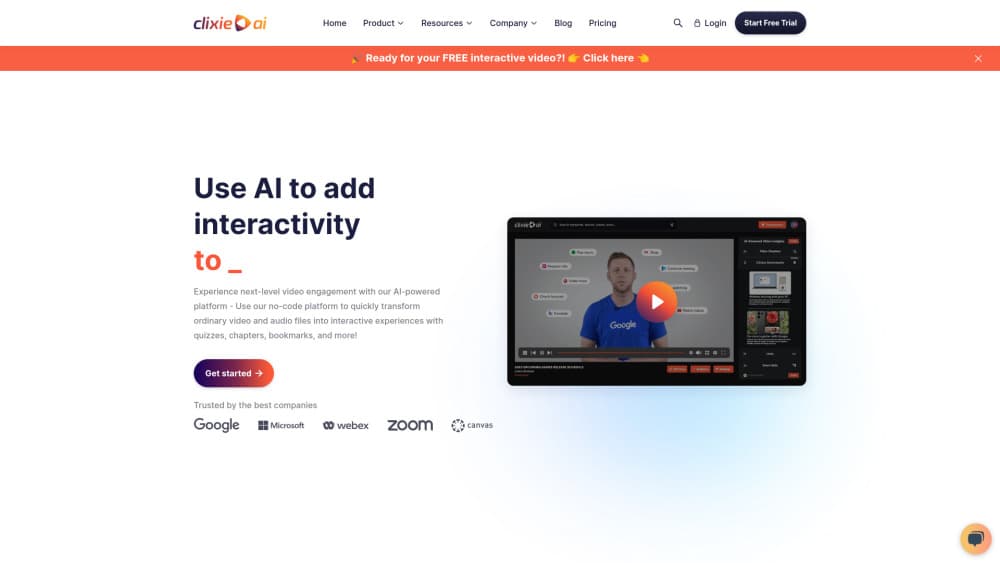
Clixie AI is an AI interactive video platform that turns uploaded videos into quizzes, chapters, branching paths, and SCORM-ready training modules.
About Clixie AI Interactive Video Platform
What Is Clixie AI
Clixie AI is a no-code platform for turning plain video files into interactive lessons, onboarding modules, and sales demos. You upload a recording, and the AI reads the transcript, picks out the concepts worth testing, and drops quizzes, chapters, and branching choices onto the timeline. The company started in Ann Arbor, Michigan in 2021 and sells mostly to learning and development teams, compliance groups, and marketing departments.
The gap it closes is the one between a video and a course. A 40-minute recording proves nothing about whether anyone learned anything. Clixie adds checkpoints, so a viewer answers a question or picks a path before moving on, and the platform logs the answer.
Two limits define the fit. Output lives in Clixie's player or in a SCORM package, so you don't get a raw MP4 with the interactions baked in. The AI draft also needs a human pass. Quizzes land on the right chapters, but the wording and answer choices usually need a rewrite before a compliance reviewer will sign off.
Getting Started
- Open clixie.ai and start the 14-day trial. No card is required, and the trial unlocks the full feature set while it runs.
- Upload a video from your computer, or pull a cloud recording straight from Zoom, Cisco Webex, or Microsoft Teams.
- Check the AI draft. Subtitles, chapters, and quizzes appear within minutes, and you edit or delete any of them.
- Add the interactive layer. Hotspots, in-video forms, polls, and branching scenarios sit in a side panel, and each one takes a couple of clicks to place.
- Publish. Push a SCORM 1.2 or SCORM 2004 package to your LMS, embed the player on a site, share a link, or trigger the API. Reporting starts the moment the first viewer presses play.
Product Information
A quick look at Clixie AI Interactive Video Platform's pricing, supported platforms, and performance.
Best for
The users, tasks, and scenarios where this tool fits best.
Users
- Learning and development teams
- Compliance and safety trainers
- Sales enablement managers
Tasks
- Converting a recorded webinar into a course
- Building onboarding paths for new hires
- Certifying staff on a policy update
- Localizing an existing training library
Scenarios
- A 45-minute all-hands recording nobody finishes
- A product launch demo that needs to qualify leads
- A small L&D team with no video editor
Key features
AI Quiz and Chapter Generation
The platform transcribes an uploaded video, finds the teaching moments in the transcript, and writes multiple-choice questions against them. Chapters come out with titles you can edit. The value is the blank page it removes: you start from a draft with 8 to 12 checkpoints instead of an empty timeline.
Branching Scenarios
You split a video into decision points where the viewer picks a response, and each choice continues down a different path. Compliance teams use it for handling difficult conversations, where a wrong choice leads to a consequence scene rather than a score screen. Building a branch takes a few clicks, which is the main difference from timeline editors that need a separate authoring tool.
SCORM and xAPI Reporting
Clixie exports SCORM 1.2 and SCORM 2004 packages and reports through xAPI, so quiz scores, time on task, completion status, and branch choices land in your LMS. It supports 20+ LMS platforms out of the box, including Canvas, Blackboard, Moodle, Brightspace, Docebo, and iSpring, plus LTI and custom APIs. If your LMS speaks any of those standards, the integration takes minutes.
28 Interactive Element Types
Beyond quizzes, the library covers hotspots, polls, embedded forms, downloadable resources, clickable CTAs, bookmarks, and audio layers. Each element is placed from a side panel without code. The count matters less than the mix: a single video can carry a quiz, a form, and a resource link without a second tool.
Predictive Video Analytics
Dashboards report completion rate, engagement heatmaps, and where viewers drop off, and the platform forecasts likely completion before a course goes wide. Viewer behavior maps to persona groups, and skill gaps get flagged when a cluster of people miss the same question. That last part is the useful bit: you learn which concept failed, not just that someone failed.
Multilingual Localization
The AI transcribes and translates uploaded videos into 120+ languages, and you choose between burned-in subtitles or a toggle in the playbar so viewers pick their own language. Human translation is available as an add-on for legal or regulated content, where a machine pass isn't good enough.
Pros and cons
Pros
- Upload to a working interactive draft takes about 15 minutes, and the AI chapter and quiz output is usable as a starting point rather than a demo.
- SCORM 1.2, SCORM 2004, LTI, and xAPI coverage means it slots into the LMS most companies already run, without a migration.
- Branching scenarios and in-video forms sit in the same editor as quizzes, so one video can serve training and lead generation at once.
- Analytics go past completion rates into per-question misses and persona grouping, which is what you need to fix a course.
- The 14-day trial needs no credit card, so you can test a real video against your own LMS before paying.
Cons
- There's no free tier. After the trial ends you pick a plan, and the cheapest one at $19/mo caps you at 3 interactive videos and 720p.
- Analytics are tiered hard. The Lite plan ships without them, and Pro only gets limited reporting, so the measurement features you came for start at $299/mo.
- Video and streaming caps are tight for large libraries. Advanced allows 1.5TB of monthly streaming, and heavy all-staff viewing can hit that ceiling.
- The AI quiz wording needs editing. Questions read as generic first drafts, and answer choices sometimes give away the correct option.
Frequently asked questions
It adds interactivity to existing video. You upload a recording, and the platform generates chapters, quizzes, subtitles, and branching paths, then publishes the result as a SCORM package, an embed, or a shared link.
Related content
Explore related tools, skills, and articles for Clixie AI Interactive Video Platform.
Clixie AI Interactive Video Platform Alternatives
Griffin by Tavus
Tavus · Voice & Language · Video · ChatbotGriffin by Tavus is the first Human Interaction Model: a full-duplex, video-to-video system that watches, listens, and answers during a live video call in real time.

Syllaby AI Avatar 2.0
Syllaby · Video · MarketingSyllaby AI Avatar 2.0 turns a script into a presenter-led video with a reusable AI avatar, natural voice, B-roll and automatic subtitles, all in one browser workflow.

Vitra.ai
Vitra.ai · Voice & Language · Video · MarketingVitra.ai is an agentic content platform that creates, translates, reviews, and publishes video, images, documents, and app content in 120 languages from one shared brief.