

Syllaby AI Avatar 2.0
Syllaby · Video · Marketing
Syllaby AI Avatar 2.0 turns a script into a presenter-led video with a reusable AI avatar, natural voice, B-roll and automatic subtitles, all in one browser workflow.
About Syllaby AI Avatar 2.0
What Is Syllaby AI Avatar 2.0
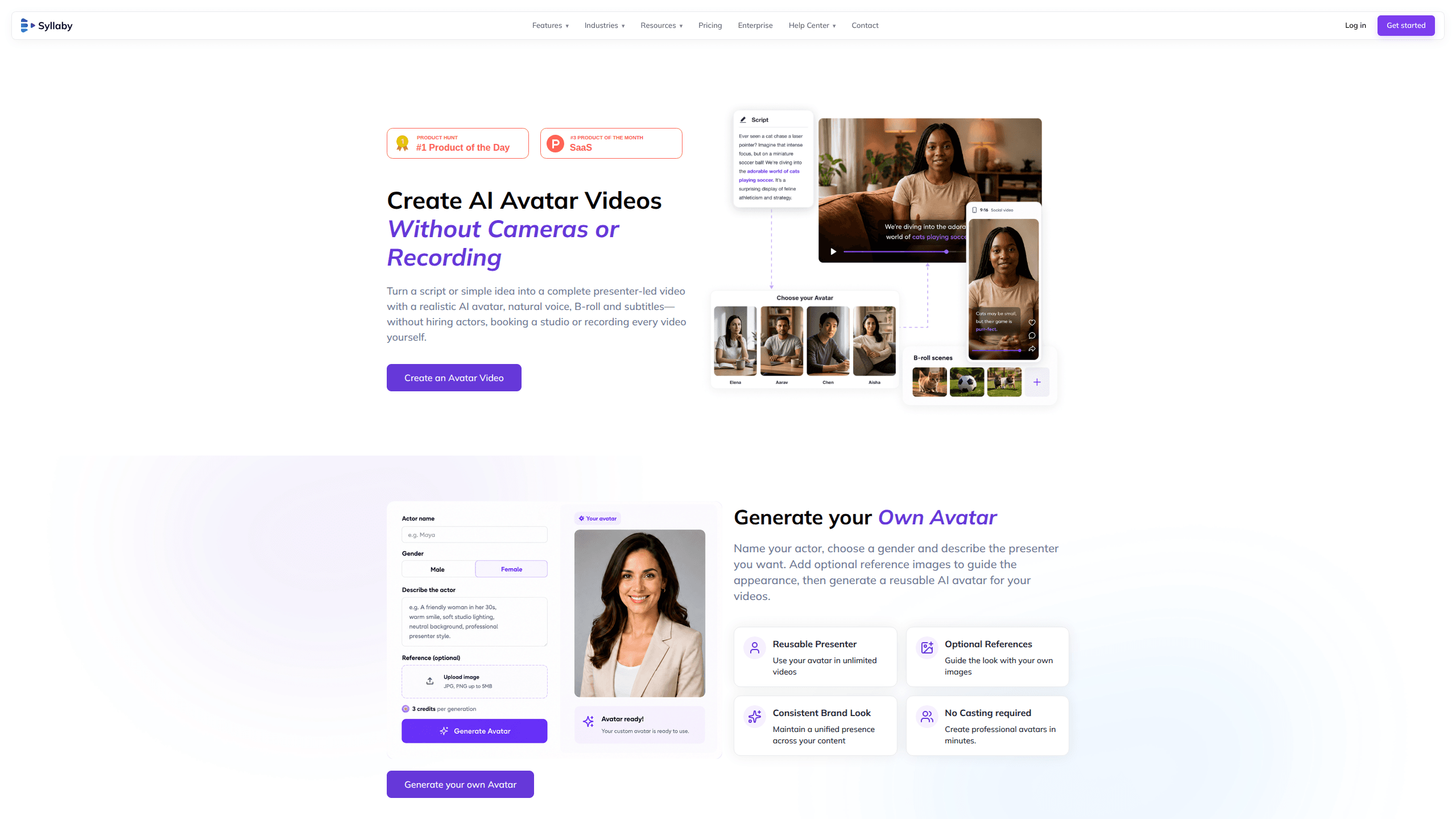
Syllaby AI Avatar 2.0 is the avatar tool inside Syllaby, a video platform built for people who publish often and would rather not sit in front of a camera. It works as an AI avatar generator: you bring a script or a rough idea, pick a presenter, and get a finished video where that presenter speaks your words with scenes, cutaways and captions already in place.
The reusable part matters more than the novelty. You describe the presenter, give the actor a name and a gender, and add reference images if you have a specific look in mind. The custom avatar stays in your account, so the same face carries across every video you publish. For a small brand or a solo operator, that fixes the consistency problem that usually means booking the same person twice a month.
The limits sit in the credit maths. An avatar video costs 30 video credits, against 13 for a faceless video, so the entry plan's 100 credits buy about three avatar clips a month. The built-in presenter library is small, five named characters at the time of writing, and scene control is closer to a template editor than to a full production suite.
Getting Started
- Sign up at syllaby.io and open Avatars 2.0 from the features menu. New accounts start with 50 credits, enough for one avatar video and a few experiments.
- Write or generate the script. The AI script writer charges 1 credit for a one-minute script, so settling the words before rendering keeps the spend predictable.
- Pick a presenter from the library or build your own. Name the actor, choose a gender, describe the look, and upload reference images if you want a closer match.
- Assemble the video scene by scene. Add B-roll, change the voice and delivery, and set the subtitle style.
- Export and publish. Rendering an avatar video takes 30 credits, and the content calendar can push the finished file to your connected social accounts.
Product Information
A quick look at Syllaby AI Avatar 2.0's pricing, supported platforms, and performance.
Best for
The users, tasks, and scenarios where this tool fits best.
Users
- Solo content creators
- Small business owners
- Marketing teams of one or two
- Course creators and trainers
Tasks
- Turning a written post into an AI presenter video
- Keeping a weekly publishing rhythm
- Producing the same message in several languages
- Making product explainers without a studio
Scenarios
- A consultant who needs the same face on every LinkedIn clip
- A clinic or firm with no media budget
- A channel that publishes daily
Key features
Custom avatar from a description and a photo
You name the actor, choose a gender, and describe the presenter in plain language. Reference images are optional but sharpen the result. Syllaby also accepts a single image to guide the look, which is the fastest route to a talking avatar that resembles a real person on your team.
A small library of ready-made presenters
Five named characters ship with Avatars 2.0: Aisha for teaching, Chen for marketing, Leila for creator-style content, Emma for narration and Lucas for corporate presenting. Each one is described by tone rather than by demographic, which helps when you're matching a voice to a format instead of casting a role.
Scene-by-scene control
The scene editor lets you add, delete and rearrange shots visually, so the video isn't one long take of a head. You can place B-roll where the script changes topic and keep the presenter on screen when the argument matters. It's a storyboard you edit, not a timeline you build from scratch.
Voice and delivery settings
You can swap the voice to fit the message and the avatar, which matters when the same presenter has to sound reassuring in one video and brisk in another. Syllaby also sells voice cloning on its paid plans, so a founder's own voice can be paired with a generated face.
Automatic subtitles with style control
Captions are generated for every video and the styling is adjustable. Since most social platforms play video muted by default, this is the difference between a clip that works in a feed and one that doesn't.
One workflow from script to schedule
Script, avatar, scenes, captions and publishing sit in the same account, and the content calendar picks up the export. You're not moving files between a script tool, an editor and a scheduler, which is where most small teams lose a day.
Pros and cons
Pros
- The avatar is saved and reusable, so a series can share one presenter without repeat shoots.
- Videos are built from scenes, B-roll and captions, not just a talking head reading a script.
- The script writer, the scene editor and the scheduler share one account, which shortens the loop from idea to post.
- A free account with 50 credits and a $9 entry plan make the first test cheap.
- Web, iOS and Android apps mean a draft can be reviewed or scheduled away from the desk.
Cons
- At 30 credits per avatar video, the $9 Starter plan covers roughly three clips a month, so regular publishing pushes you to the $29 tier or above.
- The presenter library is five characters, and building a custom avatar that looks right can take several attempts, each one spending credits.
- Avatar generation isn't listed among the documented API endpoints, so automated pipelines have to use the faceless video route.
- Scene editing is template-style, which is quick for talking-head formats but limiting for anything with complex motion or camera work.
Frequently asked questions
It's the avatar video feature inside Syllaby. You supply a script, choose or create a presenter, and the platform renders a video where that avatar speaks the lines, with scenes, B-roll and subtitles.
Related content
Explore related tools, skills, and articles for Syllaby AI Avatar 2.0.
Syllaby AI Avatar 2.0 Alternatives

ngram 2.0
ngram · Video · Marketingngram 2.0 is an AI video generator for teams. It turns a prompt, a screen recording, or a product URL into a narrated explainer, product demo, or AI avatar video, and every scene stays editable.

OpenScreen 2
OpenScreen (open-source project) · Video · ProductivityOpenScreen 2 is a free, open-source screen recorder and demo video editor for Windows, macOS, and Linux, with automatic zooms, styled frames, local captions, and agent edits.

Skreno
Skreno · Video · ProductivitySkreno is a browser screen recorder that captures a tab, a window or your whole display, then attaches AI transcripts, summaries and console logs to one share link.