

cmux
manaflow-ai · Coding
cmux is a native macOS terminal made for people who run AI coding agents all day. It renders terminals through libghostty, the same engine behind Ghostty, then layers on vertical tabs, notification rings, an in-app browser, and a scripting socket so every agent keeps visible. Think of it as a Claude Code terminal that also handles Codex, OpenCode, and anything else you can launch. The app is free and open source. Cloud virtual machines are the paid part.
About cmux
What Is cmux
cmux is a terminal emulator for macOS that treats multiple AI coding agents as first-class citizens. Most terminals assume one shell per tab. cmux assumes you'll have Claude Code, Codex, or four other agents talking at once. So it restructures the whole window around that assumption. Slightly unsettling at first. Then it clicks.
The product comes from manaflow-ai and is open source, so you can read the Swift and AppKit code. It's not a fork of Ghostty, which is a common misconception. cmux uses libghostty as a rendering library, the same way a browser app borrows WebKit, and builds a different application on top of it.
The main limit? Platform. There's no Windows or Linux desktop build yet, so this is a Mac-only tool for now. An iPhone companion app sits in beta and pairs with your Mac. That helps when you want to check a long agent run while you're away from your desk.
Getting Started
- Download the signed disk image from the official site or the GitHub releases page, then drag cmux into Applications.
- Open it and pick a terminal theme and font. cmux reads keybindings from your Ghostty config, so existing setups carry over.
- Launch your first agent by typing its command, such as
claudeorcodex, in a normal terminal pane. - Split the window with
Cmd+Dfor vertical panes orCmd+Shift+Dfor horizontal ones, then start another agent in each. - Optional: run a cloud VM or an SSH workspace if you'd rather keep heavy agent work off your laptop.
Product Information
A quick look at cmux's pricing, supported platforms, and performance.
Best for
The users, tasks, and scenarios where this tool fits best.
Users
- Developers running multiple AI coding agents at once
- Engineers on remote machines
- Mac power users who live in the terminal
Tasks
- Orchestrating subagents
- Verifying web changes
- Keeping long jobs organized
Scenarios
- Running a batch of coding tasks overnight
- Debugging an agent that got stuck
- Pairing an agent with a browser
Key features
Vertical Tabs and Split Panes
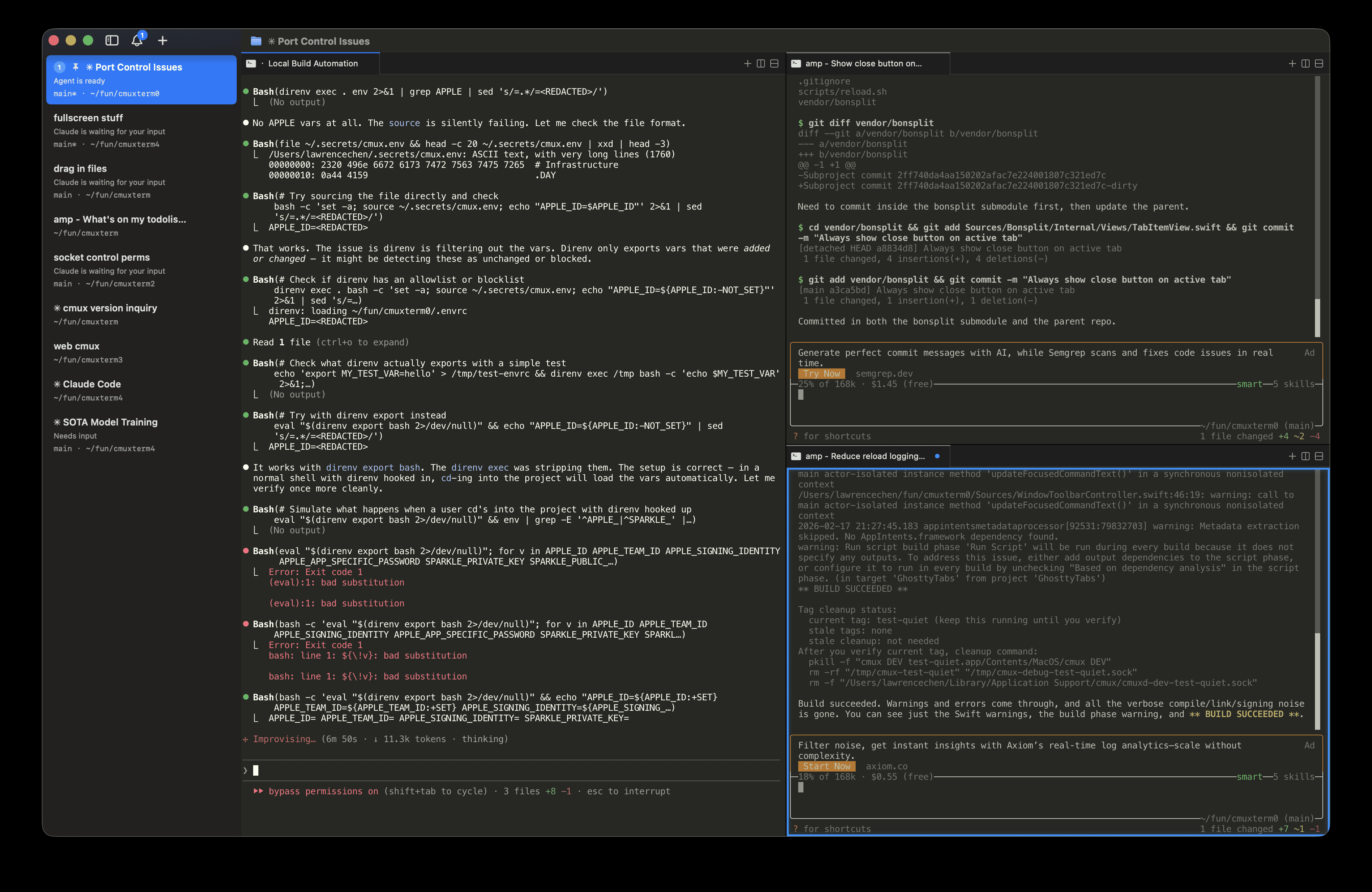
The sidebar stacks your workspaces vertically, and each entry shows the git branch, linked pull request status, working directory, listening ports, and the latest notification text. You split the window horizontally or vertically, so a screen full of agents stays readable. It beats a maze of tabs. Every time.
Notification Rings and Unread Badges
When a process needs your attention, cmux draws a blue ring around the pane and lights up the tab. A notification popover collects everything pending. A macOS desktop alert fires too. These trigger from standard terminal escape sequences, or you can push them yourself through the cmux CLI and agent hooks. No setup required.
In-App Browser Pane
cmux can open a real browser next to your terminal and, more importantly, control it. The browser API is ported from agent-browser and lets an agent navigate, snapshot the DOM, click, type, evaluate JavaScript, and read console or network activity over the same socket. That means an agent can confirm its own front-end fix without switching apps. No tab juggling.
SSH and Remote Workspaces
Running cmux ssh user@remote creates a workspace for a remote machine. Browser panes route through the remote network, so a localhost address on the server just works locally. You can drag an image into a remote session to upload it over scp, and pass an initial command to run once the connection opens.
Claude Code Teams and Multi-Agent Runs
The cmux claude-teams command starts Claude Code's teammate mode in one step. Teammates appear as native splits with their own sidebar metadata. It also supports oh-my-opencode, which is multi-agent orchestration across several models. For anyone wiring up multi-agent orchestration by hand, this is the part that saves the most time. No tmux layer sits in between, so a whole class of configuration headaches disappears.
Scriptable CLI and Unix Socket
Every action in the app is reachable from the command line: create workspaces, open panes, send input, read screen contents, take screenshots, and drive the browser. Want to automate your own workflow? This is the feature that turns cmux into a platform. Not just a nicer terminal.
Pros and cons
Pros
- Free and open source for local use, so trying it costs nothing but disk space.
- Notification system solves the real problem of not knowing which agent finished.
- The in-app browser lets agents verify their own web changes in the same window.
- Remote workspaces over SSH keep heavy agent runs off your laptop.
- Reads your Ghostty config, so you don't rebuild keybindings from scratch.
Cons
- macOS only for now, which rules it out if your team is on Windows or Linux.
- Cloud VMs, the headline paid feature, start at $50/mo, which is steep for solo hobby users.
- The Apple silicon builds are the smoothest; Intel Mac users may see rougher edges.
- A fair number of features assume you already run AI agents daily, so casual terminal users won't use most of it.
Frequently asked questions
Yes. The macOS app is open source and free forever, and local agents run with your own API keys at no cost from cmux. You only pay if you want cloud VMs or the iOS beta's early access tier.
Related content
Explore related tools, skills, and articles for cmux.
cmux Alternatives
Forefront
Forefront · CodingForefront is a web platform for building with open-source AI. It lets you fine-tune leading open-source language models on your own data, evaluate how they perform, and run them through an API or export them to host yourself. Developers who want the convenience of a closed-source platform but insist on owning their models and data are the target audience here.

Startkit
StartKit.AI · CodingStartkit is a boilerplate for building AI SaaS and AI wrapper products. Think of it as an AI startup boilerplate with the boring parts already wired up: authentication, Stripe and Lemon Squeezy payments, usage limits, transactional email, and an AI API starter that talks to OpenAI, Anthropic, Groq, or Llama. You clone the repo, set your price, and start on the part of your product that people actually pay for. It's Next.js under React and Tailwind, so most of the boilerplate code already feels familiar.
Testim
Tricentis · CodingTestim is an AI-powered test automation platform for building and running end-to-end tests across web, mobile, and Salesforce applications. It leans on machine learning to keep tests stable when an interface changes, so teams spend less time fixing broken selectors. Not bad for an automated testing tool you can start using today. You create tests by recording actions in a browser, then optionally add JavaScript when you need more control. It's a solid pick for busy QA teams.