
Complexity
Emil Ahlbäck and Hamed Mohammadpour · Coding · Marketing
Complexity is a free AI search engine that turns a question into a short, sourced answer and keeps the thread in a session you can reopen later.
About Complexity
What Is Complexity
Complexity is a browser-based AI answer engine built by Emil Ahlbäck and Hamed Mohammadpour. You type a question, it searches the web, and it returns a compact written answer with its cited sources listed above the text.
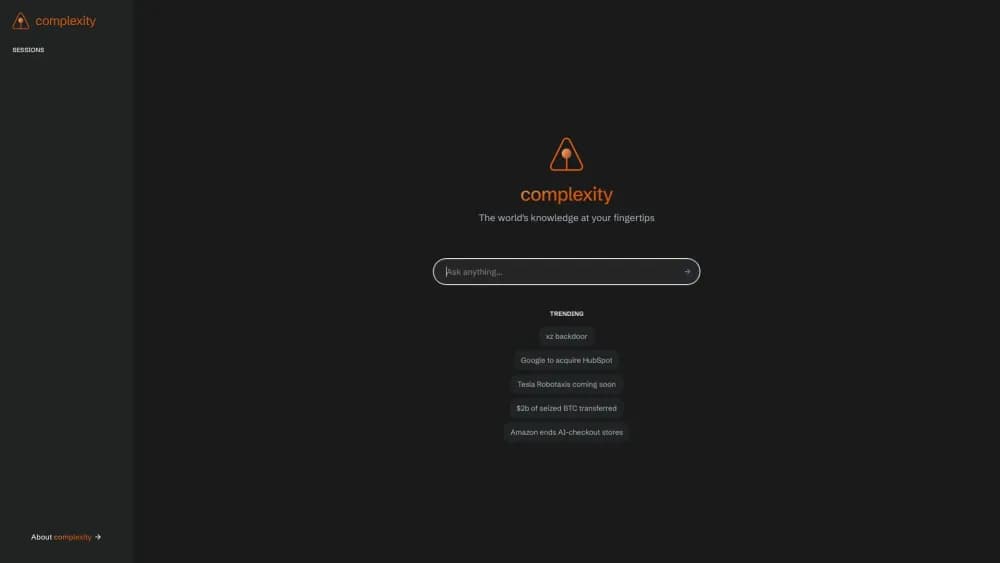
The layout is spare by design. A left sidebar holds your sessions, the main panel holds the sources and the answer, and an input at the bottom takes follow-ups. Key phrases in the answer are tinted orange so you can see which parts map back to the sources.
It's a small independent project rather than a full research suite. There's no file upload, no workspace sharing, and no documented API. The About page credits Cohere as the model provider, and the source code sits on GitHub, where the repository describes itself as a Perplexity clone for searching the web.
That origin explains both the strengths and the ceiling. You get a free AI search tool without a sales funnel attached. You don't get the document analysis, team features, or model choice that larger platforms bundle.
Getting Started
- Open cplx.ai in any modern browser. Nothing to install.
- Type a question into the Ask anything box, or pick one of the trending topics on the home screen.
- Scan the sources row before you read the answer. Each card shows a thumbnail and a snippet from the page.
- Read the answer, then open any source card to check the original wording.
- Type a follow-up question at the bottom to keep digging, or click an older entry in the sidebar to return to that session.
Product Information
A quick look at Complexity's pricing, supported platforms, and performance.
Best for
The users, tasks, and scenarios where this tool fits best.
Users
- Students and self-learners
- Journalists and researchers doing first-pass checks
- Casual users who want an answer without an app
Tasks
- Getting up to speed on an unfamiliar story
- Comparing two options
- Tracing a claim back to a source
- Following a thread across several questions
Scenarios
- A five-minute gap before a meeting
- Reading a breaking story with conflicting reports
- A study session at a desk
Key features
Ask Anything Search Box
The home screen is a single input with the prompt Ask anything. Type a full question rather than keywords, since the engine is built to handle natural language. Answers stream in rather than appearing all at once, which makes longer responses feel quicker than they are.
Sources With Preview Cards
Before the answer, Complexity shows a row of source cards with a thumbnail, a headline, and a text snippet. The previews come from each page's metadata, so you can judge relevance without opening five tabs. Clicking a card takes you to the original article.
Grounded Answer Format
Answers are short paragraphs, not essays, with key entities and phrases highlighted in orange. The highlighting gives you a rough map of what the model pulled from the sources, and it makes scanning faster when you only need one fact.
Session History
Every search becomes a session in the left sidebar, labeled with your original question. Clicking one reloads the sources and the answer, so you can pick up a thread days later. It's closer to a reading list than a chat log, and that suits research better than an endless scroll.
Follow-Up Questions
A second input at the bottom of an answer takes follow-up questions. Because the session keeps its earlier sources in view, you can narrow a broad question step by step: what happened, who was involved, what changed since. The context stays put instead of resetting with every query.
Trending Topic Starters
The home screen lists a handful of trending queries, from tech news to weather and recipes. They work as icebreakers when you want to see how the tool handles a topic before trusting it with your own question. The mix is broad, which is a fair signal of the engine's general-purpose intent.
Pros and cons
Pros
- No install and no visible paywall: the whole product is a web page you can open in a tab.
- Sources appear before the answer, which makes it easy to spot a thin evidence base early.
- Session history gives continuity that most free answer engines skip.
- The interface is fast and uncluttered, with no ads or upsell panels in the way.
- The code is public on GitHub, so technically minded users can inspect how answers are assembled.
Cons
- Web only. There's no iOS or Android app, so phone users get the mobile browser layout and nothing more.
- No file upload or document analysis, which rules out contract review, PDF summarization, and similar work.
- No documented API, so developers can't wire the engine into their own tools.
- The project moves slowly. The public repository's last code update was in December 2024, so don't expect new features on a short timeline.
Frequently asked questions
Yes. There's no pricing page and no paid tier listed on the site, and every feature described here is available from the main page. If a paid plan appears later, it will show up on cplx.ai first.
Related content
Explore related tools, skills, and articles for Complexity.
Complexity Alternatives
Forefront
Forefront · CodingForefront is a web platform for building with open-source AI. It lets you fine-tune leading open-source language models on your own data, evaluate how they perform, and run them through an API or export them to host yourself. Developers who want the convenience of a closed-source platform but insist on owning their models and data are the target audience here.

Startkit
StartKit.AI · CodingStartkit is a boilerplate for building AI SaaS and AI wrapper products. Think of it as an AI startup boilerplate with the boring parts already wired up: authentication, Stripe and Lemon Squeezy payments, usage limits, transactional email, and an AI API starter that talks to OpenAI, Anthropic, Groq, or Llama. You clone the repo, set your price, and start on the part of your product that people actually pay for. It's Next.js under React and Tailwind, so most of the boilerplate code already feels familiar.
Testim
Tricentis · CodingTestim is an AI-powered test automation platform for building and running end-to-end tests across web, mobile, and Salesforce applications. It leans on machine learning to keep tests stable when an interface changes, so teams spend less time fixing broken selectors. Not bad for an automated testing tool you can start using today. You create tests by recording actions in a browser, then optionally add JavaScript when you need more control. It's a solid pick for busy QA teams.