
Conferbot
Conferbot · Coding · Chatbot
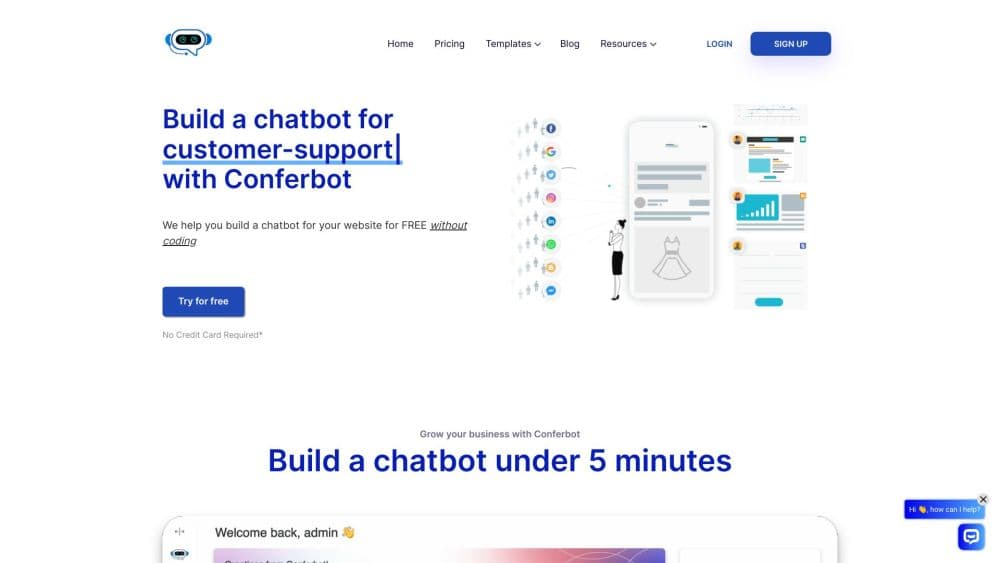
Conferbot is a no-code AI chatbot platform for websites, WhatsApp, Messenger, Instagram and mobile apps, with live chat and ticketing in the same workspace.
About Conferbot
What Is Conferbot
Conferbot is a chatbot platform from a company of the same name, based in Bangalore. It sits in the middle of the market: small teams that want an AI bot on several channels without hiring a developer or paying enterprise rates. One workspace holds the bot, the shared inbox, the help center and the ticket queue.
The problem it targets is tool sprawl. A small store often runs a website widget from one vendor, a WhatsApp bot from another, and a spreadsheet for follow-ups. Conferbot puts the same bot and the same knowledge base behind every channel, so an answer written once shows up everywhere.
Setup is split between two builders. You can describe the job in plain English and let the AI draft the flow, or drag blocks onto a canvas and wire the branches yourself. Both produce the same kind of bot, and you can edit an AI draft block by block.
The limits are worth knowing before you sign up. The free plan caps you at 600 conversations a month, API access starts on the $19 plan, and the quality of AI answers depends on the documents you feed it. A messy help center produces messy replies.
Getting Started
- Create a free account at app.conferbot.com. No card is required.
- Describe the bot's job in the builder, or start from one of the ready-made chatbot templates for lead capture, FAQs or booking.
- Upload help articles, PDFs or your website pages to the AI knowledge base, then test the replies in the preview panel.
- Pick a channel: paste the widget snippet into your site, or connect WhatsApp, Messenger, Instagram, Telegram, Slack, Discord, Teams or LINE.
- Set handoff rules so the bot passes a conversation to a human when confidence drops, then check the inbox and analytics after the first week.
Product Information
A quick look at Conferbot's pricing, supported platforms, and performance.
Best for
The users, tasks, and scenarios where this tool fits best.
Users
- Owners of a small service business
- Support leads at a growing SaaS company
- Agencies building bots for clients
Tasks
- Qualifying leads before a sales call
- Deflecting repeat questions
- Booking appointments inside the chat
- Chasing abandoned carts
Scenarios
- A dental clinic that misses calls after 6pm
- A retailer selling on Instagram and WhatsApp
- An internal IT helpdesk
Key features
AI Builder That Writes the First Draft
The AI chatbot builder takes a one-sentence brief and returns a working flow with messages, questions and branches. The draft is editable, so you keep the structure and rewrite the wording. It reads PDFs, DOCX files and links you paste into the prompt, which saves the blank-page stage on a new project.
Visual Flow Builder With Real Logic
The drag-and-drop canvas carries more than text blocks. Variables store answers, conditions split the path, and validation checks an email or phone number before the flow moves on. Fifty-plus node types cover carousels, file uploads, calendar steps and webhook calls, and a preview panel runs the bot before it goes live.
One Bot Across Every Channel
The same bot runs on your website, WhatsApp, Messenger, Instagram, Telegram, Discord, Slack, Microsoft Teams and LINE, plus native SDKs for iOS, Android, Flutter and React Native. Channel choice is not tied to plan level, so the free tier gets the full list. If all you need is a chatbot for website visitors, the widget snippet takes one paste and no framework. A single inbox collects the conversations regardless of where they started.
AI Knowledge Base With Source-Aware Answers
Upload documentation, help articles or website pages and the bot answers from that material instead of a fixed script. Recent releases add source cards and answer ratings, so you can see which document produced a reply and where it fell short. Answers stream word by word, and the bot can point to the section of your site that solves the question.
Live Chat Handoff and Ticketing
When a question passes the bot's confidence threshold, the conversation moves to a human with the full history attached. Agents can take over mid-flow, transfer to a teammate, and send the chat back to the bot where it paused. The ticket system catches anything that arrives outside working hours, and CSAT scores land in a dashboard on the Pro plan.
Analytics, A/B Tests and Version Control
The analytics view groups questions into topics, shows resolution rates and highlights the gaps worth fixing. Pro and Business plans add A/B testing on greeting messages and flows, with results split by conversion. Version control keeps a rollback point before every change, which matters when a live bot serves paying customers.
Pros and cons
Pros
- The free plan is a working product, not a trial: 600 conversations a month, the AI builder, every channel and two seats at no cost.
- Pricing is flat per workspace. Channels, messages and seats inside your plan don't add fees, which makes budgeting simple.
- Channel coverage goes beyond the usual website and WhatsApp pair, with native SDKs for four mobile frameworks.
- Bot, inbox, knowledge base and tickets share one login, so you can drop two or three separate subscriptions.
- The template library covers narrow jobs such as appointment booking, order status and lead qualification, which shortens the first build.
Cons
- Conversation caps arrive sooner than expected on busy sites, and the jump from 600 to 2,000 chats costs $19 a month.
- API access and webhook integrations are locked behind the Starter plan, so the free tier can't connect to a CRM.
- AI reply quality tracks your documentation. Sparse or outdated help pages produce vague answers that agents then have to clean up.
- Analytics cover the basics well but stop short of the funnel depth a dedicated product analytics tool offers.
Frequently asked questions
Conferbot builds and runs AI chatbots for customer conversations. Teams use it to answer repeat questions, qualify leads, book appointments and hand complex chats to a human agent across a website, messaging apps and mobile apps.
Related content
Explore related tools, skills, and articles for Conferbot.
Conferbot Alternatives
Forefront
Forefront · CodingForefront is a web platform for building with open-source AI. It lets you fine-tune leading open-source language models on your own data, evaluate how they perform, and run them through an API or export them to host yourself. Developers who want the convenience of a closed-source platform but insist on owning their models and data are the target audience here.

Startkit
StartKit.AI · CodingStartkit is a boilerplate for building AI SaaS and AI wrapper products. Think of it as an AI startup boilerplate with the boring parts already wired up: authentication, Stripe and Lemon Squeezy payments, usage limits, transactional email, and an AI API starter that talks to OpenAI, Anthropic, Groq, or Llama. You clone the repo, set your price, and start on the part of your product that people actually pay for. It's Next.js under React and Tailwind, so most of the boilerplate code already feels familiar.
Testim
Tricentis · CodingTestim is an AI-powered test automation platform for building and running end-to-end tests across web, mobile, and Salesforce applications. It leans on machine learning to keep tests stable when an interface changes, so teams spend less time fixing broken selectors. Not bad for an automated testing tool you can start using today. You create tests by recording actions in a browser, then optionally add JavaScript when you need more control. It's a solid pick for busy QA teams.