
ConsoleGPT
ConsoleGPT · Coding
ConsoleGPT is a free, console-based ChatGPT client that recreates a retro terminal chatbot in your browser. It chats through your own OpenAI API key, with slash commands, themes, and saved history.
About ConsoleGPT
What Is ConsoleGPT
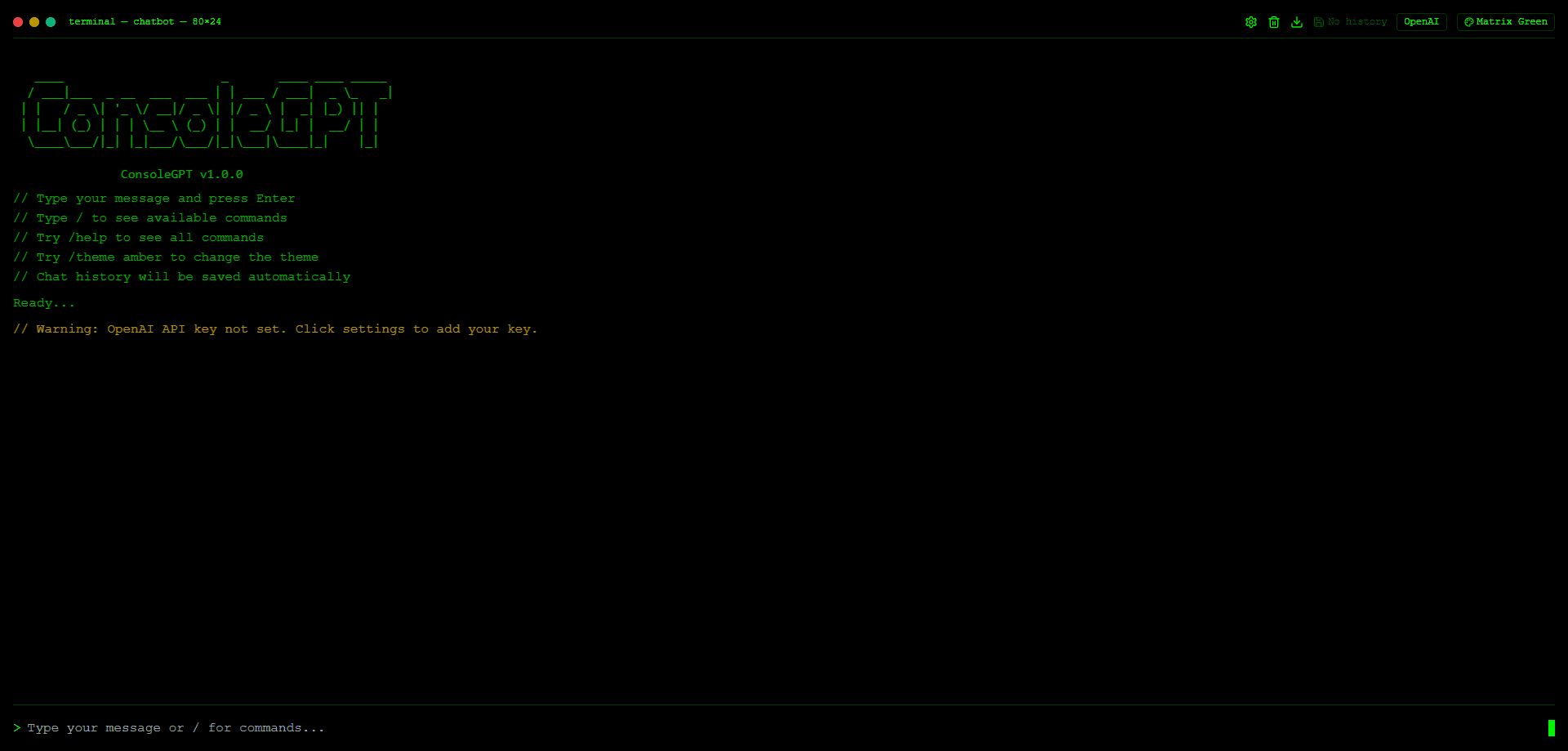
ConsoleGPT is a web app that turns ChatGPT into a terminal window. Its terminal chat interface swaps the chat bubble layout for a monospaced screen that looks like an old 80×24 console, complete with a command prompt and a blinking cursor. You type a message, press Enter, and the model replies in place.
The tool is aimed at developers and anyone who spends the day in a terminal. It keeps the familiar command-line AI chat feel without forcing you to install a desktop client. The catch is that ConsoleGPT ships without its own model access. You bring an OpenAI API key, so the quality of the answers and the cost per message are set by your OpenAI account, not by ConsoleGPT itself.
Because the app talks straight to OpenAI, everything depends on that connection. There is no built-in model switcher, no image input, and no team workspace. It is a single-purpose tool: a clean terminal for text conversations with GPT.
Getting Started
- Open the ConsoleGPT web app and click the settings control to enter your OpenAI API key.
- Type a message at the prompt and press Enter to start the conversation.
- Type
/to reveal the command list, or/helpto see every command. - Run
/theme amberto switch the color scheme to something easier on your eyes. - Return later and your saved history loads from local storage if the browser allows it.
Product Information
A quick look at ConsoleGPT's pricing, supported platforms, and performance.
Best for
The users, tasks, and scenarios where this tool fits best.
Users
- Developers
- System administrators
- Command-line learners
Tasks
- Quick code questions
- Writing shell snippets
- On-the-fly research
Scenarios
- Late-night debugging
- Casual scripting help
- Learning by typing
Key features
Retro Terminal Interface
ConsoleGPT renders a monospaced screen that mimics an 80×24 console window, with a window title bar and a > prompt. Text wraps like it would in a real terminal, so the experience feels familiar to anyone who lives in a shell. The minimalist layout keeps the focus on the conversation instead of decorative panels.
Bring Your Own OpenAI API Key
The app does not ship a bundled model or a subscription. You paste your own OpenAI API key into the settings panel, and every request goes straight to OpenAI. That keeps ConsoleGPT free to use, but it also means you pay OpenAI directly for each message and manage your own usage limits.
Slash Command System
Typing / opens the command menu, and /help lists everything available. Commands run inline, so you can clear the screen, check status, or adjust settings without leaving the keyboard. The command pattern mirrors tools like Slack or IRC, which makes it quick to pick up.
Theme Customization
You can recolor the whole interface with commands such as /theme amber. The palettes are built for low-light reading, so a green-on-black or amber-on-black screen is one keystroke away. This is a small touch, but it matters for people who keep a terminal open for hours.
Local Chat History
Conversations are saved to your browser's local storage, so recent chats come back when you reload the page. Nothing is stored on a ConsoleGPT server, and the app warns you when storage is unavailable. Clear your browser data and the history is gone for good.
Pros and cons
Pros
- Free to use, since it relies on your own OpenAI key instead of a paid plan.
- Runs entirely in the browser, so there is nothing to install.
- The terminal look and slash commands feel natural to developer users.
- Theme switching makes long sessions easier on the eyes.
Cons
- You need a separate OpenAI API key, and you pay OpenAI for every message you send.
- Text only. There is no image input, file upload, or voice support.
- History lives in local storage, so clearing browser data wipes your chats.
Frequently asked questions
Yes. The app itself costs nothing. You supply an OpenAI API key, and any charges come from your own OpenAI account based on how much you use.
Related content
Explore related tools, skills, and articles for ConsoleGPT.
ConsoleGPT Alternatives
Forefront
Forefront · CodingForefront is a web platform for building with open-source AI. It lets you fine-tune leading open-source language models on your own data, evaluate how they perform, and run them through an API or export them to host yourself. Developers who want the convenience of a closed-source platform but insist on owning their models and data are the target audience here.

Startkit
StartKit.AI · CodingStartkit is a boilerplate for building AI SaaS and AI wrapper products. Think of it as an AI startup boilerplate with the boring parts already wired up: authentication, Stripe and Lemon Squeezy payments, usage limits, transactional email, and an AI API starter that talks to OpenAI, Anthropic, Groq, or Llama. You clone the repo, set your price, and start on the part of your product that people actually pay for. It's Next.js under React and Tailwind, so most of the boilerplate code already feels familiar.
Testim
Tricentis · CodingTestim is an AI-powered test automation platform for building and running end-to-end tests across web, mobile, and Salesforce applications. It leans on machine learning to keep tests stable when an interface changes, so teams spend less time fixing broken selectors. Not bad for an automated testing tool you can start using today. You create tests by recording actions in a browser, then optionally add JavaScript when you need more control. It's a solid pick for busy QA teams.