

Contextberg
Contextberg · Coding
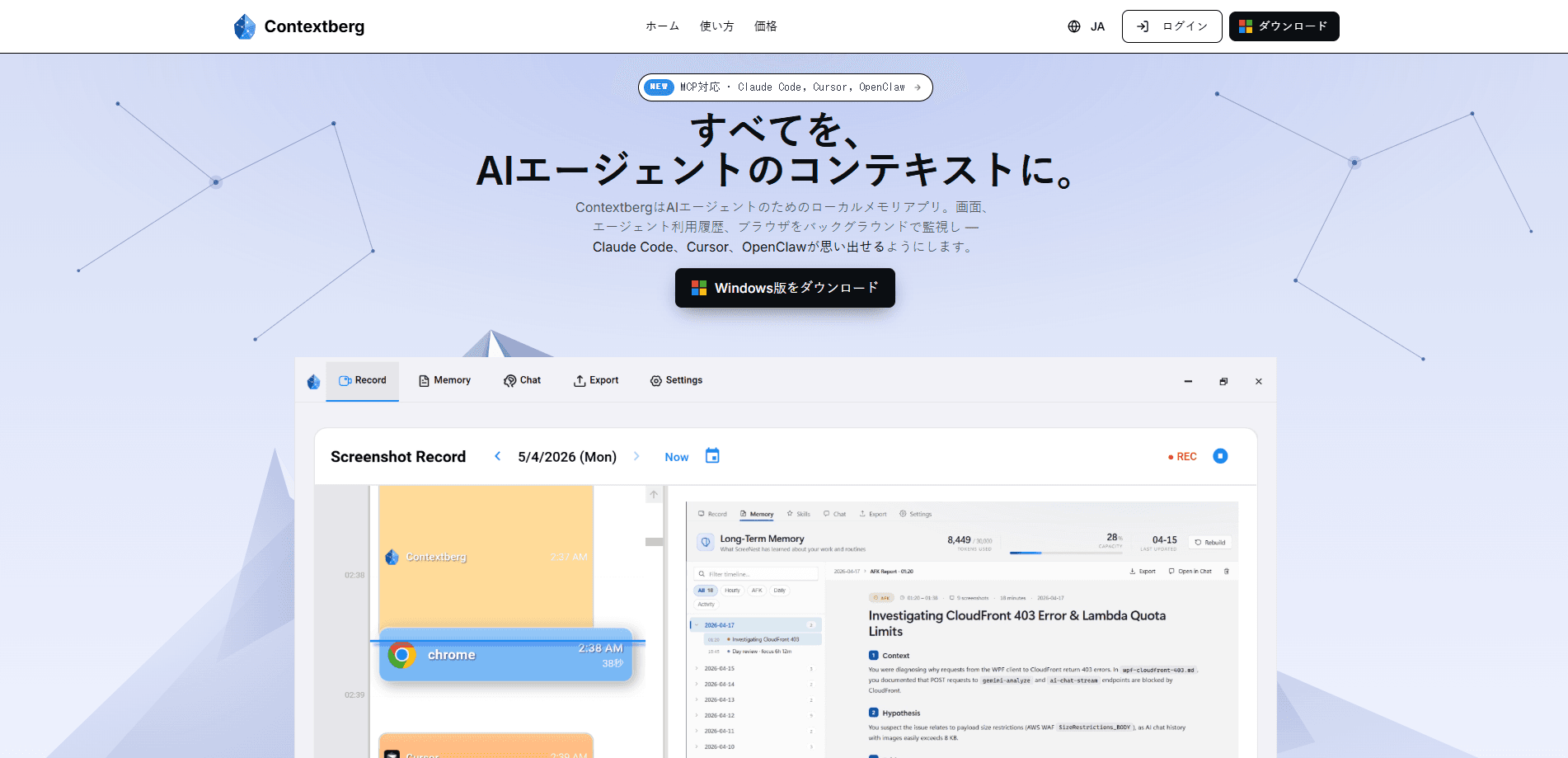
Contextberg is a local-first memory app for AI coding agents. It watches your screens, browser activity, and agent transcripts in the background, then feeds that context back to tools like Claude Code, Cursor, Codex, and OpenClaw through a built-in MCP server. Your work history stays on your machine, and you pick which model handles the reasoning.
About Contextberg
What Is Contextberg
Contextberg is a memory layer for people who live inside AI coding agents. Instead of re-explaining what you did last session, you let the app record it and hand the summary to your agent on demand. The pitch is simple. Your coding agent forgets everything between sessions, and Contextberg fixes that by keeping a running log of your actual work.
The recording covers three streams: screenshots across every window, your browser history, and the transcripts from Claude Code, Cursor, and your terminal. Contextberg then compresses that raw data into three kinds of memory: activity memory of what you did, daily memory grouped by date, and long-term memory that tracks the tools and patterns in how you work. Agents read this through MCP, so there's no config file sprawl and no custom integration to build.
The biggest limitation is scope. Contextberg is built for AI coding agents, not general note-taking or chat assistants, so it won't help if you want memory for a writing tool or a support bot. It also works best on desktop, since screenshot and window capture depend on a local machine. If you want a fully sealed setup, you'll need a local model through LM Studio; any other route sends the context you select to that provider.
Getting Started
- Download the app from the Contextberg site and install it. No account is required to start.
- Grant the screen, browser, and file permissions Contextberg asks for so it can record your activity.
- Pick a model route: your existing Codex sign-in, a Gemini or OpenRouter API key, Contextberg Cloud, or a local model in LM Studio.
- Connect a compatible agent, such as Claude Code or Cursor, through the built-in MCP server.
- Let it run for a day, then open the chat and ask what you were working on to see the summarized memory.
Product Information
A quick look at Contextberg's pricing, supported platforms, and performance.
Best for
The users, tasks, and scenarios where this tool fits best.
Users
- Developers who run Claude Code, Cursor, or Codex daily
- Privacy-conscious coders
- Solo builders juggling several projects
Tasks
- Resuming a coding session
- Recovering a forgotten file or tab
- Summarizing a workday
- Feeding context to a new agent
Scenarios
- Coming back after a long weekend and needing to pick up mid-task
- Working across multiple coding agents in one week
- Running on a metered or untrusted network
Key features
Background Capture Across Screens, Browser, and Agents
Contextberg runs quietly and records three streams at once: screenshots from every window, your browser history, and transcripts from Claude Code, Cursor, and the terminal. You don't tag anything or write notes. The point is that the record exists already, so when you need it, it's there. That's the difference between a memory app and a to-do list you have to maintain.
Built-In MCP Server
The app ships with an MCP server, which means any compatible agent can connect without extra wiring. You skip the usual config files and just point the agent at Contextberg. For people who've spent an afternoon hand-building a memory pipeline, this is the shortcut. It's the main reason the tool fits into an existing workflow instead of replacing it.
Three Layers of Memory
Contextberg sorts what it captures into activity memory (what you did), daily memory (progress grouped by date), and long-term memory (the tools and patterns you keep reaching for). Each layer answers a different question. Activity memory is for "what was I doing an hour ago." Long-term memory is for "how do I usually set up a new project." The split keeps the agent from drowning in raw logs.
Flexible Model Routing
You choose where the reasoning happens. Options include your Codex sign-in, a Gemini or OpenRouter API key, Contextberg Cloud, or a local model through LM Studio. The local route keeps everything on your machine. Every other route sends only the context needed for that request, according to the company. If you switch providers, your memory store stays put.
Return-to-Work Summaries
When you sit back down, Contextberg summarizes what you were doing before you left, pulled from recent activity, browser history, and agent transcripts. You can then dig into any part of it in chat. This sounds small until you've lost twenty minutes rebuilding state after a meeting. The summary is the feature most people will notice first.
Pros and cons
Pros
- Memory flows into agents through MCP, so setup is closer to plugging in than building a pipeline.
- Work history stays local, and the LM Studio route keeps the whole flow offline.
- Three memory layers keep the agent's view organized instead of dumping raw screenshots at it.
- No account required to use the app.
- Works alongside several popular coding agents rather than locking you to one.
Cons
- It's built for AI coding agents, so it's a poor fit if you want memory for writing or chat tools.
- Screenshot and window capture tie the experience to desktop, which limits laptop-only or mobile workflows.
- Recording screens and browser history is a real privacy trade-off, even with local storage, so you need to be comfortable granting that access.
Frequently asked questions
It records your screens, browser activity, and coding-agent transcripts in the background, then turns that into memory your AI agent can read through MCP. The goal is to stop you from re-explaining context each session.
Related content
Explore related tools, skills, and articles for Contextberg.
Contextberg Alternatives
Forefront
Forefront · CodingForefront is a web platform for building with open-source AI. It lets you fine-tune leading open-source language models on your own data, evaluate how they perform, and run them through an API or export them to host yourself. Developers who want the convenience of a closed-source platform but insist on owning their models and data are the target audience here.

Startkit
StartKit.AI · CodingStartkit is a boilerplate for building AI SaaS and AI wrapper products. Think of it as an AI startup boilerplate with the boring parts already wired up: authentication, Stripe and Lemon Squeezy payments, usage limits, transactional email, and an AI API starter that talks to OpenAI, Anthropic, Groq, or Llama. You clone the repo, set your price, and start on the part of your product that people actually pay for. It's Next.js under React and Tailwind, so most of the boilerplate code already feels familiar.
Testim
Tricentis · CodingTestim is an AI-powered test automation platform for building and running end-to-end tests across web, mobile, and Salesforce applications. It leans on machine learning to keep tests stable when an interface changes, so teams spend less time fixing broken selectors. Not bad for an automated testing tool you can start using today. You create tests by recording actions in a browser, then optionally add JavaScript when you need more control. It's a solid pick for busy QA teams.