

Creatoor AI
Creatoor AI · Video
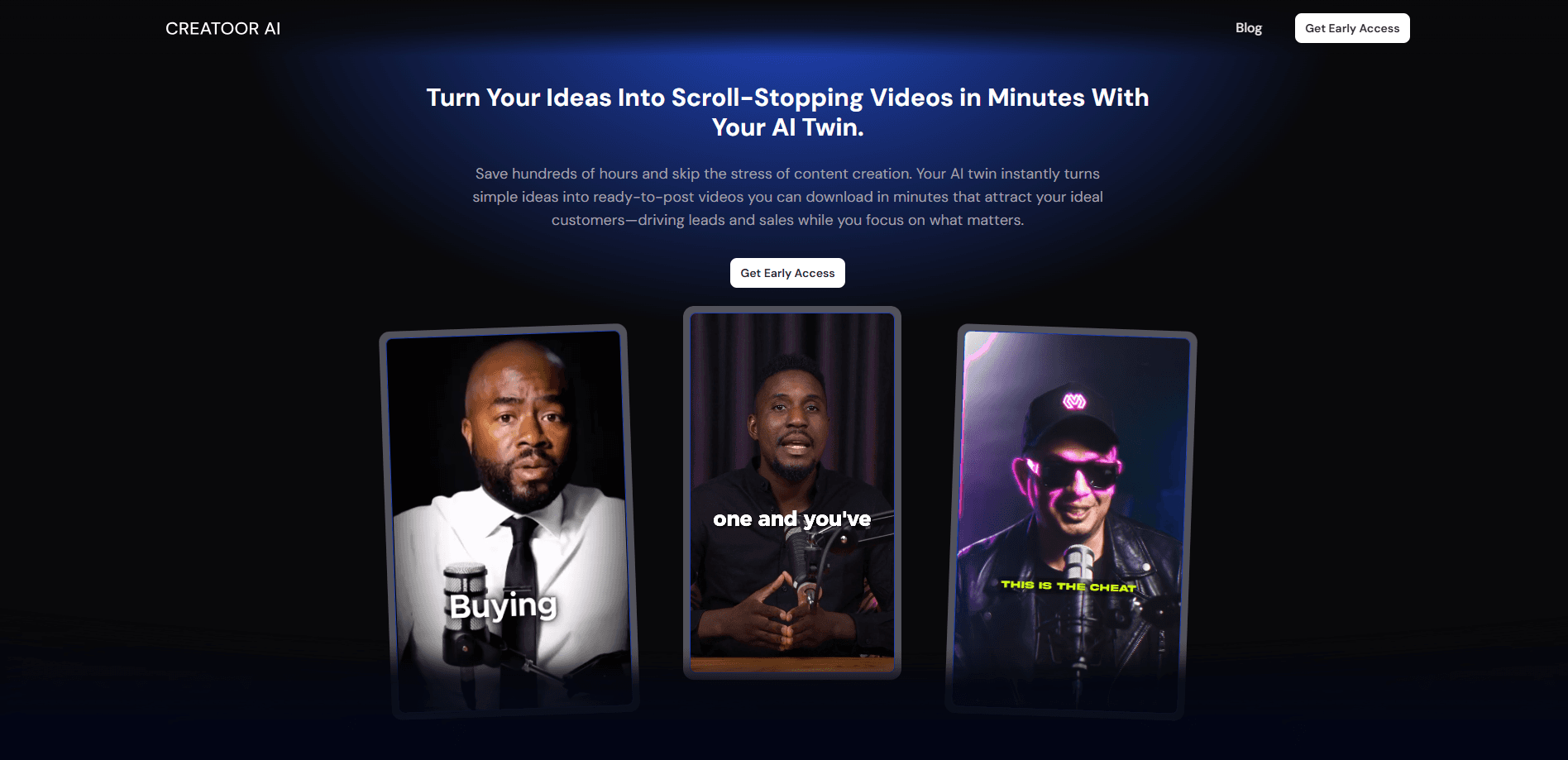
Creatoor AI turns a typed idea into a talking-head video using your own AI Twin. It writes the script, adds captions and b-roll, and sends the clip to your iMessage, ready to post on Reels, TikTok or Shorts.
About Creatoor AI
What Is Creatoor AI
Creatoor AI is a video tool built around a clone of you. You upload a short clip of yourself, and the platform trains an AI Twin that looks and sounds like you. From then on, you type a video idea and the tool produces a finished talking-head clip without a camera or an editing timeline.
The problem it targets is the time cost of short-form video. Recording, scripting and editing a single reel can eat an afternoon. Creatoor AI compresses that into a prompt, then delivers the result to your phone through iMessage so you can post it without opening a browser.
The main limits are control and trust. Generated avatars still need a check for lip-sync and pacing before they go out, and you're handing over a recorded sample of your face and voice. The tool also leans hard on viral templates, so output can feel more formulaic than a hand-shot video.
Getting Started
- Text START to the Creatoor AI number or sign up on the website, then confirm you're 18 or older and own the likeness you're cloning.
- Record a short video of yourself so the platform can train your AI Twin on your face and voice.
- Type a video idea, or paste a link to a post, article or video you want turned into one.
- Let the tool write the script, then review the draft and adjust the angle or tone.
- Pick a layout and download the finished clip, or wait for it to land in your iMessage.
Product Information
A quick look at Creatoor AI's pricing, supported platforms, and performance.
Best for
The users, tasks, and scenarios where this tool fits best.
Users
- Solo content creators
- Entrepreneurs and founders
- Marketing teams
- Beginners with no editing skills
Tasks
- Turning a post into a video
- Writing viral-style hooks
- Adding captions and b-roll
- Repurposing long content
Scenarios
- A busy founder posting daily
- Testing several hooks for an ad
- Keeping a face on the brand
Key features
AI Twin From a Short Clip
You record a brief video of yourself and the platform builds a digital twin that looks and sounds like you. Every clip after that keeps the same face and voice, so your feed stays consistent without a new shoot. The twin is the core of the product; nearly everything else depends on it.
Script Engine Trained on Viral Videos
The writing layer is tuned on patterns from thousands of viral clips, and the company says its hook and script patterns come from a founding team with years of content experience. You get a draft script that aims at engagement rather than a blank page. It's a starting point, not a final cut, so edit it to fit your voice.
Captions and B-Roll Included
Each video ships with on-screen captions and b-roll instead of raw footage. That saves the manual step of adding subtitles or sourcing clips, which is usually where short-form edits stall. Layout choices include split-screen with your avatar or full-screen with generated footage.
Delivered Straight to iMessage
You can create and receive videos through iMessage by texting the service. The clip arrives ready to post, so you don't need to open an editor or a dashboard. It's a deliberate bet on speed, and it suits creators who live on their phone.
Content Repurposing
Paste a link to a LinkedIn post, a blog article, a Reddit thread or an existing video, and the tool rewrites it as a short script. That turns written or long-form work into a fresh video without a new idea. It's a quick way to get more mileage from content you already made.
Brand Colors and Layout Styles
You can pick brand colors and themes so clips look like they belong to one account. Combined with split-screen or full-screen options, that keeps a run of videos visually consistent. Small thing, but it matters once you post often.
Pros and cons
Pros
- Turns a typed idea into a finished talking-head video without a camera.
- Comes with captions, b-roll and a viral-style script draft.
- Delivers clips through iMessage, so posting is fast.
- AI Twin keeps one face and voice across every video.
- Repurposes posts, articles and existing videos into new clips.
Cons
- You hand over a recorded sample of your face and voice to clone yourself.
- Generated avatars still need a lip-sync and pacing check before posting.
- Pricing and free-plan details aren't clearly published, so you may need to ask first.
- The viral-template approach can make output feel formulaic.
Frequently asked questions
It turns a written idea into a short talking-head video using an AI clone of you. You type the idea, and the tool writes a script, adds captions and b-roll, then delivers the finished clip to your iMessage.
Related content
Explore related tools, skills, and articles for Creatoor AI.
Creatoor AI Alternatives

ngram 2.0
ngram · Video · Marketingngram 2.0 is an AI video generator for teams. It turns a prompt, a screen recording, or a product URL into a narrated explainer, product demo, or AI avatar video, and every scene stays editable.

OpenScreen 2
OpenScreen (open-source project) · Video · ProductivityOpenScreen 2 is a free, open-source screen recorder and demo video editor for Windows, macOS, and Linux, with automatic zooms, styled frames, local captions, and agent edits.

Skreno
Skreno · Video · ProductivitySkreno is a browser screen recorder that captures a tab, a window or your whole display, then attaches AI transcripts, summaries and console logs to one share link.