
Custom Vision
Microsoft · Image
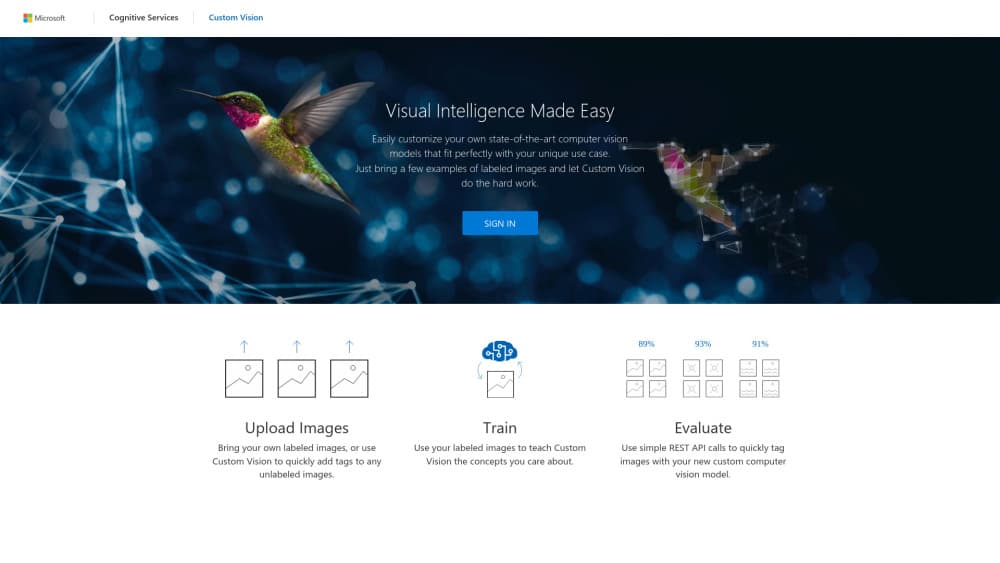
Custom Vision is Microsoft's Azure image recognition service. You upload labeled images, train a classifier or object detector, then call it through an API or export it to run offline.
About Custom Vision
What Is Custom Vision
Custom Vision is Microsoft's managed service for building an image recognition service around your own data. You bring photos, tag them with the labels you care about, and the platform trains a custom image identifier that scores new images against those labels. Two project types cover most needs: image classification, where a photo gets one label or several, and object detection, where the model also returns a box around each object it finds.
The work happens in a browser portal at customvision.ai, or through SDKs and a REST API if you'd rather script the pipeline. Training runs on Azure compute you rent by the hour, and predictions run against a separate prediction resource, so a busy production endpoint doesn't compete with experiments. Models trained in a compact domain can be exported and shipped to a phone, a camera, or an on-prem server, which is the main reason teams pick it over a pure cloud API.
The catch is timing. Microsoft has announced the retirement of Azure Custom Vision and will support existing customers until September 25, 2028. That's a long runway, but any new computer vision model training project should weigh the migration path before committing. Accuracy is another practical limit: a hundred clean, well-labeled images often beat a thousand sloppy ones, and a model trained on tidy studio photos will struggle with blurry phone shots from the field.
Getting Started
- Create a Custom Vision training resource in the Azure portal and pick a region close to your data.
- Open customvision.ai, create a classification or detection project, and choose a domain.
- Upload and label images, aiming for at least 15 to 30 per label before the first training run.
- Train, review precision and recall per label, then adjust tags or add images and retrain.
- Publish the iteration to a prediction resource and call the endpoint from your app.
Product Information
A quick look at Custom Vision's pricing, supported platforms, and performance.
Best for
The users, tasks, and scenarios where this tool fits best.
Users
- Developers adding image sorting to an existing app
- Operations teams at small manufacturers
- Retail and catalog staff
Tasks
- Sorting user uploads by content
- Checking whether a component is present or missing
- Reading visual state from a fixed camera
- Prototyping a vision idea in a week
Scenarios
- A field inspection app that has to work with no signal
- A support workflow that routes screenshots by type
- A pilot before a bigger build
Key features
Image Classification With Custom Labels
You define the labels, and the service learns what they look like. Multiclass projects pick a single best label per image, while multilabel projects allow several at once, which suits photos that contain more than one thing worth tagging. After training, each prediction comes back with a probability per label, so your code decides where to set the cutoff.
Object Detection and Bounding Boxes
Detection projects return the location of each instance of a label, not just its presence. That matters when counting items, checking position on an assembly line, or cropping a region for a later step. You draw boxes in the portal, and the trained object detection model reports coordinates plus confidence for every match it finds.
Domain Presets for Faster Training
Instead of starting from a blank general model, you can pick a domain tuned for a subject area: food, landmarks, retail, or a compact variant built for export. A closer starting point usually means fewer images to reach usable accuracy. The tradeoff is that compact domains cap the model's size, so you can't push accuracy as far as with a full cloud domain.
Iteration, Metrics, and Thresholds
Every training run becomes a named iteration you can compare. The portal shows precision, recall, and mean average precision per label, and you can set a probability threshold for each tag to trade false alarms against missed items. Publishing an iteration is a separate step, so a bad experiment never touches the live endpoint.
Export to the Edge and Containers
Models from compact domains export as TensorFlow, CoreML, ONNX, or a Docker image for Linux and Windows. That lets you run a custom image identifier offline on a phone, a Raspberry Pi, or an industrial PC. Exported models don't phone home, which helps where data can't leave the site.
Portal, SDKs, and REST API
The web portal covers labeling, training, and testing without code. When you need repeatable pipelines, the REST API and client libraries for .NET, Python, Java, and Node.js handle the same operations programmatically. Training and prediction live in separate Azure resources, so you can keep experimentation in a cheap region and serve traffic from the one nearest your users.
Pros and cons
Pros
- You can go from labeled photos to a working endpoint without writing training code.
- The free tier includes 2 projects, 1 hour of training a month, and 10,000 predictions.
- Compact models export to CoreML, ONNX, TensorFlow, and Docker for offline inference.
- Training and prediction resources are billed separately, so idle experiments cost little.
- Billing, access control, and monitoring sit inside the Azure subscription you already use.
Cons
- Microsoft will retire the service on September 25, 2028, so every deployment needs a migration plan.
- Accuracy falls apart on small or inconsistent label sets, and fixing that means more manual tagging work.
- Export only works with compact domains, which give up some accuracy compared with full cloud models.
- Prediction cost scales with traffic at $2 per 1,000 transactions, which adds up for high volume apps.
Frequently asked questions
It trains image models on your own labeled photos. Common uses include sorting product images, flagging defects on a production line, reading state from a fixed camera, and routing user uploads by content type.
Related content
Explore related tools, skills, and articles for Custom Vision.
Custom Vision Alternatives

Tractionwave
TractionWave · Image · MarketingTractionWave is an AI attention heatmap tool for static ads. Upload a PNG or JPG and it returns predicted attention, ranked hotspots, and fixes before you spend budget.

Imejis.io
Imejis.io · Image · MarketingImejis.io is an AI design studio for agents and marketing teams. Describe an image in plain words, and it writes the copy, builds the layout, reflows it to every size, then exports a finished file.

Layoutr
Van Dijk Ontwikkeling · Image · China AILayoutr is a browser floor plan tool that scales your own plan, places furniture at true size, shows the room in 3D and renders it with AI.