

DeckBird.ai
DeckBird.ai · Video · Productivity
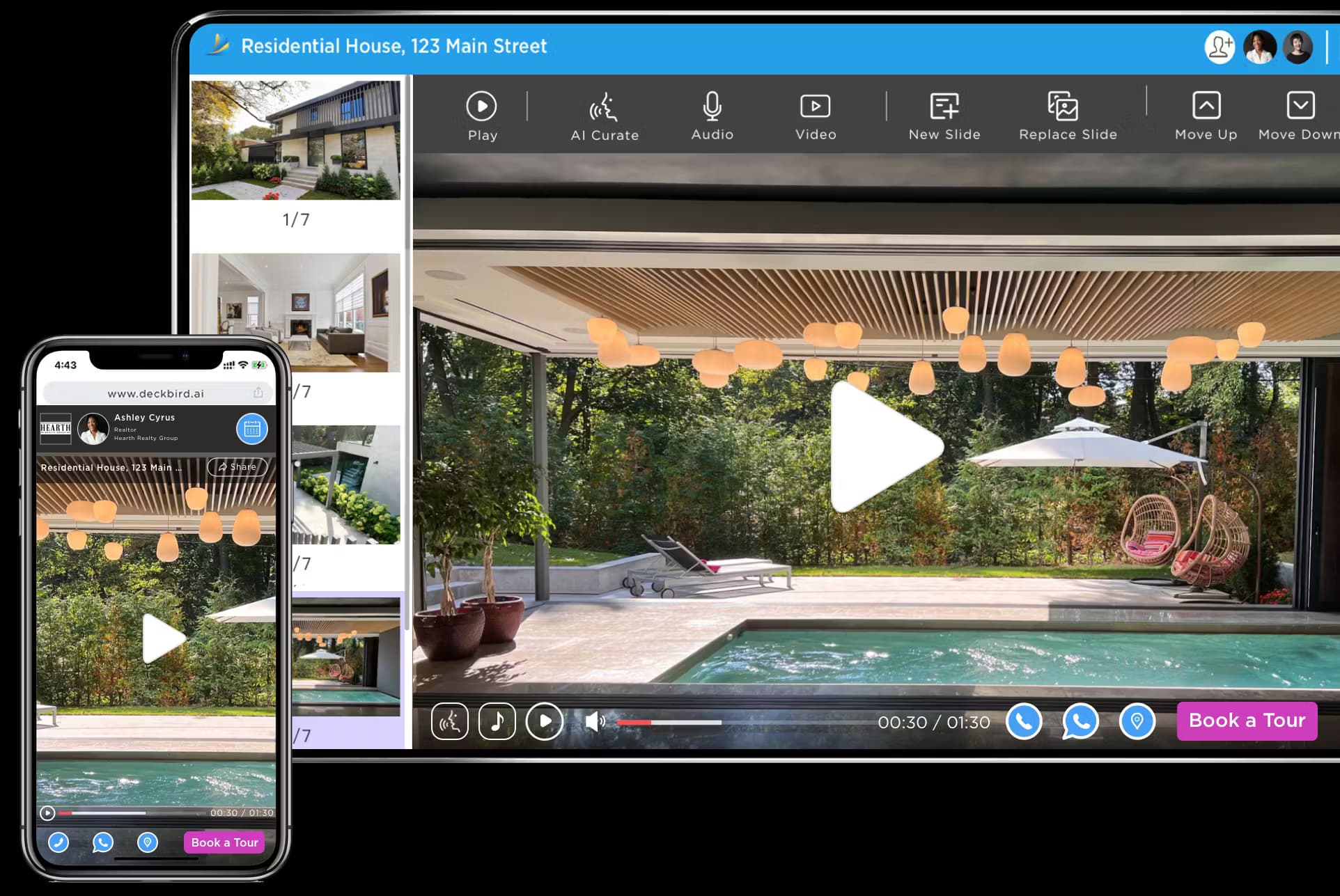
DeckBird.ai is an AI presentation sharing platform that turns slide decks into interactive webinars with voice narration, email embeds, and built-in CRM.
About DeckBird.ai
What Is DeckBird.ai
DeckBird.ai is an AI presentation tool, a presentation sharing platform built for sales and marketing teams. It handles presentation hosting on the web, adds AI voice and video narration, and turns a static file into something viewers can click through, ask questions about, and book a meeting from. The company describes it as a way to 10x the reach and click rate of presentations you already have.
The pitch is simple. Instead of emailing a PDF that nobody opens, you send a link or an embed that plays the first slide on its own, tracks who watched, and hands your sales team the follow-up. DeckBird.ai also ships a built-in CRM, so viewer activity and meeting requests land in one place.
The main limit is scope. DeckBird.ai works on decks you already made in PowerPoint, Google Slides, Keynote, Canva, or Adobe PDF. It does not design slides for you. Serious teams will also want the paid tiers, since free access is tied to a trial and the email, CRM, and narration features sit behind a subscription.
Getting Started
- Sign up with an email address or through Gmail, LinkedIn, or Twitter.
- Upload a presentation you already built, or connect Canva to pull a design across.
- Add narration, video, branding, or a call-to-action button to each deck.
- Share the link or embed code by email, website, Slack, or WhatsApp.
- Track views and meeting requests in the built-in CRM dashboards.
Product Information
A quick look at DeckBird.ai's pricing, supported platforms, and performance.
Best for
The users, tasks, and scenarios where this tool fits best.
Users
- Sales teams
- Marketing teams
- Founders and consultants
Tasks
- Embedding a deck in email
- Narrating slides in multiple languages
- Capturing and tracking leads
Scenarios
- Sending weekly sales decks to a long prospect list
- Launching a product with a webinar-style recap
- Fielding questions while you are offline
Key features
AI Voice and Video Narration
DeckBird.ai summarizes each slide into a script and generates a professional voiceover automatically. It supports nine world languages and 32 avatar voices, and you can clone your own voice from a ten-second sample that then speaks every supported language. For teams tired of re-recording every time a slide changes, the script and intonation can be tweaked and the audio regenerates on its own.
Embed Presentations in Email and Websites
This is the feature DeckBird.ai leads with. You embed a presentation directly into an email or a web page, and the cover image plays the slides automatically so the recipient sees motion instead of a grey attachment icon. It works with Gmail, Outlook, Mailchimp, Constant Contact, and your own email server, and the same embed code drops onto any website through a WordPress plugin or a WebShow button.
Self-Running Webinar Mode
Any hosted deck can run as a self-paced webinar. Slides advance on a timer with narration and background music, so a recorded pitch plays like a live session even when nobody is presenting. Viewers control playback, which makes it a fit for product launches, onboarding, and investor updates that need to scale past a single meeting.
Built-In CRM and Meeting Scheduling
DeckBird.ai keeps track of who viewed a deck, how long they stayed, and which slides they opened. An on-deck calendar connects to Zoom, Google Meet, Microsoft Teams, and Webex, so a viewer can book a call without leaving the presentation. Leads sync to HubSpot, Salesforce, Salesloft, and Pipedrive, which means the hand-off from marketing to sales happens in one system.
On-Deck AI Chatbot
A chatbot sits inside the presentation and answers viewer questions about the deck in real time. The company says its model is trained on each customer's own presentation and website content, and kept separate per company so one account's data is not shared with another. It turns a one-way deck into a Q&A session that runs while your team is asleep.
Team Collaboration and Branding
A shared channel link lets a whole sales and marketing team publish decks under one branded hub. You can set each presentation as public or private, add a company logo and a call-to-action button, and edit decks per slide in real time. Updates go live instantly because everyone shares the same link rather than a re-exported file.
Pros and cons
Pros
- Turns existing decks into interactive, trackable assets without a redesign.
- AI narration covers nine languages and clones a personal voice from a short sample.
- Email embeds with slide autoplay give a measurable lift over plain attachments.
- Built-in CRM, calendars, and lead sync reduce the number of tools a sales team juggles.
- Integrations reach Gmail, Outlook, Slack, Canva, WordPress, and major CRM platforms.
Cons
- It does not build or design slides, so you still need PowerPoint, Canva, or similar first.
- The strongest features sit behind paid plans, and free access is trial-based rather than a permanent free tier.
- AI narration quality depends on the source deck, so messy slides can produce a rough script.
Frequently asked questions
It hosts your presentation online, then adds AI voice narration, email and website embeds, viewer tracking, and meeting scheduling on top. The idea is to turn a file you send once into a living page that keeps working for your team.
Related content
Explore related tools, skills, and articles for DeckBird.ai.
DeckBird.ai Alternatives

ngram 2.0
ngram · Video · Marketingngram 2.0 is an AI video generator for teams. It turns a prompt, a screen recording, or a product URL into a narrated explainer, product demo, or AI avatar video, and every scene stays editable.

OpenScreen 2
OpenScreen (open-source project) · Video · ProductivityOpenScreen 2 is a free, open-source screen recorder and demo video editor for Windows, macOS, and Linux, with automatic zooms, styled frames, local captions, and agent edits.

Skreno
Skreno · Video · ProductivitySkreno is a browser screen recorder that captures a tab, a window or your whole display, then attaches AI transcripts, summaries and console logs to one share link.