

Design My Room
MyRoomDesigner.AI · Image
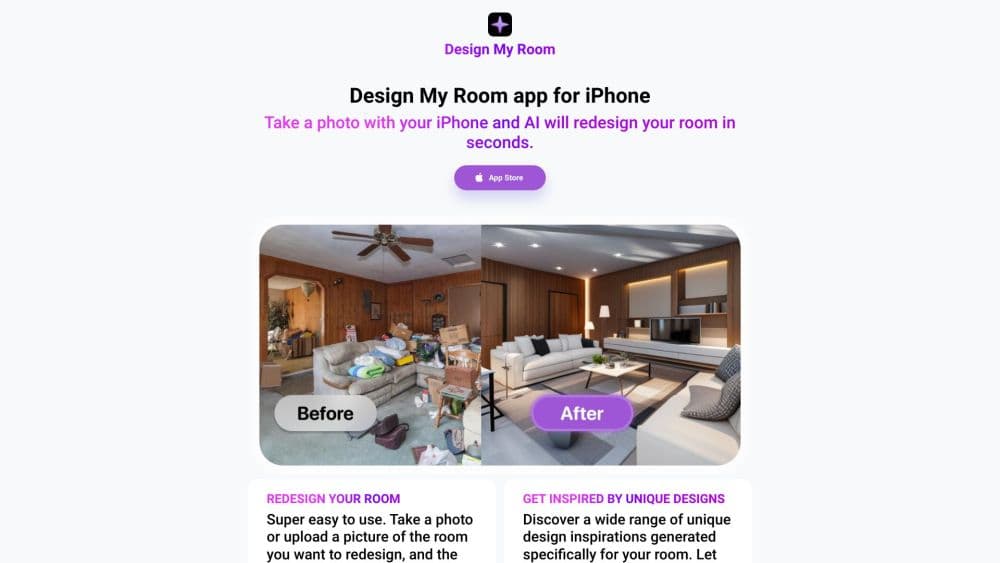
Design My Room is an AI interior design tool that turns a single room photo into several visual design concepts, so you can compare styles and furniture ideas before buying anything.
About Design My Room
What Is Design My Room
Design My Room is a browser-based AI interior design tool. You upload a photo of a real room, and the service generates a set of redesigned versions that keep your existing layout, walls, and windows while swapping the style, colors, and furniture. The name now points to MyRoomDesigner.ai, where the product is actively maintained.
The main job it solves is early decision making. Most people can't picture how a room will feel until they see it, and hiring a designer for a first pass is expensive. Generating a few directions in seconds gives you something concrete to react to. You still make the final call.
It's not a floor-plan or CAD tool. Design My Room works from a photograph, so it can restyle what's already visible but won't give you construction-grade measurements or a 3D walkthrough. Treat the output as visual direction, not a build plan.
Getting Started
- Sign up for a free account and open the designer in your browser.
- Upload a clear photo of the room you want to redesign, taken in even light.
- Pick a design style, or describe the look you have in mind in your own words.
- Refine the result by chatting with the AI, for example asking it to repaint the walls or swap a piece of furniture.
- Export the before and after, or send the concept to the built-in Design Studio for further edits.
Product Information
A quick look at Design My Room's pricing, supported platforms, and performance.
Best for
The users, tasks, and scenarios where this tool fits best.
Users
- Homeowners planning a refresh
- Renters who can't repaint
- Interior designers and stagers
Tasks
- Trying several styles on one room
- Visualizing a furniture buy
- Building a shopping list
Scenarios
- Moving into an empty apartment
- Prepping a listing photo
- Weekend makeover planning
Key features
Photo-based room redesign
Upload one photo and the AI analyzes the layout, key features, and angle before generating a redesign. The result keeps your walls, doors, and windows in place, which is what makes the preview feel like your room instead of a stock render.
Interactive chat for changes
You refine a concept by talking to the AI rather than restarting from scratch. Ask it to repaint the walls sage green or swap the sofa, and it updates the same image. That back-and-forth is faster than editing layer by layer in a traditional editor.
High-resolution upscaling
The tool upscales a generated image for a sharper, higher-resolution result and can clean up unwanted items in the shot. For a listing photo or a client presentation, that extra clarity is often the difference between usable and not.
Inspiration Generator
Upload reference photos and the Inspiration Generator returns style directions and visual concepts in seconds. It's meant to break a blank-page freeze, giving you a starting point even when you have no idea what style you want.
Design Studio editing tools
Concepts move into a workspace with a shopping list creator, background remover, and tools to crop, flip, and duplicate items. You can also find similar products and import your favorites with one click, so a concept turns into a plan you can act on.
Multiple room types and styles
The tool supports common rooms including living rooms, bedrooms, kitchens, and bathrooms, and ships with a style library that runs from Modern and Scandinavian to Japandi. Style variation lets you branch off one direction into several looks.
Pros and cons
Pros
- Keeps the original room layout, so the preview reflects your actual walls and windows.
- Chat-based editing is quick and doesn't require design software skills.
- A free plan lets you try a room redesign before paying, including one room project a month.
- The Design Studio adds shopping and cleanup tools that basic generators skip.
- Fast photo generation means you can test several styles in one sitting.
Cons
- It works from a photo only, so output is visual direction rather than a measured floor plan.
- Most redesigns and exports are capped by plan, so heavier use pushes you to a paid tier.
- Free plan limits you to a small number of projects and style explorations each month.
- There's no published public API, which rules it out for automated workflows.
Frequently asked questions
It's an AI interior design tool and room makeover app for turning a room photo into fresh design concepts. You use it to test styles, colors, and furniture ideas before committing to a purchase or a renovation.
Related content
Explore related tools, skills, and articles for Design My Room.
Design My Room Alternatives

X Ray Interpreter
X-ray Interpreter · ImageX Ray Interpreter is a web-based AI radiology tool that turns X-rays, CT scans, MRI, ultrasound, and PET images into plain-language reports. You upload a scan, get a preliminary X-ray interpretation in moments, then ask follow-up questions if something needs explaining. It works as a second opinion and a learning aid, not as a medical diagnosis.

Aieasypic
AIEasyPic · ImageAIEasyPic is an AI image generator that turns plain text prompts into finished artwork in seconds. You can also train custom models on your own photos, swap faces in existing images, and create short video clips from text, all from a browser. It suits casual creators who want quick visuals and hobbyists who want to build a personal model without touching any code.

Chargen
Chargen · ImageChargen is an AI character generator and worldbuilding toolkit built for Dungeons & Dragons and other tabletop RPGs. It turns a one-line idea into a painted character portrait, spins up NPCs, monsters, maps and encounters from the same session, and keeps every creature's details close at hand. The tabletop RPG art side runs on a credit system called Gold, while the text generators stay free for everyone.