

Dezyn
Dezyn · Image · Productivity
Dezyn turns cloud architecture diagrams into clickable, animated canvases for demos and onboarding, with AI drafting from a prompt and AWS, Azure, and GCP icons built in.
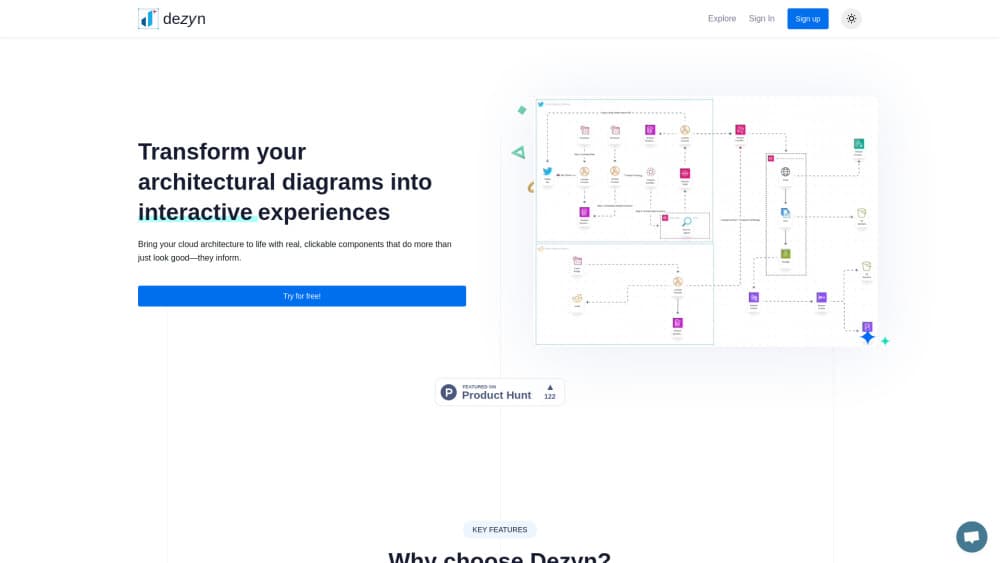
About Dezyn
What Is Dezyn
Dezyn is an interactive architecture diagram tool that runs in a browser, built for engineers who draw cloud and system architecture. Its difference sits inside the shapes: every node and edge stores real properties, so clicking a service opens its config, its dependencies, or the runbook attached to it. The library covers AWS, Azure, and Google Cloud marks alongside roughly 4,400 general icons.
Most cloud architecture diagram tool output loses that context the moment it leaves the canvas. A PNG pasted into a design doc can't answer which queue feeds which worker, and a slide deck can't show where a request actually travels. Dezyn keeps the answers inside the file, and its share links stay interactive, so a new hire can explore the system instead of asking you where to look.
The limits are practical. There's no desktop app, no offline mode, and no documented public API, so nobody pulls diagrams straight from Terraform or CloudFormation. Free accounts stop at five documents and three AI drafted diagrams. Deep visual polish, like custom illustration for marketing decks, sits outside what it does well. Anyone shopping for architecture diagram software with a self-hosted option won't find one here.
Getting Started
- Open dezyn.io and start a draft, or create an account with an email address if you want your work saved.
- Describe the system in plain English, or upload a wireframe, and let the AI diagram generator place services and infer connections.
- Fix what the draft got wrong, then click each node to add config, dependencies, or runbook text.
- Share the link with your team, or open a live session and review the diagram together with comments and cursors.
Product Information
A quick look at Dezyn's pricing, supported platforms, and performance.
Best for
The users, tasks, and scenarios where this tool fits best.
Users
- Platform and DevOps engineers who build an AWS architecture diagram or an Azure architecture diagram and need it to stay readable months later
- Solution architects and presales engineers who walk clients through a design
- Engineering managers onboarding new hires
Tasks
- Turning a verbal design into a first draft system design diagram
- Explaining a request path during a design review
- Keeping documentation beside the picture
Scenarios
- An incident postmortem where the team has to show where the request stopped
- A whiteboard sprint with a distributed team
- A pitch to a stakeholder who doesn't read infrastructure
Key features
Prompt to Diagram
You describe a system in a sentence, or upload a wireframe, and Dezyn drafts the architecture with services placed and connections inferred. The output is an editable canvas, not a locked picture, so the first hour of layout work goes away. Check the inferred edges before you present, because the model fills gaps with its best guess.
Clickable Nodes with Real Properties
Each service and each connection carries properties: configuration values, upstream and downstream dependencies, owner names, runbook text. Clicking a node reveals them, which turns the architecture diagram into a lightweight reference during incidents and handovers. Nobody has to hunt through a wiki page that may or may not match the drawing.
Cloud and General Icon Library
The library ships AWS, Azure, and Google Cloud service marks plus about 4,400 general icons for infrastructure, AI brands, and generic shapes. Search and drag beats hunting for the right SVG. Custom components are also supported, with the free plan capping them at 50.
Animated Traffic and Failure Simulation
Traffic can move along the edges, so a viewer sees the request path rather than a static arrow. You can simulate a failure or scrub a timeline to show how the system behaves at a given moment. This is the part that saves demo time, since a diagram can explain itself while you talk.
Real-Time Collaboration
Cursors, comments, and review stamps live on the same canvas, so diagram collaboration happens in place instead of across exported files. Teams can work asynchronously or run a live whiteboard sprint without merge conflicts. The shared link stays interactive, which matters when the audience includes people who never open the editor.
Start Without an Account
A draft can begin without signing up, which makes Dezyn easy to test on a real system before you commit. Saved work, documents, and team features need an account, and the free tier holds five documents and three AI generated diagrams.
Pros and cons
Pros
- AI drafting removes the blank-canvas phase, so you start by correcting a layout instead of building one node at a time.
- Nodes hold config, dependencies, and runbook text, which lets one diagram serve as documentation, demo, and onboarding material.
- The icon library covers AWS, Azure, GCP, and 4,400 general marks, so asset hunting stops.
- Animation makes a request path obvious in reviews without a separate screen recording.
- The free tier is enough to test on a real architecture: 5 documents and 3 AI diagrams.
Cons
- Cloud coverage centers on the big three providers, and niche or internal stacks mean uploading your own components, capped at 50 on the free plan.
- No documented API or CLI means diagrams can't be generated from Terraform or CloudFormation files automatically.
- Browser only, with no desktop app and no offline editing.
- The Professional plan shows a limited-time $4.99 rate against a $9.99 list price, so budget on the higher figure.
Frequently asked questions
Dezyn is used to draw cloud and system architecture diagrams that stay useful after the meeting: nodes hold configuration, dependencies, and runbook text, edges can animate a request path, and a share link opens an interactive view for demos, reviews, and onboarding.
Related content
Explore related tools, skills, and articles for Dezyn.
Dezyn Alternatives

Tractionwave
TractionWave · Image · MarketingTractionWave is an AI attention heatmap tool for static ads. Upload a PNG or JPG and it returns predicted attention, ranked hotspots, and fixes before you spend budget.

Imejis.io
Imejis.io · Image · MarketingImejis.io is an AI design studio for agents and marketing teams. Describe an image in plain words, and it writes the copy, builds the layout, reflows it to every size, then exports a finished file.

Layoutr
Van Dijk Ontwikkeling · Image · China AILayoutr is a browser floor plan tool that scales your own plan, places furniture at true size, shows the room in 3D and renders it with AI.