
DHTMLX ChatBot
DHTMLX (XB Software Ltd) · Chatbot
DHTMLX ChatBot is a free, MIT-licensed JavaScript widget for building AI chat interfaces. It handles the chatbot UI and connects to any LLM backend, including ChatGPT, Claude, and Gemini.
About DHTMLX ChatBot
What Is DHTMLX ChatBot
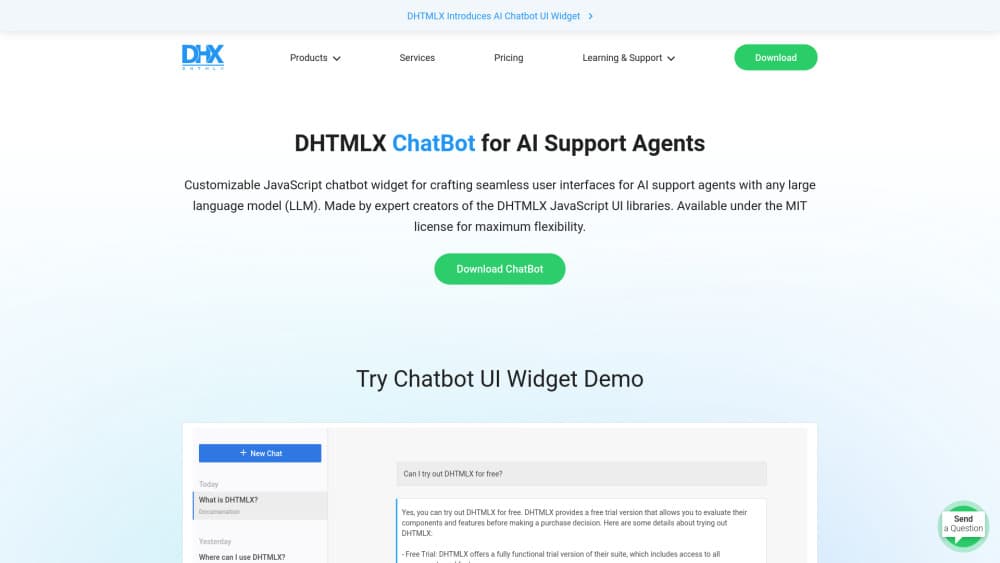
DHTMLX ChatBot is a client-side JavaScript component that renders a full chat interface for AI support agents. The company behind it, DHTMLX, has shipped JavaScript UI libraries for web apps for years, and this widget applies the same approach to conversational interfaces. You get the message list, the input box, the agent sidebar, and the styling. You bring the model.
The widget solves a narrow problem well. Teams that already have an LLM endpoint often spend weeks rebuilding chat bubbles, scroll behavior, typing indicators, and markdown rendering. This AI chat UI component covers those pieces as a configurable layer, so the work shifts to prompt design and backend logic instead of CSS.
The limits are worth knowing up front. It's a UI kit, not a hosted chatbot platform. There's no built-in model, no training dashboard, no analytics, and no fallback to a human agent. If you need those, you'll build them or pick a different product.
Getting Started
- Install the package with npm from the DHTMLX registry, or load the CSS and JS files from the CDN, or drop the static files into your project.
- Create a container element in your page and initialize the widget with
new ChatBot(container, config). - Pick a message layout and pass your agent definitions, including names, avatars, and welcome messages.
- Wire the send event to your own backend endpoint that calls the LLM, then push the reply back into the widget.
- Load earlier messages at startup if you want conversations to survive a page reload.
Product Information
A quick look at DHTMLX ChatBot's pricing, supported platforms, and performance.
Best for
The users, tasks, and scenarios where this tool fits best.
Users
- Front-end developers who need a chat UI without designing one from scratch
- Small product teams shipping an AI assistant inside an existing web app
- Agencies building client chatbots on a fixed budget
Tasks
- Adding a support chat panel to a SaaS dashboard
- Building multi-agent demos
- Rendering long markdown answers
Scenarios
- Early prototyping of a conversational feature
- Internal tools where users already have accounts
- Embedding a chat panel in a popup or slide-out drawer
Key features
Four Message Layouts
Messages can render as blocks, bubbles, cards, or flow. Cards suit structured replies with a title and a short body, while flow keeps a compact transcript for long threads. Switching layouts is a config change, so you can test which one reads better with real conversations.
Multi-Agent Chats With a Sidebar
The widget supports one assistant or several. Each agent gets a name, avatar, and welcome message, and the sidebar lists conversations so users can jump between them. That structure fits internal tools where a writing assistant and a coding assistant serve different jobs.
Typewriter Effect and Markdown Rendering
Replies can appear character by character at a configurable speed, which makes streamed answers feel less abrupt. Markdown is parsed, so headings, lists, links, and code blocks display as formatted text. Long technical answers stay readable.
Chat History Loading
You can pass an initial message array when the widget starts, which means conversations reload after a refresh. History comes from your own storage, so you decide how long it lives and who can read it. The widget only renders what you hand it.
Lightweight, Framework-Agnostic Install
The package weighs about 65 KB and installs through npm, a CDN link, or static files. Nothing in it assumes React, Vue, or Angular, so the same chatbot UI library works in a plain HTML page or inside a component tree. It's an open source chatbot widget, which helps when a team needs to audit what ships to production.
Responsive and Read-Only Modes
The layout adapts to narrow screens, which matters for support panels opened on phones. Read-only mode turns off the input field, useful for transcripts, compliance archives, or demo pages where visitors should read but not type.
Pros and cons
Pros
- MIT licensed chatbot widget with no per-seat fees or usage caps.
- Small footprint at roughly 65 KB, which keeps page weight down for a chat panel.
- Works with any LLM chat interface on the backend, so you aren't locked to one vendor.
- Ships with documentation, live samples, and an OpenAI integration guide.
- Several display modes cover both compact transcripts and richer card replies.
Cons
- It's a UI component only, so you still need a backend, prompt logic, and error handling before anything answers a question.
- No built-in analytics, conversation logs, or human handoff, which means support teams must build reporting elsewhere.
- The plugin library is smaller than what full chatbot platforms offer, so fewer ready-made add-ons exist.
- Custom theming beyond the provided options requires CSS work.
Frequently asked questions
It builds the chat interface of an AI assistant inside a web app. You supply the model endpoint and the widget handles messages, input, agents, and formatting.
Related content
Explore related tools, skills, and articles for DHTMLX ChatBot.
DHTMLX ChatBot Alternatives

Knocket
Knocket (Tencent RTC team) · Productivity · Business · ChatbotKnocket is a free live chat and contact page tool that lets visitors message you from your website, app, or a shareable link, with every reply handled from Telegram or one inbox.
Agibot
Agibot · Productivity · AI Assistant · ChatbotAgibot is a personal AI agent for Mac that keeps running after you close the window, runs routines on a schedule, and works from Telegram or Slack with your own API keys.

Melete
Melete · Productivity · AI Assistant · ChatbotMelete is an AI workspace for teams where agents research, draft, and act in Slack, Notion, Linear, and GitHub. Shared memory and approval gates keep people in control.