

Diiverge
Diiverge · Image · Video
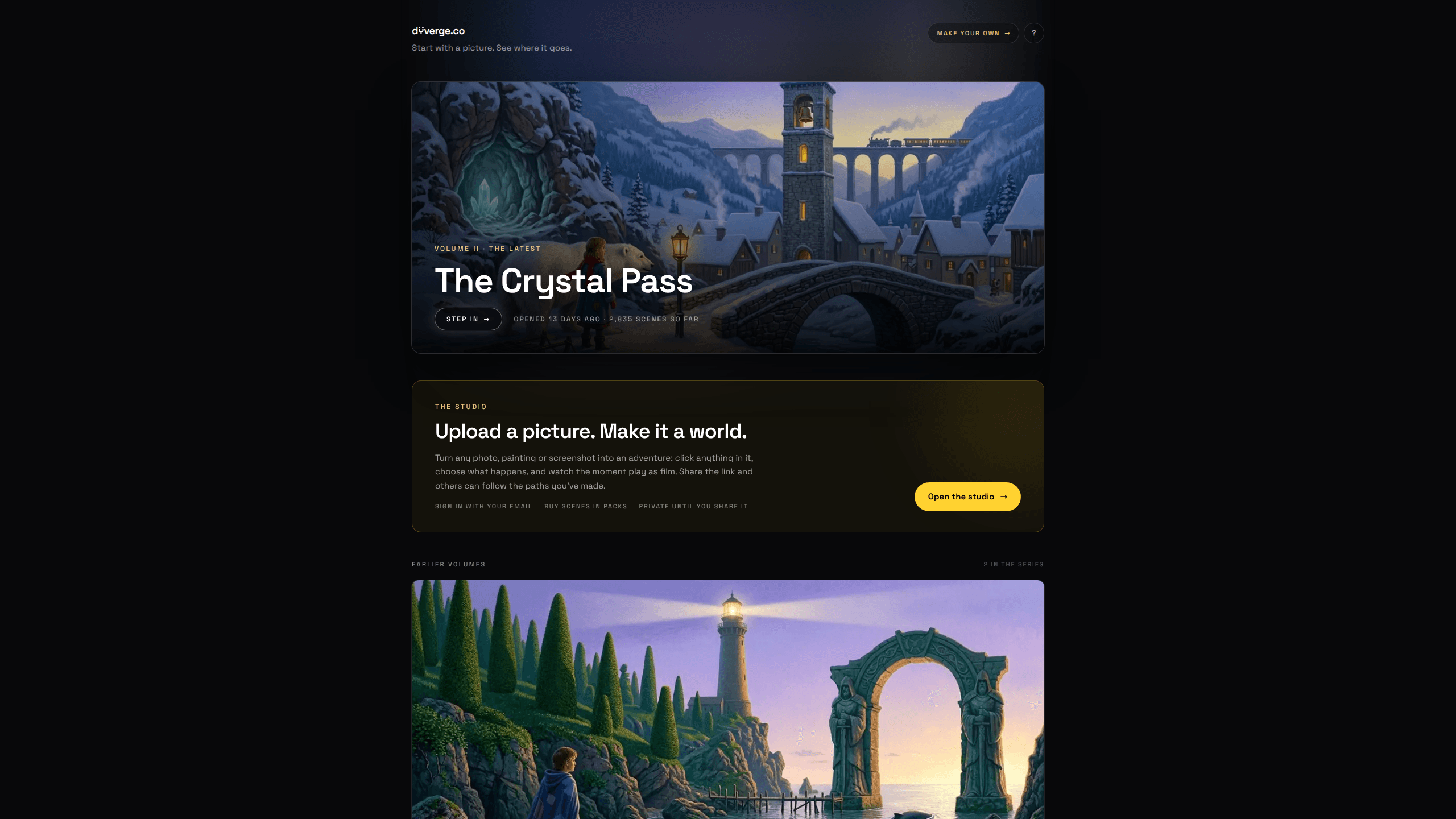
Diiverge is an AI adventure world builder that turns any single picture into a playable, explorable world. It's a way to turn a photo into a game without any coding. You upload a photo, painting, or screenshot, click on anything inside the frame, choose what happens to it, and the platform generates the next scene plus a short film of the moment in between. Every world you make stays private until you share the link, and the paths other people walk get saved into a persistent map.
About Diiverge
What Is Diiverge
Diiverge (diiverge.co) is a web platform built around one idea: a single image can seed an entire world. Instead of typing prompts into a blank text box, you start with a picture you already have and let AI grow an interactive story outward from it. The official site describes each world as a "volume," a persistent point-and-click adventure where the dots glowing on the frame mark the things you can touch and change. No prompt writing required.
The product runs on a chain of AI models working together. A segmentation model cuts the objects out of your frame and makes them clickable. A vision model figures out what each object is and what it might do. From there, an image model paints the aftermath of your choice as the next frame, and a video model renders the moment between two frames as a short film. A judge model reads the story so far and cuts any choice that breaks continuity. That's what keeps a world from drifting into nonsense as more people explore it. In practice, Diiverge works like an AI story generator that never runs out of branches.
The biggest limitation is cost, and it's worth being upfront about it. Playing is free, and replaying scenes other people have already carved costs nothing at all. Generating a brand-new scene does cost real money, so each volume ships with a fixed number of free scenes and simply stops growing once those run out. Sponsors refill that budget for everyone. That's the catch. If you want unlimited worlds of your own, you'll be buying scene packs. The tool is also web-only, so there's no mobile app to install.
Getting Started
- Go to diiverge.co and sign in with your email.
- Open the studio and upload a photo, painting, or screenshot to seed your world.
- Buy scene packs if you plan to generate beyond the free scenes, since each new scene consumes credits.
- Click a glowing dot in the frame, then choose what happens to that object and let the scene and film generate.
- Share your link when you're ready. The adventure stays private until you do.
Product Information
A quick look at Diiverge's pricing, supported platforms, and performance.
Best for
The users, tasks, and scenarios where this tool fits best.
Users
- Storytellers and writers
- Artists and illustrators
- Casual players
Tasks
- Turning a single image into an interactive adventure
- Collaborative worldbuilding
- Prototyping interactive fiction ideas
Scenarios
- Sharing a link with friends who follow the exact paths you carved
- Showcasing an artwork as something playable
- Sponsoring a themed volume for a community
Key features
Image to Adventure Conversion
Upload any photo, painting, or screenshot and Diiverge turns it into a playable world. The platform's segmentation model cuts the objects out of the frame and marks them with glowing dots, so you can see at a glance what's interactive. From there, each object you click becomes a decision point rather than a static prop. Just pick and click.
Branching Scene Generation
When you pick what happens next, an image model paints the aftermath as the following frame. That new frame becomes part of the world permanently, and anybody who visits later can walk the same branch. Think of it as an interactive story tool that remembers every turn. This is what separates Diiverge from a one-shot image generator: the output is a growing tree of scenes, not a single picture.
Film Transitions Between Scenes
Every choice you make doesn't just jump cut to the next frame. A video model renders the moment in between as a short film, so clicking an object plays out like a snippet of animation. It's a small touch that makes the world feel less like a slideshow and more like a story you're stepping through.
Persistent Shared Maps
A volume's map shows every branch anyone has taken so far. Paths aren't discarded when you close the tab, so the world accumulates structure the more it gets explored. A shared link always lands on the exact scene it points to. That keeps collaboration from falling apart across a growing tree of choices. Nothing gets lost.
Continuity Guardrails
A judge model reads the story so far and rejects any choice that breaks its continuity. That's the difference between an adventure that holds together and one where random users derail the plot. It also means a world stays coherent as it grows, even when strangers are the ones shaping it. No drift.
The Studio for Custom Worlds
The studio is where you build your own adventure from scratch. You sign in with your email, upload your seed image, buy scenes in packs, and share the link when it's ready. Your world stays private until you decide to publish it, which makes it usable for personal experiments before you show anyone. Perfect for tinkering first.
Volume Sponsorship
Sponsors can add scenes to any volume in the series, for everyone. Tiers start at $25, and each sponsorship adds roughly 2 scenes per dollar to the volume you choose. Those scenes never expire, and the sponsor's name gets placed on the volume's frames. It's an unusual funding model that keeps free play alive.
Pros and cons
Pros
- Playing and replaying existing scenes is completely free, so you can explore without spending anything.
- Worlds grow from a single image, which means far less prompting than a typical AI story tool.
- Every path is saved, turning each volume into a shared, collaborative map instead of a solo experience.
- The continuity judge keeps long-running worlds from falling apart when strangers add branches.
- Web-based and install-free, so there's nothing to download before you start.
Cons
- Generating new scenes costs real money, and each volume stops growing once its free scene budget runs out.
- There's no mobile app, so you're tied to a browser.
- You can't spin up unlimited personal worlds for free; heavier use means buying scene packs.
- The catalog is small right now, with only a few volumes published in the series.
Frequently asked questions
Diiverge is a web platform that turns a single image into an explorable, point-and-click AI adventure. You upload a photo, painting, or screenshot, click objects in it, choose what happens, and AI generates the next scene plus a short film of the transition. Simple as that.
Related content
Explore related tools, skills, and articles for Diiverge.
Diiverge Alternatives

X Ray Interpreter
X-ray Interpreter · ImageX Ray Interpreter is a web-based AI radiology tool that turns X-rays, CT scans, MRI, ultrasound, and PET images into plain-language reports. You upload a scan, get a preliminary X-ray interpretation in moments, then ask follow-up questions if something needs explaining. It works as a second opinion and a learning aid, not as a medical diagnosis.

Aieasypic
AIEasyPic · ImageAIEasyPic is an AI image generator that turns plain text prompts into finished artwork in seconds. You can also train custom models on your own photos, swap faces in existing images, and create short video clips from text, all from a browser. It suits casual creators who want quick visuals and hobbyists who want to build a personal model without touching any code.

Chargen
Chargen · ImageChargen is an AI character generator and worldbuilding toolkit built for Dungeons & Dragons and other tabletop RPGs. It turns a one-line idea into a painted character portrait, spins up NPCs, monsters, maps and encounters from the same session, and keeps every creature's details close at hand. The tabletop RPG art side runs on a credit system called Gold, while the text generators stay free for everyone.