

Duang AI Tab
wboke.com (Duang AI team) · Coding · Productivity
Duang AI Tab is a Chrome extension that turns your new tab page into an AI workspace, adding a sidebar chat, a prompt library, and document Q&A to any site you open.
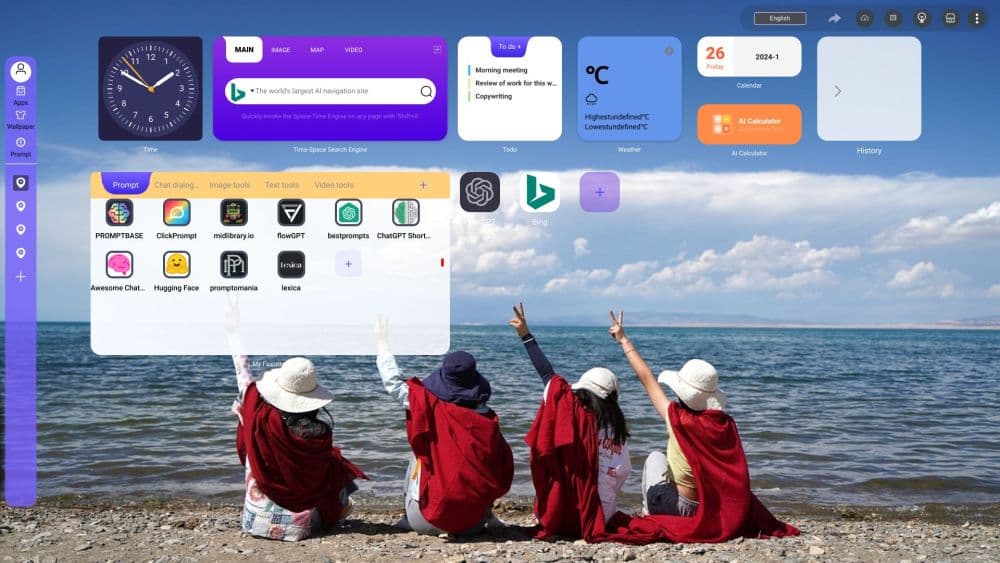
About Duang AI Tab
What Is Duang AI Tab
Duang AI Tab is an AI browser extension for Chrome and Edge that replaces the default start page and adds an assistant panel to every tab. It comes from the team behind wboke.com, and its store listing describes it as an all-in-one AI copilot for writing, summarizing, and chatting over PDF, Word, and TXT files.
The idea is to stop moving text between windows. Highlight a paragraph and ask for a rewrite, drop a report into the side panel, or press Alt+Q to chat over whatever page is open. The panel points your request at assistants such as ChatGPT, Claude, Gemini, Copilot, or Kimi, so you can reach those models without a separate ChatGPT login.
Two limits matter before you install. The listing shows May 31, 2024 as the last update, so the model lineup has not tracked newer releases, and the developer's site no longer serves a product page, which makes official help docs hard to find. Access also runs on a seven-day trial before the Pro plans take over.
Getting Started
- Install the extension from the Chrome Web Store, then refresh your open tabs so the Alt+Q shortcut registers.
- Sign in with a Google, Microsoft, X, or WeChat account. You don't need an OpenAI account.
- Set a wallpaper and pin your regular sites on the new tab page, then save the instructions you retype often to the one-click prompt list in settings.
- Open the panel with Alt+Q, or select text and choose an action such as rewrite, proofread, explain, or translate.
Product Information
A quick look at Duang AI Tab's pricing, supported platforms, and performance.
Best for
The users, tasks, and scenarios where this tool fits best.
Users
- Students and researchers
- Knowledge workers who live in a browser
- Writers and marketers
- People juggling several AI services
Tasks
- Summarizing contracts, reports, and lecture slides
- Rewriting a paragraph in place
- Translating a page section
- Drafting short copy
- Checking a fact mid-article
Scenarios
- Reading a research paper in a second language
- Comparing two products while shopping
- Working through a client brief on a deadline
- Cleaning up an email before sending
Key features
One-Click AI Panel on Any Page
Alt+Q opens the assistant over the page you're reading, and the panel keeps the page text as context. That means you can ask about a chart, a spec sheet, or a news story without copying anything. The same shortcut works on most sites. Chrome and Edge web store pages block extensions by design, so those two are the exception.
Text Actions for Selected Content
Highlight a sentence and a small menu offers rewrite, proofread, explain, and translate. Each action runs your selection through the model and returns an editable result. For people who read in a second language, the explain and translate pair covers most of the daily friction.
Prompt Library and Custom Prompts
The extension ships with a set of ready-made one-click AI prompts for writing, summarizing, and replying, and you can add your own to the same list. Saved prompts behave like shortcuts: pick one, and it runs against the current page or selection. Teams that repeat the same instructions every day get the most out of this.
Document Chat for PDF, Word, and TXT
You can load a PDF, Word file, or plain text document into the panel and ask questions about it. Summaries, section lookups, and "what does this clause mean" queries all work from the uploaded file. This is the feature that saves the most time if you already pay for a separate PDF summarizer extension.
AI New Tab Page With Shortcuts and Wallpapers
The AI new tab page replaces Chrome's default start screen with a wallpaper, a row of pinned sites, and AI entry points. You can drag favorites around, pin the ones you use hourly, and jump into a prompt without typing a URL. It's a launcher first and a chat surface second, which is the right order for a page you see dozens of times a day.
Multi-Assistant Access in One Panel
Instead of installing a dedicated ChatGPT sidebar plus a Claude extension plus a Gemini shortcut, you pick the assistant inside Duang AI Tab. The listing names ChatGPT, Claude, Gemini, Copilot, and Kimi. Answer quality then depends on the model you choose, and the extension itself doesn't add a layer of tuning on top.
Search Tab With Cited Answers
The Search tab takes a question and returns a short answer with links to the pages it used. That's handy when you want a quick check without leaving the current task. Treat the citations as a starting point and open the sources before you rely on a number.
Pros and cons
Pros
- Alt+Q puts an assistant on any page, which removes the copy, switch tab, paste loop that breaks reading flow.
- Selection actions cover the four jobs people actually repeat: rewrite, proofread, explain, and translate.
- Document upload means one panel handles both web reading and long PDFs.
- The prompt library turns your own instructions into reusable buttons, and custom prompts are easy to add.
- The new tab page doubles as a launcher, so favorites and AI tools sit in the same place.
Cons
- The last store update is May 31, 2024, so newer models are missing and bugs are unlikely to get fixed.
- The free window is a seven-day trial, not a permanent free tier, which makes it a hard sell for occasional use.
- It runs on desktop Chrome and Edge only. Firefox, Safari, and mobile browsers get nothing.
- With roughly 200 users and no public documentation, help is limited to email and whatever the panel tells you.
- An account is required before the first prompt, and the login options are Google, Microsoft, X, or WeChat.
Frequently asked questions
It's free to try for seven days after installation. After that you need a Pro subscription for continued access, and the app shows current prices at checkout. Invite codes can add extra usage, according to the developer.
Related content
Explore related tools, skills, and articles for Duang AI Tab.
Duang AI Tab Alternatives
Forefront
Forefront · CodingForefront is a web platform for building with open-source AI. It lets you fine-tune leading open-source language models on your own data, evaluate how they perform, and run them through an API or export them to host yourself. Developers who want the convenience of a closed-source platform but insist on owning their models and data are the target audience here.

Startkit
StartKit.AI · CodingStartkit is a boilerplate for building AI SaaS and AI wrapper products. Think of it as an AI startup boilerplate with the boring parts already wired up: authentication, Stripe and Lemon Squeezy payments, usage limits, transactional email, and an AI API starter that talks to OpenAI, Anthropic, Groq, or Llama. You clone the repo, set your price, and start on the part of your product that people actually pay for. It's Next.js under React and Tailwind, so most of the boilerplate code already feels familiar.
Testim
Tricentis · CodingTestim is an AI-powered test automation platform for building and running end-to-end tests across web, mobile, and Salesforce applications. It leans on machine learning to keep tests stable when an interface changes, so teams spend less time fixing broken selectors. Not bad for an automated testing tool you can start using today. You create tests by recording actions in a browser, then optionally add JavaScript when you need more control. It's a solid pick for busy QA teams.