

EasySketch
EasySketch · Image
EasySketch turns a rough sketch and a reference photo into finished images, charts, graphs or YouTube thumbnails in seconds, with pay-as-you-go credits instead of a subscription.
About EasySketch
What Is EasySketch
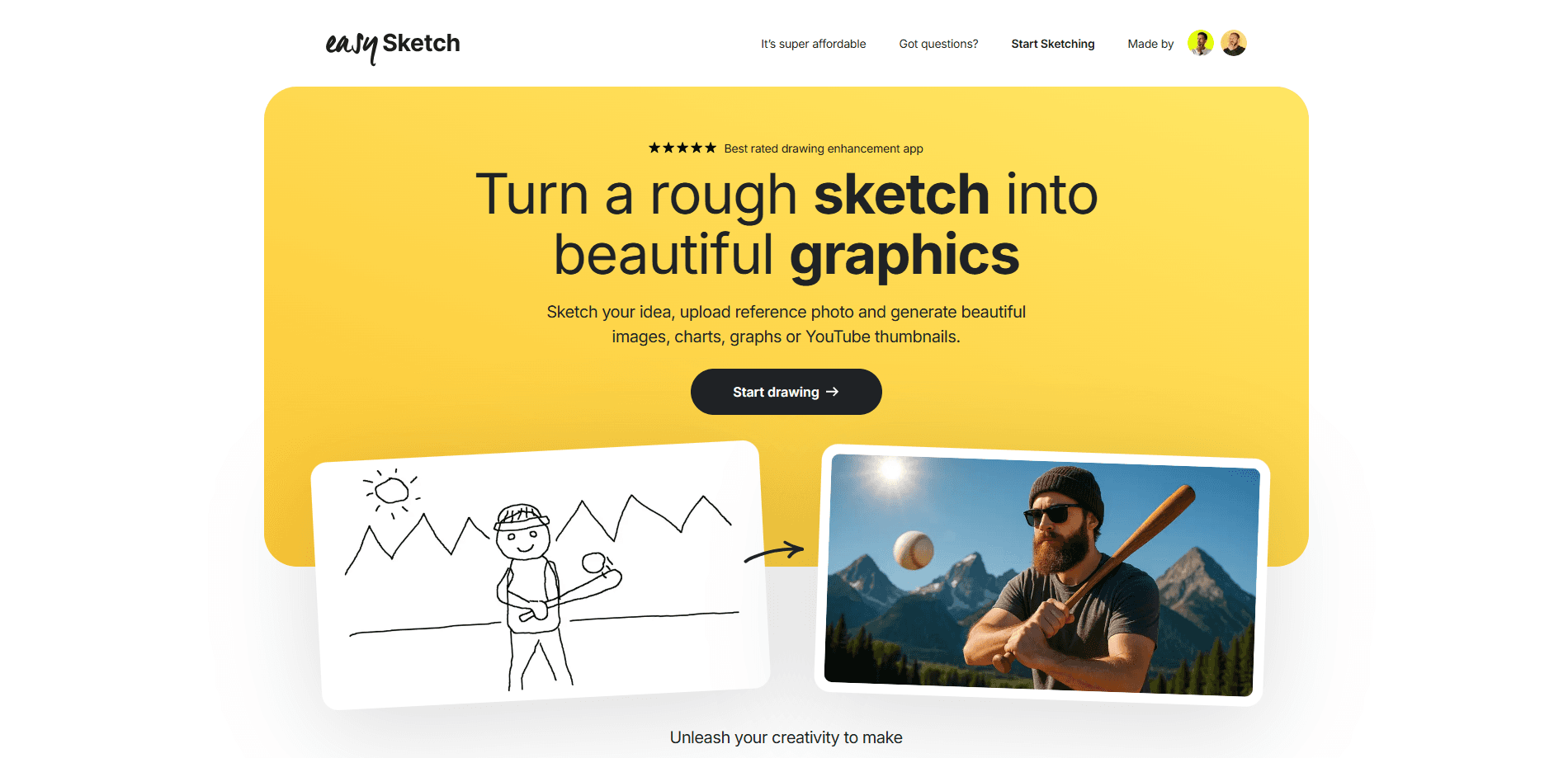
EasySketch is a browser-based AI sketch to image tool, and it doubles as a sketch to image converter for people with no art background. You draw a rough idea, upload a reference photo that shows the style you're after, and the site generates a polished image, chart, graph or YouTube thumbnail from that pair. It runs in the browser, so there's no app to install and nothing to configure.
The problem it targets is familiar to anyone who's tried to turn a napkin doodle into something presentable. Drawing tools expect you to be good at drawing. Generic AI image generators expect a well-crafted text prompt. As a pay-as-you-go AI tool, EasySketch skips both. The company's stated approach is that you don't need to draw well or prompt well, which lowers the barrier for people who have the idea but not the skill.
Two limits are worth knowing up front. It's built for sketch-to-image work, not for editing existing photos, so it won't replace a full image editor. And there's no free tier to test on, since every generation spends a credit.
Getting Started
- Open the EasySketch site and sign in with your email
- Purchase a credit pack, starting at 10 sketches for $5
- Draw your general idea on the canvas, no drawing skill needed
- Upload a reference photo that shows the style you want
- Click generate and download the finished result from your dashboard
Product Information
A quick look at EasySketch's pricing, supported platforms, and performance.
Best for
The users, tasks, and scenarios where this tool fits best.
Users
- YouTube creators
- Content marketers
- Non-designers with ideas
- Bloggers and newsletter writers
Tasks
- Making YouTube thumbnails
- Turning a rough chart into a clean graph
- Creating blog illustrations
- Drafting product visuals
Scenarios
- A video is due and the thumbnail is still blank
- A report needs a chart that matches your other visuals
- A client wants to see a concept today
- You're between projects and don't want a subscription running
Key features
Sketch to Image Conversion
The core idea is simple: you draw roughly, and EasySketch fills in the rest with AI. Your sketch sets the composition, so the output follows your layout instead of inventing its own. That's the difference from a plain text-to-image generator, where you describe a scene and hope the model lands near what you pictured.
Reference Photo for Style Matching
Uploading a reference photo is what steers the visual style, and it turns a plain sketch to illustration instead of a generic render. Instead of writing a paragraph about colors and textures, you hand the tool an example and it follows that look. This keeps a series of images on-brand without repeating the same prompt every time, and it's the step that makes results feel deliberate rather than random.
Charts, Graphs and Thumbnails
EasySketch isn't limited to one output type. The site lists images, charts, graphs and YouTube thumbnails as targets, so the same tool works as a YouTube thumbnail maker and as a chart and graph generator. For people juggling several kinds of visual work, that saves signing up for two separate tools.
Pay-as-You-Go Credits
There's no monthly plan. You buy a pack of credits and spend them only when you generate. The three packs are 10 sketches for $5, 22 for $10 and 50 for $20, which works out to roughly 40 to 50 cents per image. The company says credits don't expire for over a year, so a small pack can sit until your next project.
Saved Dashboard of Past Work
Signing in with your email gives you a dashboard that keeps every image you've made. You can return to a past generation, compare attempts, and download the ones you want to keep. For anyone who works in batches, having the history in one place beats digging through downloads folders.
No Prompt or Drawing Skill Required
The tool is built for people who don't want to write prompts or hone their drawing. You provide a rough idea and a reference, and the generation step handles the rest. That covers the two biggest reasons people bounce off AI image tools: not knowing what to type, and not being able to draw an accurate starting point.
Pros and cons
Pros
- Pay-as-you-go pricing avoids a monthly subscription for occasional users
- Reference photo styling keeps a set of images visually consistent
- Low skill floor, since you don't need to draw well or write detailed prompts
- Covers several output types, from thumbnails to charts and graphs
- Email sign-in saves every generation in a dashboard you can revisit
Cons
- No free tier, so you pay before you can test whether the style suits your work
- Built for sketch-to-image, so it won't replace a full photo editor for retouching
- Results depend on how clear your sketch and reference are, which is the trade-off for skipping prompts
Frequently asked questions
No. It works on a pay-as-you-go model, so you only pay when you use it. You buy credits, and the company says they don't expire for over a year, which suits people who generate images in bursts rather than every day.
Related content
Explore related tools, skills, and articles for EasySketch.
EasySketch Alternatives

X Ray Interpreter
X-ray Interpreter · ImageX Ray Interpreter is a web-based AI radiology tool that turns X-rays, CT scans, MRI, ultrasound, and PET images into plain-language reports. You upload a scan, get a preliminary X-ray interpretation in moments, then ask follow-up questions if something needs explaining. It works as a second opinion and a learning aid, not as a medical diagnosis.

Aieasypic
AIEasyPic · ImageAIEasyPic is an AI image generator that turns plain text prompts into finished artwork in seconds. You can also train custom models on your own photos, swap faces in existing images, and create short video clips from text, all from a browser. It suits casual creators who want quick visuals and hobbyists who want to build a personal model without touching any code.

Chargen
Chargen · ImageChargen is an AI character generator and worldbuilding toolkit built for Dungeons & Dragons and other tabletop RPGs. It turns a one-line idea into a painted character portrait, spins up NPCs, monsters, maps and encounters from the same session, and keeps every creature's details close at hand. The tabletop RPG art side runs on a credit system called Gold, while the text generators stay free for everyone.